After sixteen years of building enterprise systems, I released my first open-source project.
It is called Cendor, and it is production plumbing for LLM applications: seven small libraries and an SDK that control cost, block unsafe inputs, and keep an audit trail under any agent framework. Python and TypeScript, Apache-2.0, free.
This blog stays on its Microsoft-stack beat, so I am keeping the announcement short. Cendor has a home of its own now, and it is described far better there than I could repeat here.
One rule I set for the project: honest claims. Every public number on the site is benchmark-backed and regenerates offline, and the limits are published beside the numbers. Cendor is open source under Apache-2.0, non-commercial and local-first. If you build something with it, or find a claim I cannot back, I want to hear about it.
I have spent the last few programmes wiring Microsoft Foundry models into real workloads, and the same confusions keep surfacing in design reviews. People conflate the model with the deployment, pick a deployment type by habit, and discover the cost implications only when the first invoice lands. This post is the guide I wish my teams had read first.
I have deliberately left out resource and project creation, RBAC setup, and quota-increase mechanics, because those sit in the getting-started post. Here I focus on the four decisions that actually move cost and behaviour: what a deployment is, which deployment type to choose, how to evaluate before you commit, and how to call the model cleanly from the SDK.
One caveat up front. Foundry naming and feature status move quickly, and pricing on Azure renders dynamically. Treat every number below as something to verify on the Azure pricing calculator before you budget, and check the (preview) tag on the specific Learn page before you depend on a feature.
Resource, project, model, deployment. The deployment name, not the model name, is the addressable unit for inference.
What “deploying a model” actually means
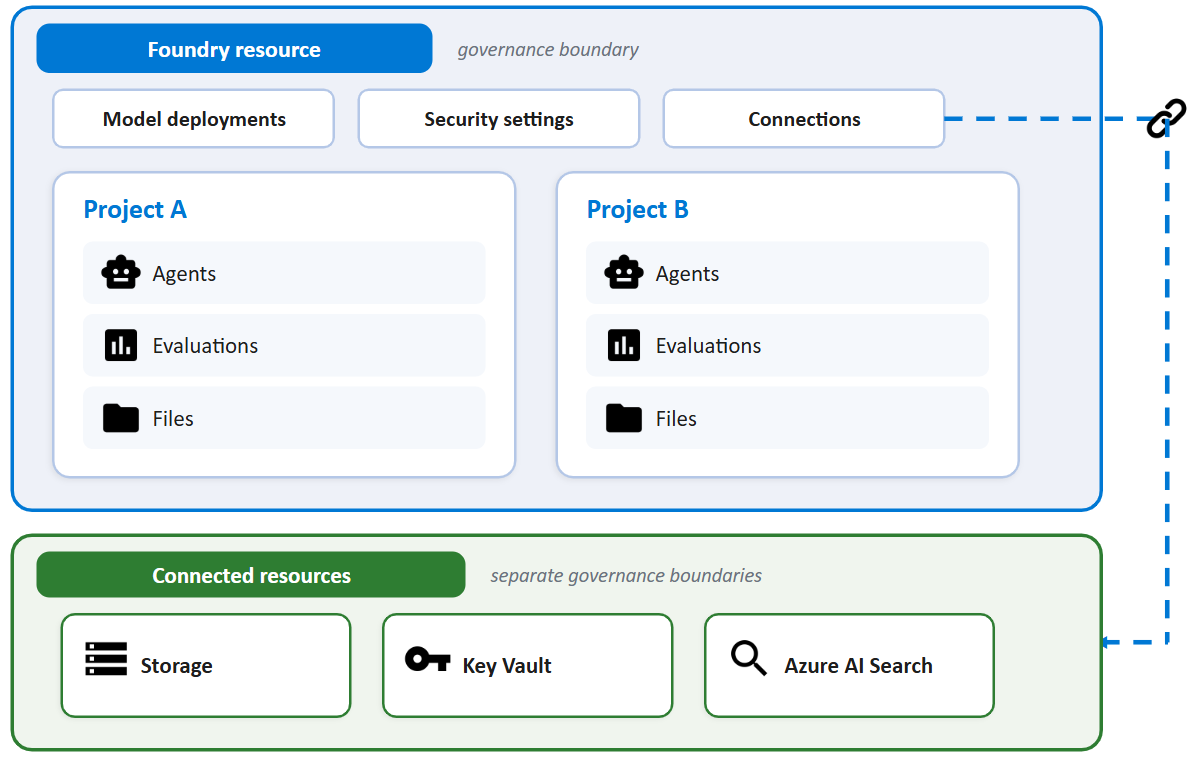
The mental model that saved my teams the most time is to separate four things. The resource is the Microsoft.CognitiveServices account of kind AIServices: it is the governance, quota, and networking boundary. The project is the RBAC and isolation boundary inside it, and it owns agents, connections, evaluations, and threads.
The model is an item in the catalogue, whether an Azure OpenAI model, a Microsoft model, or a partner model from Anthropic, Meta, Mistral, Cohere, DeepSeek, xAI, and others. The deployment is what you get when you deploy a model into the resource with a chosen deployment type (the SKU) and quota. It has a deployment name that you choose, and that name, not the underlying model name, is the addressable unit for inference.
This matters in code. Microsoft’s quickstart is explicit: the model parameter requires the model deployment name, and if your deployment name differs from the underlying model name you adjust your code accordingly. An agent definition references the same deployment name through its model field.
There is a useful exception since early 2026. Instant models (preview) let you call a supported model by name with no deployment at all, drawing on a separate global quota pool. They route to the latest evergreen version by default (pin a version by appending a date suffix), and during preview they are available only in West US 3 projects. Microsoft frames deployments as something you level up to, not a gate you must pass first. I reach for a deployment when I need reserved throughput, custom content filters, data residency, or enterprise configuration.
Deployment types: the decision that fixes everything else
The deployment type is the single biggest choice. It fixes data residency, latency variance, the quota model, and how you pay. Microsoft groups the types into standard (pay-per-token), provisioned (reserved PTU), and batch (async, 50% off), each available at global, data-zone, or regional scope. Data stored at rest always remains in the designated Azure geography: the differences below are about where inference is processed and how throughput is guaranteed.
Deployment type
SKU code
Data processing scope
Billing model
SLA / latency
Best for
Instant (preview)
N/A (no deployment)
Any Azure region
Pay-per-token (global quota pool)
Best-effort, no SLA
Getting started, prototyping
Global Standard
GlobalStandard
Any Azure region
Pay-per-token
Best-effort, highest default quota
General workloads, highest quota
Data Zone Standard
DataZoneStandard
Within US or EU data zone
Pay-per-token
Best-effort, higher quota than regional
EU/US data-zone compliance
Standard (regional)
Standard
Single deployment region
Pay-per-token
Best-effort, limited regional capacity
Regional compliance, low to medium volume
Global Provisioned
GlobalProvisionedManaged
Any Azure region
Reserved PTU (hourly or reservation)
Guaranteed throughput, low latency variance
Predictable high throughput
Data Zone Provisioned
DataZoneProvisionedManaged
Within US or EU data zone
Reserved PTU
Guaranteed throughput plus data-zone
Data-zone plus predictable throughput
Regional Provisioned
ProvisionedManaged
Single deployment region
Reserved PTU
Guaranteed throughput, strict residency
Regional compliance plus throughput
Global Batch
GlobalBatch
Any Azure region
50% off Global Standard
No real-time SLA, 24-hour target
Large async jobs
Data Zone Batch
DataZoneBatch
Within US or EU data zone
50% off
No real-time SLA, 24-hour target
Large async jobs with data-zone
Developer
DeveloperTier
Any Azure region
Pay-per-token
No SLA, no residency guarantee, 24-hour lifetime then auto-deleted
Fine-tuned model evaluation only
A few notes from Learn that bite teams in production. Not all models support all types, so check “Foundry Models sold by Azure” for availability. With Global Standard and Data Zone Standard, a primary-region interruption affects all traffic initially routed there. Developer deployments self-delete after 24 hours, so they are for evaluating fine-tuned models, not for anything that needs to persist.
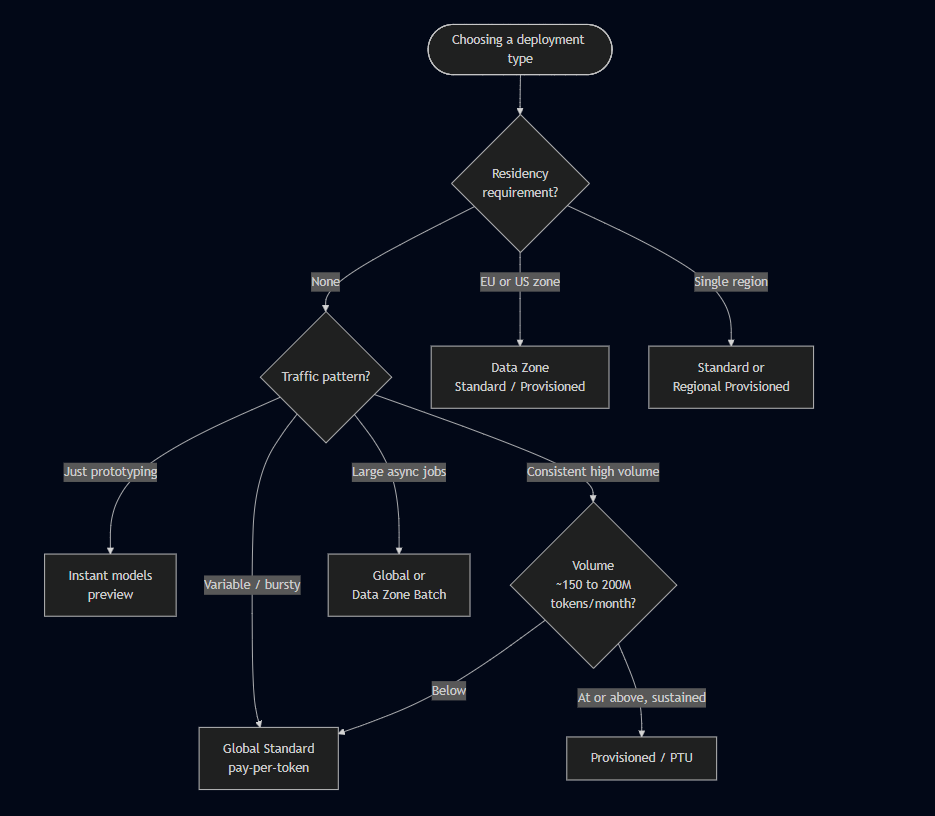
Choosing a deployment type: residency requirement, then traffic pattern, then volume.
Choosing by requirement is usually faster than reading the full matrix.
If you need
Use
No residency restriction
Global Standard or Global Provisioned
EU or US data-zone compliance
Data Zone Standard / Data Zone Provisioned
Single-region residency
Standard or Regional Provisioned
Quick start or prototype
Instant models (preview)
Variable, bursty traffic
Standard or Global Standard (pay-per-token)
Consistent high volume
Provisioned types
Large, non-time-sensitive jobs
Global Batch or Data Zone Batch
Low latency variance
Provisioned types
Fine-tuned model evaluation
Developer
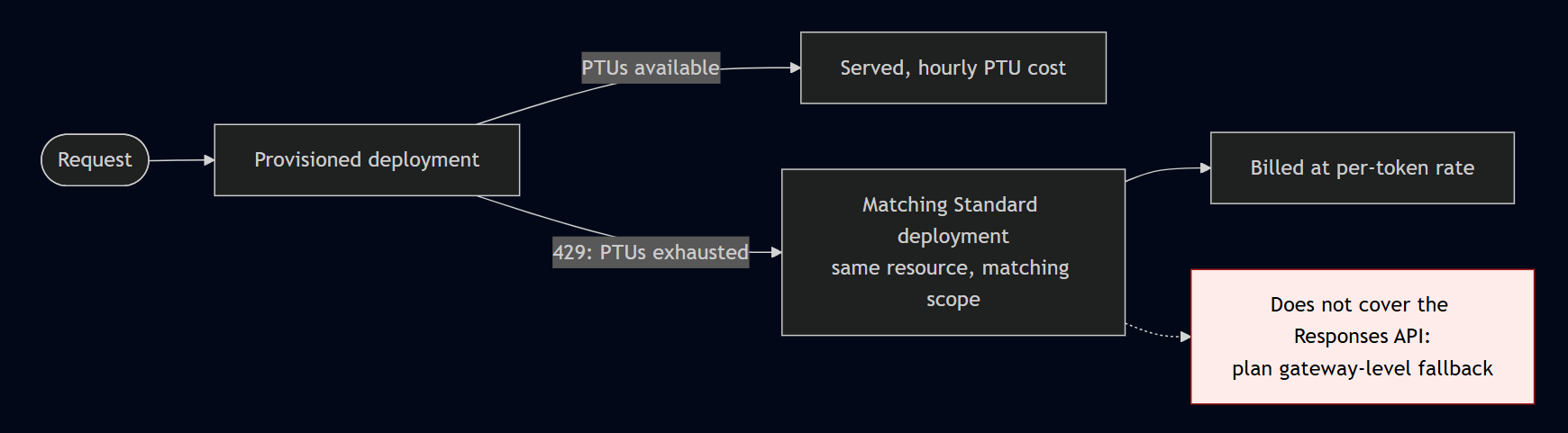
Three platform features are worth knowing before you commit. Spillover (GA, 2026) routes overflow from a provisioned deployment (a 429 when PTUs are exhausted, for example) to a matching Standard deployment in the same resource, billed at the standard per-token rate. The data-processing level must match (global provisioned to global standard), and it works with the Foundry Agent Service but not the Responses API, so plan gateway-level fallback there. Priority processing (GA, 2026) is a pay-per-call fast lane for latency-sensitive Standard workloads at a premium over Standard. Model router is a deployable chat model that picks an underlying model per prompt, and it now supports the GPT-5 series.
Spillover: a provisioned deployment hits a 429, overflow routes to a matching Standard deployment in the same resource, billed per token. Does not cover the Responses API.
Cost: the three levers, and the free money teams forget
Per-token rates on Azure match OpenAI’s direct API. The premium you pay buys compliance, private networking, Entra authentication, support, and a single invoice. The deployment type changes how you pay, not the underlying token rate for a given scope.
Indicative pay-as-you-go rates follow, for Global Standard, per 1M tokens. Verify these on the Azure pricing calculator: they are correct as of June 2026 per third-party aggregators (PricePerToken.com, last updated 14 June 2026) consistent with OpenAI list prices, not guaranteed Microsoft figures.
Model
Input / 1M
Output / 1M
Notes
GPT-4.1
\$2.00
\$8.00
1M-token context
GPT-4.1-mini
\$0.40
\$1.60
strong cost/quality for routers
GPT-5
\$1.25
\$10.00
flagship reasoning, ~272,000-token context
GPT-5-mini
\$0.25
\$2.00
GPT-5-nano
\$0.05
\$0.40
cheapest
Pay-as-you-go vs PTU vs Batch across volume, with the 150 to 200M tokens/month break-even band marked. Verify on the Azure pricing calculator.
The three cost levers are pay-as-you-go, Provisioned Throughput Units (PTU), and Batch. Pay-as-you-go wins for variable traffic. Batch runs at 50% of Global Standard with a 24-hour target turnaround and a separate enqueued-token quota, so async jobs do not disrupt online traffic. Input is JSONL, one request per line with a unique custom_id, and you pay only for completed work.
PTU is reserved capacity, billed hourly per deployed unit regardless of tokens consumed. The GPT-4o-class Global provisioned rate is roughly \$1/hour per PTU. Reservations give large term discounts: per Microsoft Learn’s onboarding page, a 1-month reservation is around 64% off and a 1-year around 70% off for GPT-4o-class, with example rates stamped “Azure pricing as of January 1, 2025”. Minimums matter too: Global and Data Zone Provisioned require 15 PTU, Regional Provisioned requires 25 PTU for mini/nano-class and 50 PTU for larger models.
Two scope and discount rules round this out. For a given model, Data Zone is roughly +10% over Global and Regional is roughly +10% to +25%. Cached input tokens receive an automatic discount (roughly 50% to 90% off the input rate on repeated prefixes), so keep system prompts byte-identical across requests to trigger it.
On the PTU break-even, do not commit on a calculator estimate. Third-party analysis (AZ365.ai, 2026) puts break-even at roughly 150 to 200 million tokens per month for GPT-5, but that assumes 100% sustained utilisation. I run pay-as-you-go for 30 to 60 days, measure P95 hourly throughput, then size PTU against real telemetry. One more trap: rate limiting estimates max processed tokens at request time including max_tokens, so an over-large max_tokens can self-throttle you.
Evaluating a model before you commit
Before deployment I shortlist with the Foundry model leaderboard (preview), which ranks catalogue models on quality, safety, cost, and throughput with trade-off charts and side-by-side comparison of up to three models. Cost benchmarks assume a 3:1 input-to-output ratio. This narrows the field cheaply before I spend on my own evaluation.
Then I evaluate on my own data. Model and dataset evaluation is GA (agent evaluation remains preview), runnable from the portal or via the azure-ai-evaluation SDK. AI-assisted evaluators need an Azure OpenAI deployment as the judge, and Microsoft recommends gpt-5-mini for a good cost/quality balance.
For a RAG system, GroundednessEvaluator is the first one I set up, because it is the leading indicator of hallucination risk. I pair it with RelevanceEvaluator and the safety evaluators (ViolenceEvaluator, SelfHarmEvaluator, HateUnfairnessEvaluator, and similar). Quality evaluators such as CoherenceEvaluator and FluencyEvaluator use a 1 to 5 Likert scale with a default pass threshold of 3. Different evaluators have different data needs: groundedness needs the source context, ROUGE-style evaluators need ground-truth references, and tool-call accuracy needs the full agent message trace. Results publish to Azure Monitor and Application Insights, so I alert on groundedness regressions. The decision rule is simple: shortlist with the leaderboard, evaluate the top two or three on your own data, and pick the cheapest model that clears your thresholds.
Using a deployed model in an agent
An agent references the deployment by name through its model field. In Azure AI Projects 2.x:
from azure.identity import DefaultAzureCredential
from azure.ai.projects import AIProjectClient
from azure.ai.projects.models import PromptAgentDefinition
The Foundry Agent Service went GA in March 2026. The teaching point worth repeating in reviews: the agent’s model is the deployment name, which you find under Models + Endpoints in the portal.
Calling the model via the Foundry SDK
The SDK consolidated. azure-ai-projects 2.x is now the single Foundry SDK, covering agents, inference, evaluations, and memory, with the standalone azure-ai-agents dependency folded in. The 2.0.0 stable release shipped on 6 March 2026 and current PyPI is 2.2.0. Code written for 2.x is incompatible with 1.x: the old from_connection_string and .inference.get_chat_completions_client() patterns were removed, so budget a refactor sprint if you built against the beta.
Authenticate with DefaultAzureCredential from azure-identity. The recommended current pattern is to get an OpenAI-compatible client from the project:
input="What is the size of France in square miles?",
)
print(response.output_text)
For OpenAI-style chat completions specifically:
with project.get_openai_client() as client:
resp = client.chat.completions.create(
model="gpt-4.1", # deployment name
messages=[{"role": "user", "content": "How many feet are in a mile?"}],
temperature=0.7,
max_tokens=500,
)
print(resp.choices[0].message.content)
Use the project endpoint and Responses API for Foundry features (agents, evaluations, tracing, content filters). Use the direct /openai/v1 endpoint for maximum OpenAI compatibility, lowest latency, or embeddings, which the project endpoint does not currently route. On .NET the equivalents are Azure.AI.Projects, Azure.AI.Extensions.OpenAI, and Azure.Identity, with the same pattern: construct AIProjectClient, get a chat or responses client, and pass the deployment name. One gotcha: do not install the preview Azure.AI.Projects.OpenAI alongside the GA Azure.AI.Extensions.OpenAI, because duplicate types cause ambiguous references.
Inference parameters, and why reasoning models break the rules
These are standard OpenAI parameters on the chat-completions and responses calls.
Parameter
What it does
Range / default
Notes
temperature
Scales the whole distribution
0 to 2, default 1.0
Tune this or top_p, not both
top_p
Nucleus sampling
0 to 1, default 1.0
0.9 a common safety net; no top_k exposed
max_tokens / max_completion_tokens
Caps output tokens
set conservatively
Reasoning models require max_completion_tokens
frequency_penalty
Penalises repeated tokens
-2.0 to 2.0, default 0
Leave at 0 for code/JSON
presence_penalty
Encourages new topics
-2.0 to 2.0, default 0
Harmful for structured output
stop
Stop sequences
list of strings
seed
Best-effort reproducibility
integer
Not guaranteed, pin model version too
response_format
text, json_object, or JSON schema
reasoning_effort
Reasoning models only
low / medium / high
Higher means more tokens, latency, cost
The guidance on temperature versus top_p is consistent across Microsoft and OpenAI: alter one or the other, not both. My default is to leave top_p at its default and tune temperature, reaching for top_p only when I want to keep temperature fixed for style but trim the occasional weird token. A common enterprise default for GPT-style chat is temperature 0.2 to 0.3 with top_p 0.8 to 0.95.
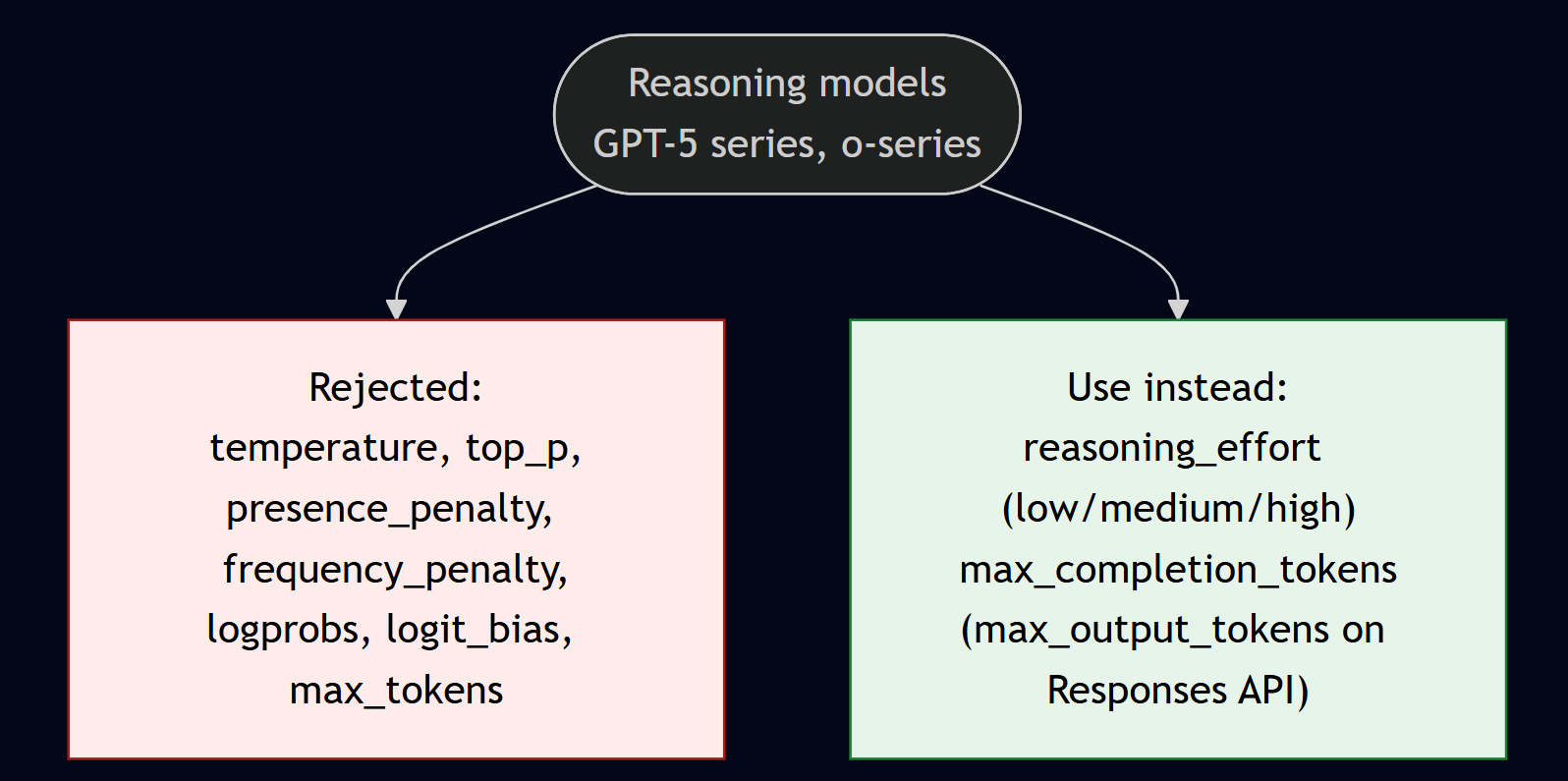
Reasoning models behave differently and this catches teams out. The GPT-5 series and o-series (o1, o3, o3-mini, o4-mini) reject temperature, top_p, presence_penalty, frequency_penalty, logprobs, logit_bias, and max_tokens. Sending temperature typically returns a 400 “Unsupported parameter”. Instead you use reasoning_effort (low/medium/high, with newer models adding none/minimal/xhigh) and max_completion_tokens on chat completions or max_output_tokens on the Responses API. A wrinkle to watch: gpt-5.1 defaults reasoning_effort to none, so migrating from an earlier reasoning model may require you to pass an effort level explicitly to get any reasoning at all. System messages are treated as developer messages on the o-series.
Reasoning models reject temperature, top_p, and the penalties, and substitute reasoning_effort and max_completion_tokens.
The practical fix is a shared wrapper that branches on model family and strips unsupported parameters before the call. That one piece of plumbing prevents most of the 400 errors that bite teams moving to GPT-5.
What I would actually do
Default to Global Standard, then narrow only for a reason: Data Zone when EU or US residency is required (accept roughly +10%), Regional only for strict single-region residency (accept +10% to +25% and smaller capacity). Do not buy PTU on a guess: run pay-as-you-go for 30 to 60 days, measure P95 hourly throughput, and commit to a 1-year reservation only once sustained volume sits in the 150 to 200M tokens/month range for GPT-5-class.
Turn on the free discounts. Route anything async to Batch, make system prompts byte-identical for cached-input savings, and send routing, extraction, and classification to a mini or nano model while reserving flagships for the hard cases. Add spillover to any provisioned customer-facing deployment, but remember it does not cover the Responses API.
Gate model choice on evaluation, not vibes, and make parameter handling model-aware. Those two habits, plus standardising on azure-ai-projects 2.x with DefaultAzureCredential, have removed most of the surprises my teams used to hit in production.
All diagrams in this post are my own. They illustrate concepts documented on Microsoft Learn (linked in the References above); pricing figures shown are indicative and should be verified on the Azure pricing calculator.
A few weeks ago a friend called me about a Dynamics 365 environment that was misbehaving. Contacts created in Finance & Operations weren’t appearing correctly in Customer Engagement, edits weren’t flowing through, and nobody could explain why. “It used to work,” he said — which is the most dangerous sentence in any integration project.
What started as a quick favour turned into one of the most instructive dual-write debugging sessions I’ve done. Here’s the whole story: the symptom, the evidence trail, the real root causes, the fix, and the issues that are still open.
A quick primer: GAB, the party model, and dual-write
If you don’t live inside Dynamics every day, three concepts are worth setting up first.
In Finance & Operations, customers, vendors, contacts, and workers are not isolated records. They all share a single Global Address Book (GAB). Every operational record points at a party — the party is the central identity, and the customer or vendor or contact hangs off it. This is the party model.
Dual-write is the near-real-time, bidirectional sync between F&O and Dataverse (the CE side). When you create a contact in F&O, dual-write is supposed to push it across, and when you edit it in CE, it’s supposed to come back.
On the Dataverse side, contacts are wired into the address book through a junction table called msdyn_contactforparty. Each of those rows is supposed to carry a msdyn_contactid pointing at the real CE contact and a party reference pointing at the right party. When those links are correct, everything lines up. When they aren’t, you get exactly the kind of ghost-in-the-machine behaviour my friend was seeing.
One detail that turned out to be central: several of the GAB relationship fields — msdyn_contactid, msdyn_associatedaccountid — are not stamped by the dual-write field map. They are stamped by a GAB plugin that runs after the write completes. That distinction matters a lot later.
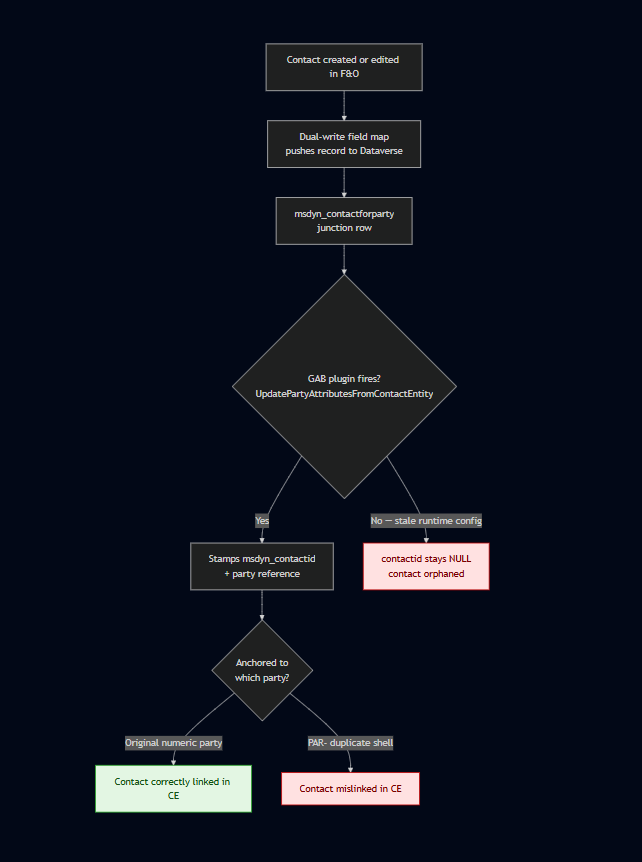
Here’s the path a contact write is supposed to take — and the two points where it broke in this environment:
The contact-write path under GAB dual-write, with the two failure branches that this environment was hitting.
The two red nodes are exactly where my friend’s environment was landing: thousands of junction rows with a null contactid because the plugin wasn’t firing, and contacts that were stamped but pointed at the wrong, duplicate party.
The symptom
The headline number was ugly: roughly 6,042 msdyn_contactforparty rows had a null msdyn_contactid. The junction rows existed, but they weren’t pointing at anything. So as far as the address book was concerned, thousands of contacts had no home.
It got worse when I looked at which parties the CE contacts were anchored to. Instead of pointing at the original numeric party records that had existed since the environment’s 2022 go-live, many contacts were anchored to a second set of duplicate, PAR- prefixed party records. These had been created in early 2026 by the DataIntServiceUser system account.
My first instinct — and I want to be honest about this because it’s a trap — was to assume contacts had been deleted and re-created. That was wrong, and my friend corrected me on it. Nothing had been deleted. The ~6,000 broken rows had always been there. They were simply linked incorrectly, a leftover from an incomplete initial sync earlier in the project’s history. Getting the framing right here saved me from “fixing” a problem that didn’t exist.
Following the evidence
I’m allergic to guessing on production systems, so the first phase was pure diagnostics — no changes, just artefacts:
CE Web API timestamp queries to see when records were created and by whom.
Plugin Trace Logs to watch which GAB plugins fired (and which stayed silent) on a write.
An export of the DualWriteProjectConfigurationEntity to read the actual map configuration.
A look at the dual-write runtime config table for stale or orphaned rows.
A few things jumped out almost immediately.
The PAR- parties were empty shells. They had no customers, vendors, or contacts attached on the F&O side. Every operational F&O record still referenced the original numeric parties. That told me the duplicates were non-authoritative debris, not something to preserve.
The trace logs showed an asymmetry I almost missed: on a contact write, UpdatePartyAttributesFromPartyEntity fired, but its sibling UpdatePartyAttributesFromContactEntity did not. These are two distinct plugins, and only one of them was running. That is a classic fingerprint of a stale runtime configuration, not a broken field map. If it had been a mapping problem, the field would simply have been missing — instead the right plugin just wasn’t being invoked.
I also found two orphaned _del-suffixed runtime config rows, stale debris from old “CDS Contacts V2” maps, and confirmed that two of those maps had at one point been running simultaneously, colliding on entity keys.
The root causes
By the end of the diagnostics phase the picture was clear. There wasn’t one bug — there was a small pile of them, layered over time:
Incomplete earlier initial syncs left thousands of contactforparty rows with a null contactid. This was the origin of the 6,000-row problem.
Duplicate parties. The PAR- shells created during a later integration run competed with the original numeric parties, and CE contacts ended up anchored to the wrong ones.
An initial sync run in the wrong direction — Dataverse treated as master instead of the intended F&O → CE flow — which produced orphaned junction rows.
A gender value-map mismatch. Custom option set values were being rejected outright by CE, silently failing writes.
A stale dual-write runtime config that stopped UpdatePartyAttributesFromContactEntity from firing — the reason updates from contacts were silently doing nothing.
The “create/update not working” complaint wasn’t a single failure. It was the combined effect of items 4, 5, and 6, sitting on top of the historical mess from items 1, 2, and 3.
The fix
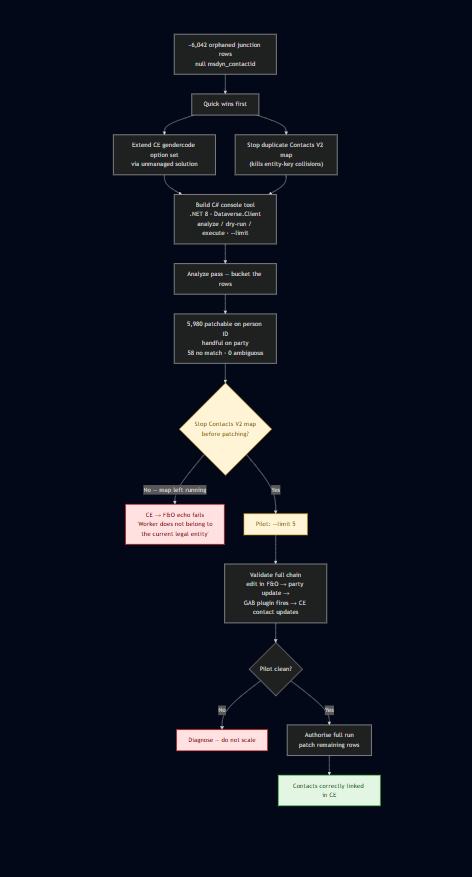
The remediation flow: stop the Contacts V2 map, pilot on five records, validate, then scale the patch.
The value-map and duplicate-map issues were the quick wins. The gender mismatch was resolved by extending the CE contact gendercode option set through an unmanaged solution so it would accept the values F&O was sending. The duplicate Contacts V2 map was stopped so the entity-key collisions disappeared.
The 6,000 broken junction rows needed something more careful. I built a small C# console tool (.NET 8, Microsoft.PowerPlatform.Dataverse.Client) with three modes — analyze, dry-run, and execute — plus a –limit flag so I could pilot on a handful of records before touching anything at scale. Safety modes and idempotency first; scope later.
The analyze pass bucketed the rows so I knew exactly what I was dealing with: about 5,980 patchable matches on person ID, a handful matched on party, 58 with no match, and zero ambiguous rows. No surprises hiding in the data.
Then came the single most important operational lesson of the whole exercise: the Contacts V2 map must be stopped before patching. If you leave it running while you patch CE records, the changes echo back to F&O and fail with a “Worker does not belong to the current legal entity” error, because of how the map routes by legal entity. I only learned this because I piloted on 5 records first and watched it happen on a tiny, recoverable scale instead of across thousands.
With the map stopped, the pilot validated the full chain end to end: edit in F&O → party update → GAB plugin fires → CE contact updates correctly. Once that was clean, I authorised the full run.
If I had to compress the remediation into a single principle: pilot, validate, then scale. The –limit flag earned its keep.
A second puzzle: when creating a contact in F&O just fails
While I was in the environment, a different but related problem surfaced. Creating a contact in F&O would sometimes fail outright with:
Unable to write data to entity msdyn_contactforparties. Unable to lookup msdyn_parties with values {…}. Writes to msdyn_contactforparties failed.
A hard rollback on a basic create looks alarming, so I treated it as a fresh investigation and worked methodically down the dual-write stack — the maps (CDS Parties, Customers V3, Contacts V2), the integration keys, party-number sync, the CE autonumber configuration, and the GAB plugin state — ruling each out in turn. Everything checked out. Nothing was misconfigured, and I changed nothing.
The answer turned out to be the how, not the what. The contact was being created through the Quick Create form rather than the full Add Contact form. Under the Party / GAB model, that shortcut path doesn’t establish the underlying party the way the full form does. So when the Contacts V2 msdyn_contactforparties) map tries to link the new contact to its party in Dataverse, the party lookup can’t resolve — and the whole transaction rolls back. That’s exactly why the party on its own synced fine, but the combined contact-create failed. Microsoft documents the equivalent failure from the View Contact page under Known problems and limitations for the Party and GAB model; the Quick Create path hits the same wall for the same reason.
The right way to create contacts under GAB
The fix here isn’t code — it’s workflow, and it depends on which side you start from.
Starting in F&O: use the full Add Contact form, not Quick Create. The full form establishes the party and the contact-for-party association in one step, and the record syncs cleanly to CE.
Starting in CE: create the contact, then create the Contact for Party association that links it to the customer or vendor — via the Associated Organizations tab on the contact, or the Associated Contacts tab on the customer/vendor. Don’t rely on the out-of-box Company Name lookup on the contact form.
The principle underneath both directions is the one that took me longest to internalise: in the GAB model, it’s the Contact for Party association — not a contact record on its own — that makes someone a customer or vendor contact and drives the sync across. A standalone contact, on either side, won’t sync as a customer contact until that association exists.
Two behaviours that look like bugs but aren’t
Once you’re working this way, two things tend to get reported as defects when they’re actually by design.
The “PAR-” party number. The party number a contact gets depends on where it was born: contacts created in F&O get a plain numeric party number (for example 000223512), while contacts created in CE get one with a PAR- prefix. The prefix is just provenance — it means the party originated in CE — and the contact and its association still sync correctly both ways. It’s worth reconciling this with the duplicate-party story earlier: the prefix itself was never the problem. The problem was duplicate PAR- shells that contacts had been wrongly anchored to instead of the original numeric parties. The prefix is normal; the duplication and mislinking were not.
The blank Company Name on the CE contact. You may notice the Company Name parentcustomerid) field on a CE contact is empty and assume something failed. It didn’t. Under the Party / GAB model the contact-to-customer relationship is no longer stored in that single lookup — it’s a many-to-many party association held in the Contact for Party record, visible on the contact’s Associated Organizations tab and the customer’s Associated Contacts tab. Microsoft confirms this in the Party and global address book documentation.
My recommendation to my friend was simple: tell the users about both workflows so contacts get created correctly no matter which app they start in. A lot of the “create isn’t working” reports were really “create was done the wrong way.”
What GAB dual-write taught me
A handful of lessons I’ll carry into every future dual-write engagement:
GAB relationship fields are plugin-stamped, not map-stamped. msdyn_contactid and msdyn_associatedaccountid populate only when the GAB plugin completes successfully after the write. If they’re empty, look at the plugin, not the field map.
A silent plugin is a runtime-config signal. When …FromPartyEntity fires but …FromContactEntity doesn’t, suspect a stale runtime config, not a mapping bug.
Stop the Contacts V2 map before patching contacts. The CE → F&O echo will bite you otherwise.
*PAR–prefixed duplicate parties are safe to treat as non-authoritative** once you’ve confirmed they have no operational records attached.
Get the framing right before you act. “Contacts were deleted” and “contacts were always there but mislinked” lead to completely different — and one of them, dangerous — remediations.
Create contacts the right way, not the convenient way. In F&O use the Add Contact form, never Quick Create; in CE create the Contact for Party association. That association — not the contact record alone — is what drives the sync.
There is a correct sequence for a clean GAB setup: parties → addresses → Customers V3 accounts → Customers V3 contacts → Vendors V2 → reference data → Contacts V2. Doing it out of order is how you end up with orphaned junction rows in the first place.
Open issues
I’m not going to pretend this is finished. A few things are still on the table:
The silent contact update failure is the big one. UpdatePartyAttributesFromContactEntity still isn’t firing reliably, which points back at a stale msdyn_dualwriteruntimeconfig. The next move is a Stop → Refresh → Start cycle on the Customers V3 (contacts) map, and if that doesn’t clear it, a clean dual-write reset and rebuild in the correct order.
There’s also a Vendors V2 gap: that map was never started, so vendor-contact associations were never being maintained. That needs its own assessment.
On the party-ID mismatch itself, there’s a clean split. It’s already fixed for newly created contacts — they link to the correct party going forward. What remains is correcting the mismatched party ID on the existing historical contact records, which I’ll run through the console tool. Microsoft documents this exact “Party ID is different” condition, and the supported fix — latest map versions plus manually corrected integration keys — in the party and global address book troubleshooting guide. I estimate roughly four hours to complete that historical-data pass.
And finally, the full end-to-end sync health needs validating across all of the legal entities, not just the ones I sampled during the fix.
Closing thoughts
The thing I keep coming back to is that none of these were exotic bugs. They were the accumulated sediment of an integration that had been started, stopped, re-pointed, and re-run over years — each step leaving a little debris behind. Dual-write rewards patience and evidence, and punishes assumptions. Stop the right map, pilot on five records, read the plugin traces, and let the data tell you what actually happened instead of what you expect.
My friend’s environment is in much better shape now. And I came away with a debugging checklist I’ll be reaching for the next time someone tells me “it used to work.”
Most Copilot feature announcements I read the way I read a release note: skim the capability list, note what changed, move on. Microsoft 365 Copilot Cowork was the first one in a while that made me stop and read the developer documentation twice. Not because of what it does — the "it sends your emails and builds your decks" story is everywhere — but because of what sits underneath it.
Chat assistants describe work. Cowork does it. That shift is the headline, and it is real. But the part worth an architect’s attention is the extensibility model: Cowork adopts an open skills standard, runs a multi-model architecture, and packages capability as standard Microsoft 365 app packages. Read that way, Cowork is less a product and more a distribution channel for agent capabilities you may already have built.
This post is a companion to my Microsoft IQ pillar post — Cowork is the most visible consumer of Work IQ to date. Here I want to cover the architecture, the extensibility model in detail, and what is worth doing (and not doing) with it while it is still preview.
What Cowork is — and the preview status everyone keeps getting wrong
Copilot Cowork carries out tasks across your Microsoft 365 environment rather than just answering questions about them. It drafts and sends email through Outlook, schedules meetings and manages your calendar, creates Word, Excel, PowerPoint, and PDF files, posts to Teams channels and chats, searches across your organisation, runs deep research, and can run prompts on a schedule for recurring work. Every step is visible in the conversation as it happens.
The control model is the important design choice. Before any sensitive action — sending, posting, creating — Cowork pauses and asks. Medium- and high-risk actions carry a risk-level indicator. The approval button is labelled for the specific action (Send, Post, Create), and you can pause, resume, or cancel at any point. Microsoft announced Cowork on 9 March 2026 and made it available through the Frontier preview programme; it runs in the browser at m365.cloud.microsoft, in the desktop app for Windows and Mac, and — since the May 2026 update — on iOS and Android through the Microsoft 365 Copilot app.
Here is the correction worth making early, because some third-party coverage has it wrong: Cowork is not generally available. Several write-ups have claimed a GA milestone. The Microsoft Learn documentation says the opposite, on every page, in a banner: this is prerelease documentation, the feature is in Frontier preview, and capabilities may change. Your admin account also has to be Frontier-enrolled (Copilot → Settings → Frontier) or Cowork will not even appear in Admin Center agent management. Treat anything you read about Cowork being "shipped" with that banner in mind.
The architecture underneath
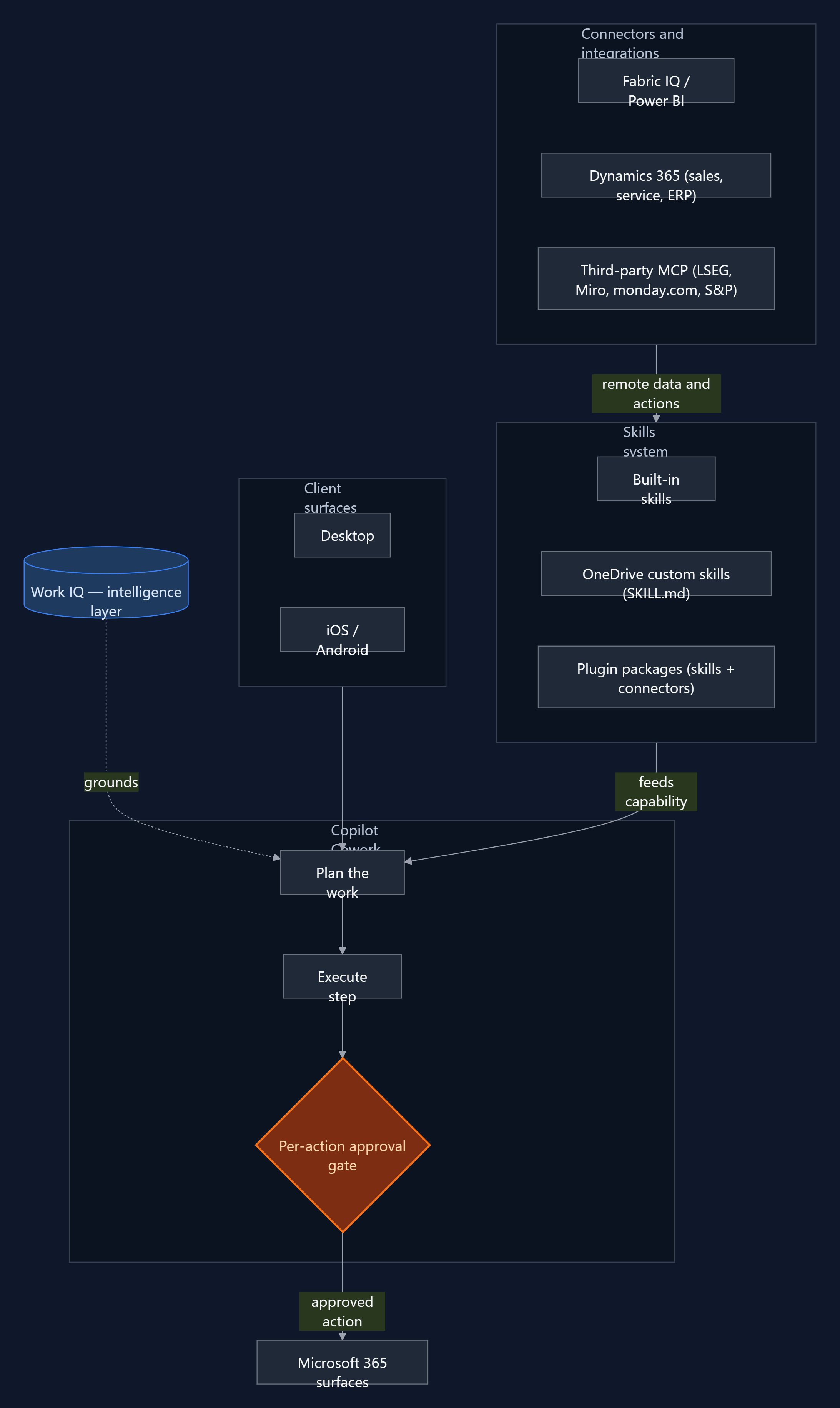
Cowork architecture — Work IQ grounds the agent, the skills system feeds capability, and every action passes a per-action approval gate before it reaches a Microsoft 365 surface.
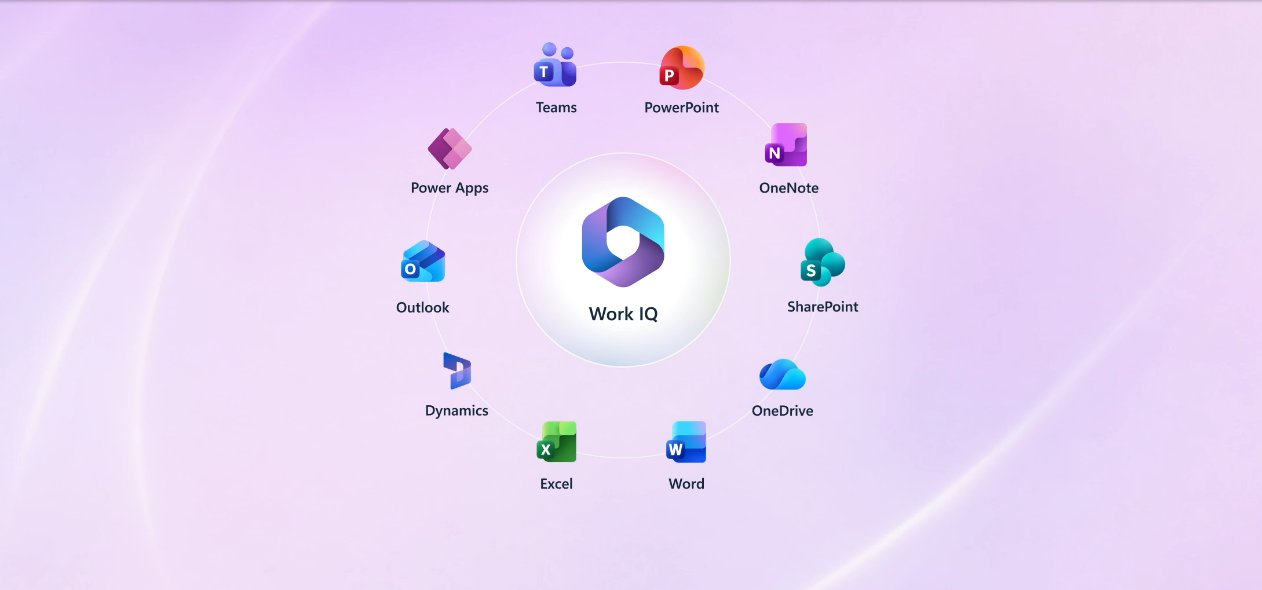
Cowork is built on Work IQ. The documentation is explicit that it "browses your entire Work IQ" to pull in the content it needs — emails, meetings, messages, files, and data across Outlook, Teams, Excel, SharePoint, and the rest of Microsoft 365. That grounding layer is what lets the agent act with context rather than starting cold from a prompt. If you want the deeper treatment of what that intelligence layer is and what it changes, that is the subject of the IQ pillar post.
The second architectural fact is that Cowork is multi-model. It uses Microsoft’s own models alongside Anthropic’s Claude — the model selector currently exposes Claude Opus 4.7 as an option, and Microsoft documents that it uses Anthropic models as a subprocessor. One consequence that belongs in your governance notes: access to the Anthropic models is limited to Anthropic-supported regions, and Cowork is not exempt from that restriction. If your tenant spans regions, verify coverage before you assume availability.
The third fact — the one that carries the rest of this post — is that the unit of capability is the skill. Cowork ships with built-in skills (Word, Excel, PowerPoint, PDF, Email, Scheduling, Calendar Management, Meetings, Daily Briefing, Enterprise Search, Communications, Deep Research, and Adaptive Cards), and it loads them dynamically during a conversation, showing you which are active in a side panel. Everything you can add to Cowork is expressed as a skill or a connector. So the extensibility model is the architecture that matters.
The extensibility model
There are two tiers, and they map cleanly to two audiences.
Tier one: OneDrive custom skills (no-code)
Any user can create up to 50 custom skills by dropping a SKILL.md file into a subfolder of their OneDrive at /Documents/Cowork/skills/<skill-name>/SKILL.md — for example /Documents/Cowork/skills/weekly-report/SKILL.md. Cowork discovers them automatically at the start of each conversation. A skill is a YAML frontmatter block (a name and a description) followed by a Markdown body of instructions: structure, tone, the steps you want followed, the output format you expect. No deployment, no packaging, no admin involvement. This is the path to test the model on a real recurring task this week.
The developer path uses the same distribution mechanism as Teams apps, Copilot agents, and Office add-ins: the Microsoft 365 app package. A Cowork plugin is a .zip containing a manifest.json (unified manifest v1.28), the two app icons, and a skills/ folder. It can carry two extension types. Skills are the prompt-based workflows already described. Connectors are remote MCP servers that give Cowork access to external data and APIs — Streamable HTTP over HTTPS (TLS 1.2+), JSON-RPC 2.0 message format, and support for tools/list and tools/call. The package limits are firm: a maximum of 20 skills and 10 connectors per package.
Packages are distributed through the Microsoft 365 App Store (submitted via Partner Center) or deployed by an admin. Connector credentials never live in the manifest or the skill files — they reference the Microsoft Enterprise Token Store, using OAuthPluginVault for OAuth 2.0 APIs or ApiKeyPluginVault for API-key services, with the secret held in the vault and only a reference ID in the package.
The Agent Skills open standard — and the Claude conversion path
This is the detail almost no one is covering properly. Cowork’s skills are not a proprietary Microsoft format. They use the Agent Skills open standard — the same SKILL.md format supported by Claude Code, Claude.ai projects, Visual Studio Code and GitHub Copilot, Gemini CLI, Cursor, JetBrains Junie, OpenAI Codex, and, per Microsoft’s own count, 30+ other AI tools. The skill text you write for one is the skill text you can use across all of them.
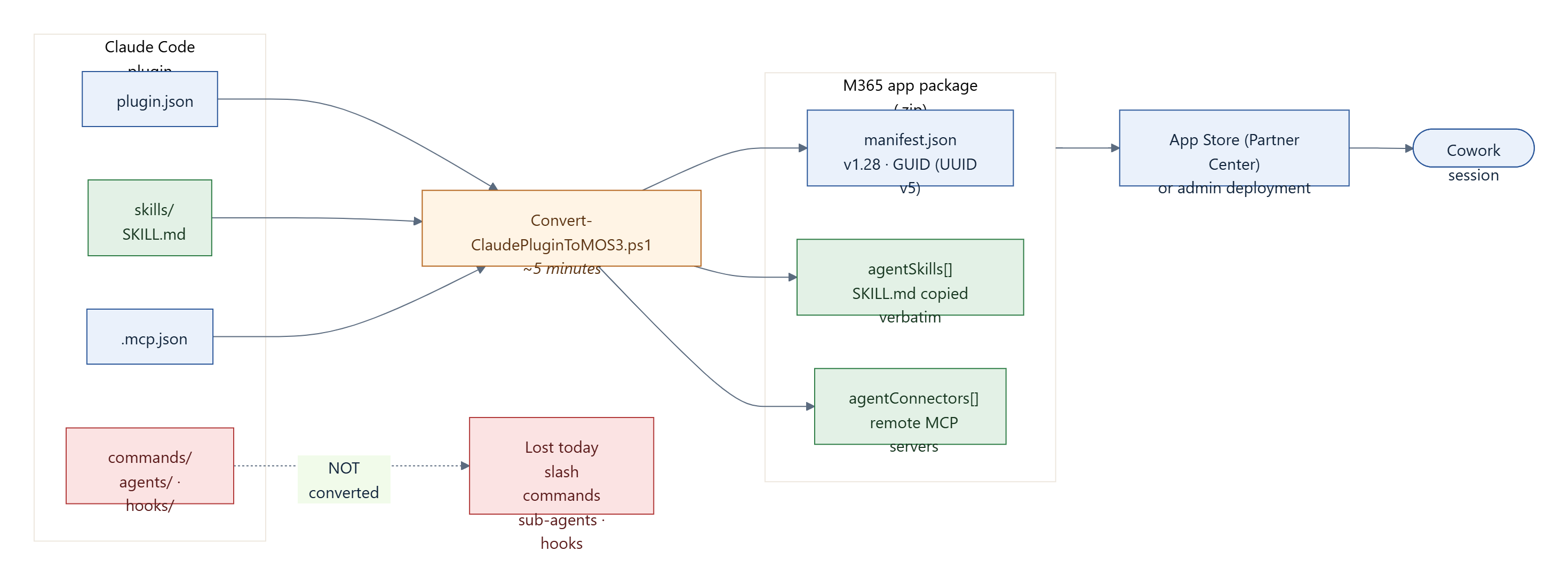
Microsoft leans into this with a PowerShell conversion script, Convert-ClaudePluginToMOS3.ps1, that turns an existing Claude Code plugin into a valid M365 package — Microsoft quotes roughly five minutes. It reads the plugin’s .claude-plugin/plugin.json, its .mcp.json, and its skills/ directory and emits a .zip with a generated manifest. The mapping is clean, but it is not complete. What converts and what does not is worth keeping in front of you:
The Claude plugin to M365 package conversion path. Skills copy verbatim and MCP servers map to connectors; slash commands, sub-agents, and hooks do not convert.
Skills copy across verbatim and MCP servers map to agentConnectors. Slash commands, sub-agents, and hooks do not convert. Hold that thought — it matters for the "portability" claim later.
How a skill is loaded — the three-layer context model
The skill format is designed around a context budget, and understanding it is the difference between a skill that triggers reliably and one that quietly never fires. The system loads a skill in three layers:
Layer
When loaded
Target size
Frontmatter (name + description)
Always — at startup
~100 tokens
SKILL.md body
When the skill triggers
Under 5,000 tokens (1,500–2,000 words)
references/
On demand, by the agent
Unlimited
scripts/
Executed, not loaded into context
N/A
The frontmatter is always resident, so the description is doing real work on every conversation. The body loads only when the skill triggers. References are pulled in when the agent decides it needs them, and scripts are run rather than read into the window at all. Each skill can carry up to 20 companion files, 5 MB each, 10 MB total. Keep the body lean and push depth into references/.
One gotcha causes more failures than any other, and Microsoft says so directly: the folder name must match the name field in the frontmatter, exactly.skills/contract-analysis/SKILL.md with name: contract-analysis works. The same folder with name: ContractAnalysis does not. Kebab-case only — lowercase alphanumerics and single hyphens, no underscores, no leading or trailing or consecutive hyphens. If a skill never activates and you have ruled out the description, check this first.
The connector surface is widening fast
The May 2026 update makes the distribution-channel framing more concrete. Microsoft is shipping native integrations into Cowork — Fabric IQ with Power BI for data, and Dynamics 365 across sales, customer service, and ERP for scenarios like pipeline reviews, case resolution, and order approvals — alongside connectors to third-party systems including LSEG, Miro, monday.com, and S&P Global Energy. Cowork has also moved onto iOS and Android, so a delegated task can run in the cloud while you are away from your desk.
Two things follow for architects. The reach is broadening quickly, which strengthens the case for treating Cowork as a delivery surface rather than a destination. But the pace also reinforces the preview caveat: Microsoft describes itself as “still early and moving fast,” with capabilities rolling out continuously. A connector that exists this month is not a contract for next month — verify availability against the live docs before you design around any specific integration.
Governance and control
The governance story is reassuringly standard, because Cowork reuses the Microsoft 365 controls you already operate. Cowork inherits the signed-in user’s Entra identity and permissions — it can only reach files and mail the user can already reach. Admins get tenant-level allow and block lists, can deploy plugins on behalf of users, and can apply compliance policies. When a plugin is revoked, its skills and connectors are removed from the user’s session on the next sync; active conversations are not interrupted, but new ones lose the capability.
Two things to note on the current preview surface. Purview sensitivity labels are surfaced in responses and citations, showing the highest-priority label across the data used — useful, but a display behaviour rather than a full enforcement story yet. And the May 2026 update brought Agent 365 integration, which is how Microsoft intends Cowork to come under enterprise observability, security, and governance through a single control plane. That integration is the direction of travel; it is not a substitute for verifying what is actually auditable in your tenant today.
Where this falls short today
It is preview, and the documentation is explicit that capabilities may change. That is not a disclaimer to skim past. Do not build production process dependencies on a Frontier preview feature whose behaviour Microsoft reserves the right to alter. The correction on the false GA claims matters precisely because someone, somewhere, is about to wire a business process to this on the assumption that it has shipped.
Per-action approval is the right default and a real friction at the same time. Human-in-the-loop on every send and post is exactly what enterprise governance requires. It also caps the autonomy story. A "delegate and walk away" workflow that pings you eight times for approval is supervised execution, not delegation — and that is fine, as long as you are honest about which one you are buying. There is a "don’t ask again" option, scoped to the current conversation, and an "Approve All" for batching pending approvals; both move risk from the system to the user, and that trade should be a conscious choice, not a reflex click.
Skill triggering is probabilistic, not configured. The description field is how the agent decides whether to activate a skill, which makes activation reliability a prompt-engineering problem rather than a guarantee. The docs push explicit trigger phrases ("use when the user asks to…") for exactly this reason. Anyone who has run function-calling agents in production will recognise the failure mode immediately; in my own work, intermittent tool selection was consistently the hardest class of bug to reproduce, precisely because it was non-deterministic. Plan for it: write specific descriptions, name your connector tools explicitly in the skill body, and measure activation rather than assuming it.
The open standard cuts both ways. Adopting Agent Skills is genuinely good — portable skill text, no proprietary lock-in on the part that holds your domain logic. But the conversion is lossy today: slash commands, sub-agents, and hooks do not come across. And the manifest, the store review process, and the Enterprise Token Store are all Microsoft-specific. Portability of the skill text is not portability of the whole solution; the wrapper stays platform-bound even when the contents travel.
Finally, cost clarity is thin. Cowork requires a Microsoft 365 Copilot licence and Frontier enrolment, and the consumption implications of agentic execution at scale — an agent that plans, calls tools, and acts across many steps — are not yet documented. This is the question to take to your account team before any pilot grows into something people depend on.
What I’d do this month
Concrete and bounded. Enrol a sandbox tenant in the Frontier programme so you are evaluating on real infrastructure rather than reading about it. Write one OneDrive custom skill for a genuine recurring task — a weekly status roll-up, a standard document format — and then measure how reliably it triggers across a dozen real prompts, not how well it works once when you phrase the prompt perfectly. That single measurement tells you more about production-readiness than any feature list.
If you already maintain Claude Code skills, run the conversion script against one and inventory exactly what is lost — the slash commands and hooks you relied on will not survive, and it is better to know that now. And hold production dependencies until GA. Build familiarity, build a couple of skills, build an opinion. Do not build a process that breaks the next time Microsoft changes a preview behaviour.
Where Cowork sits in the bigger picture
Cowork is the most visible thing Microsoft has built on top of Work IQ, and that is the right way to read it. The execution capabilities will get the attention, but the durable architectural story is the combination underneath: an intelligence layer that grounds the agent, a multi-model engine, and an extensibility model that adopts an open standard and rides the existing Microsoft 365 distribution rails. For an architect, the question is not "what can Cowork do" — that list will keep changing through preview. It is "what is the unit of capability, and how does it travel." The answer, for once, is a portable, open-standard skill. That is worth studying now, even while the product around it is still moving.
For a few years now, every enterprise agent I built started the same way: from scratch. A new connector here, a handcrafted retrieval pipeline there, a fresh attempt to teach the agent what the business already knew. I built agent grounding the hard way more than once — custom RAG, bespoke chunking, my own identity plumbing — and watched two agents in the same tenant give two different answers to the same question because they had been grounded against two different copies of reality.
That is the production problem nobody puts on a slide. Context gets rebuilt per agent. Connectors sprawl. Answers drift. And the cost of all that plumbing lands on the same small group of engineers every time a new use case appears.
Microsoft IQ is Microsoft’s answer to that problem, and it reached general availability at Build 2026. This is the pillar post for the wider Microsoft IQ cluster on this blog: what each layer does, how they compose, and — just as important — where the GA reality differs from the keynote framing.
What Microsoft IQ actually is
Microsoft IQ is a shared, permission-aware intelligence layer that agents inherit, rather than rebuild. The pitch is simple: stop stitching connectors and pipelines into every agent, and ground them all against one governed view of how people work, how the business operates, and how to reuse knowledge.
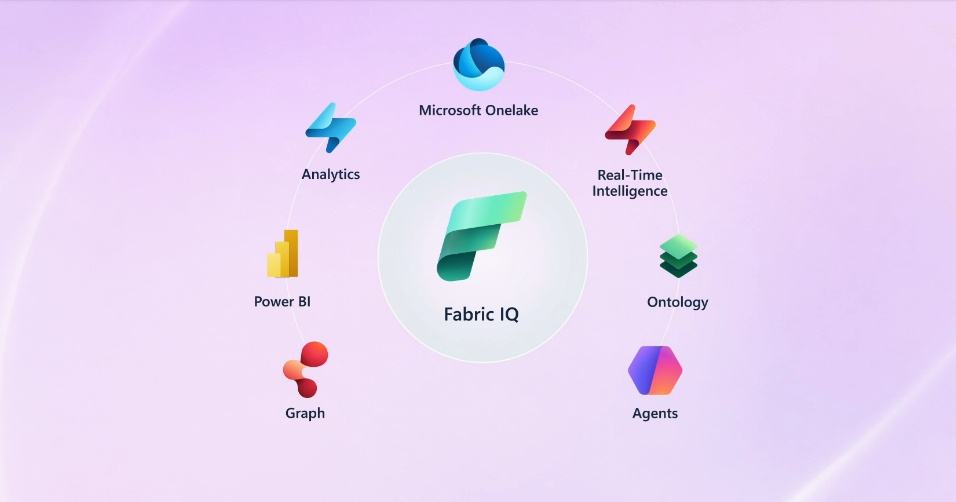
It is worth being precise about what it is not. Microsoft IQ is not a model, and it is not a chatbot feature. It sits underneath the agents you build in Copilot Studio, Microsoft Foundry, or GitHub Copilot, and feeds them context. It is composed of four layers — Work IQ, Fabric IQ, Foundry IQ, and Web IQ — and any agent across those three build surfaces can consume them.
The “GA” label, though, is an umbrella, not a uniform guarantee. Each of the four layers shipped at a different stage of maturity, and anyone scheduling a deployment this quarter — picking what to commit to in the next planning cycle — needs that breakdown up front, not buried in the small print. So I will give each layer its own section, with the state it actually shipped in.
Work IQ — the workplace context layer
Work IQ is the contextual intelligence layer for Microsoft 365. It captures the signals that describe how people actually work — emails, meetings, documents, Teams messages, people relationships, and collaboration patterns — and exposes them so an agent can reason over them in natural language.
The capability ships as a CLI and a Model Context Protocol server today, which is how AI assistants such as GitHub Copilot reach into a user’s M365 context. The broader public Work IQ APIs — REST, A2A, and MCP — are slated to reach GA on 16 June 2026.
The one thing an architect should know: as of writing, Microsoft Learn still labels Work IQ “public preview”, and accessing organisation data requires admin-consented permissions and tenant billing activation. Treat the GA date as imminent rather than banked, and plan the admin-consent step into your rollout — it is not a developer-self-serve switch.
Fabric IQ — the business-data semantic layer
Fabric IQ is the semantic layer over your business data. It elevates raw analytical, real-time, and operational data in OneLake into the language of the business — entities, relationships, rules, and actions — so that agents reason in terms of Customer, Shipment, or Breach rather than table columns.
It delivers this through two core items: semantic models and an ontology. And here is the GA nuance Microsoft’s umbrella headline glosses over — the Fabric IQ ontology is in preview. Learn marks it “ontology (preview)” consistently. The semantic-model side is more mature, and ontologies can be generated directly from Power BI semantic models already running in production, which is the realistic on-ramp for most estates that have years of Power BI behind them.
The one thing an architect should know: you can bootstrap a Fabric IQ ontology from an existing Power BI semantic model, keeping business terminology consistent across reports, agents, and apps — but treat the ontology itself as preview-grade until Microsoft says otherwise.
Foundry IQ — the managed knowledge layer
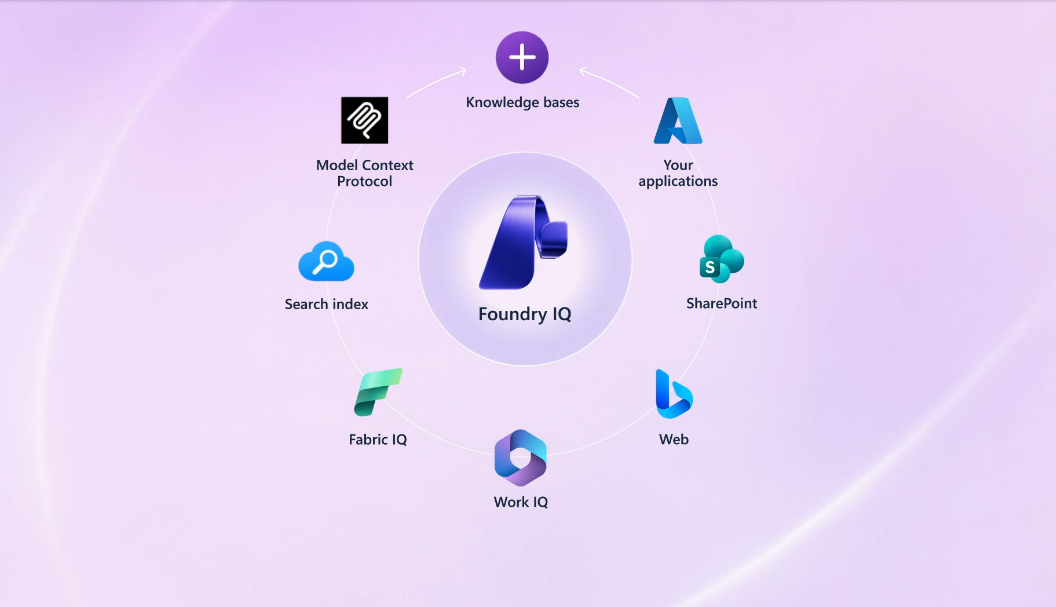
Foundry IQ is the layer that replaces the most plumbing, so it earns the most depth here. It turns fragmented enterprise content into governed, reusable knowledge that multiple agents can share.
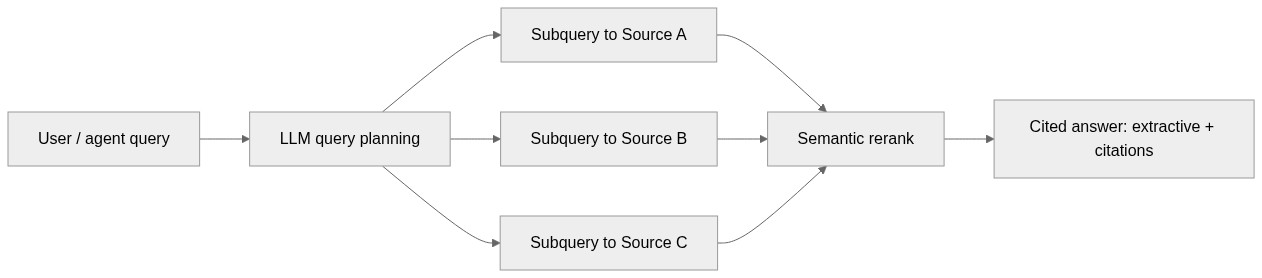
The model has three concepts worth learning precisely. A knowledge base is the top-level resource that orchestrates retrieval and carries a retrieval reasoning-effort setting of minimal, low, or medium. It is composed of knowledge sources — connections to indexed or remote content such as Azure Blob Storage, SharePoint, OneLake, the web, MCP, Azure SQL, and File Search. And it is queried through agentic retrieval: an LLM plans the query, decomposes a complex question into parallel subqueries across sources, semantically reranks the results, and returns extractive answers with citations the agent can trace.
Azure AI Search provides the underlying infrastructure. Crucially, a knowledge base is shareable: one knowledge base can ground many agents, and those agents can run in Foundry Agent Service, the Microsoft Agent Framework, or any custom app via the Azure AI Search knowledge base APIs. At Build 2026, Microsoft positioned Foundry IQ knowledge bases as the unifying point — bringing Work IQ, Fabric IQ, File Search, Azure SQL, and MCP behind a single, SLA-backed retrieval endpoint.
Now the candour. Foundry IQ’s GA is uneven, and Microsoft says so on the concept page itself: some features are generally available while others remain in preview, and which is which depends on the Search Service REST API version you call. The same page notes that the Foundry portal and Azure portal still expose all agentic retrieval features as preview-only. So “Foundry IQ is GA” is true and incomplete at the same time — the answer depends on how you call it.
The one thing an architect should know: before you plan a production rollout, pin down which Search Service REST API version your code targets, because that single choice determines whether you are on a GA or a preview surface.
Web IQ — the live web-grounding layer
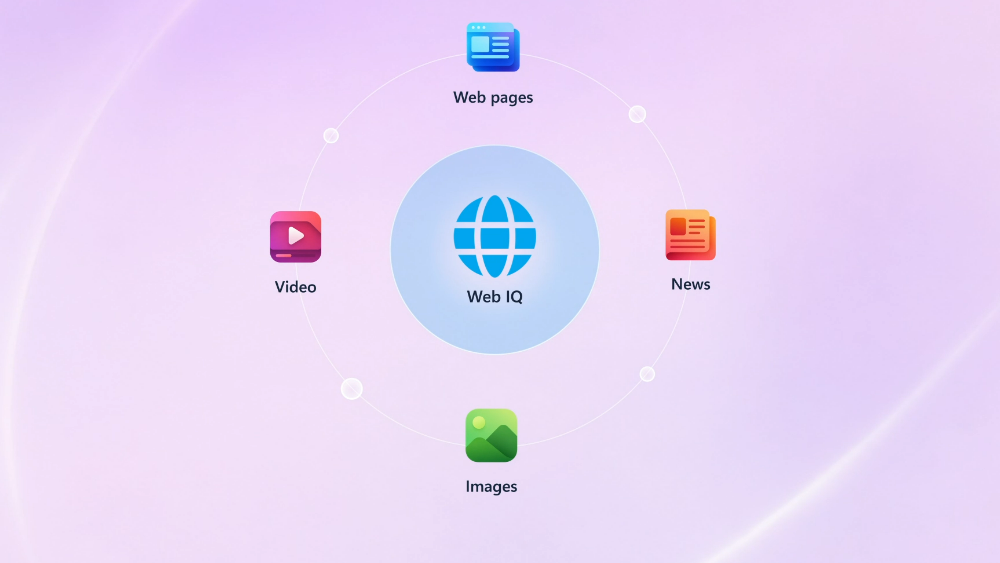
Web IQ is the newest layer, announced at Build 2026. It is web grounding rebuilt for LLMs and multi-step agents: a suite of AI-native APIs returning ranked, citation-ready context across web pages, news, images, and video, built on two decades of Bing infrastructure rather than SERP scraping.
The engineering numbers are the headline. Microsoft claims roughly 164ms P95 latency — close to 2.5x faster than the best alternative — with fewer tokens per query. It is model-agnostic and MCP-native over JSON-RPC 2.0, so there is no inference lock-in, and it is benchmarked against suites including DeepSearchQA.
The one thing an architect should know: Web IQ is limited access and waitlist-only today, prioritised for enterprise customers working with Microsoft account teams. If live web grounding matters to your roadmap, the action this month is to join the waitlist, not to design around guaranteed availability.
How the layers compose
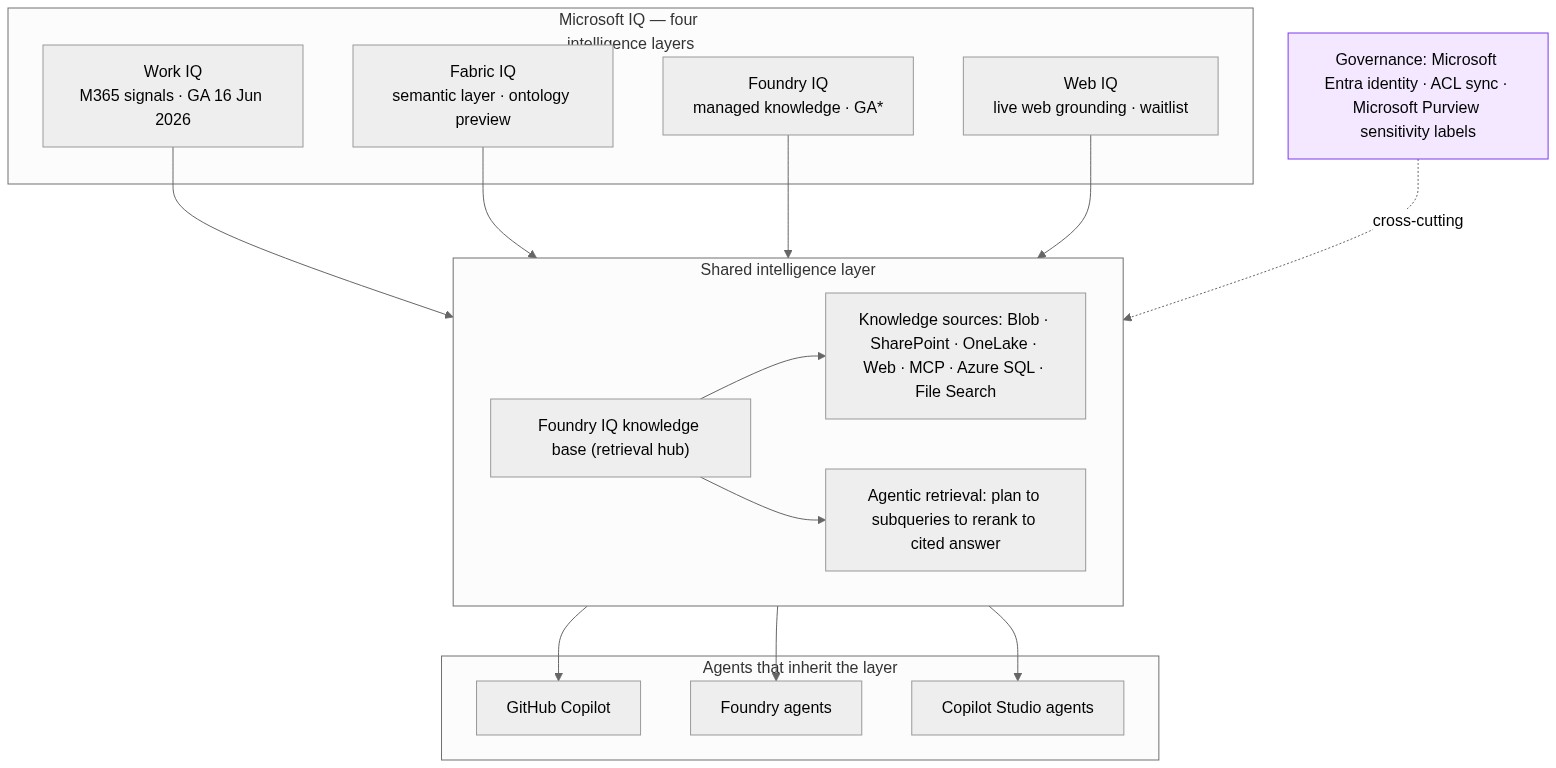
The architecture is cleaner than the four-product naming suggests. The four IQ layers feed a shared intelligence layer that any agent — GitHub Copilot, a Foundry agent, or a Copilot Studio agent — consumes. Foundry IQ knowledge bases act as the retrieval hub that the others can flow through. Cutting across all of it is governance: queries run under the caller’s Microsoft Entra identity, ACLs synchronise for supported sources, and Microsoft Purview sensitivity labels are enforced end to end.
Microsoft IQ architecture. Work IQ, Fabric IQ, Foundry IQ, and Web IQ feed a shared intelligence layer that agents inherit, with Entra identity and Purview labels as a cross-cutting governance band. (Diagram placeholder — Mermaid source in the image plan.)
The retrieval path inside Foundry IQ is the part most worth internalising, because it is where the “no complex RAG” claim meets reality: a query is planned by an LLM, decomposed into parallel subqueries across sources, semantically reranked, and returned as a cited answer.
Foundry IQ agentic retrieval. Query, LLM query planning, parallel subqueries across knowledge sources, semantic rerank, cited answer. (Diagram placeholder — Mermaid source in the image plan.)
Where this falls short today
“No complex RAG” is a marketing claim, not an engineering fact. Foundry IQ genuinely removes connector and pipeline plumbing, and that is real value. It does not remove the need to understand chunking behaviour, to evaluate retrieval quality, or to model cost. You are not maintaining the pipeline; you are still responsible for whether it returns the right thing at a price you can defend.
The GA label is uneven. Microsoft IQ is GA as an umbrella, but Fabric IQ’s ontology is preview, Web IQ is waitlist-only, and Foundry IQ’s GA depends on which Search REST API version you call. If you are signing off a production plan, build that table honestly: per layer, what is GA, what is preview, what is gated.
Microsoft has promised programmable enterprise context before. Microsoft Graph was supposed to be this a decade ago. Semantic Kernel memory abstractions and earlier Copilot extensibility models each hit walls — latency, schema drift, identity resolution. What is different this time is a retrieval-planning layer doing the grounding and GA APIs rather than perpetual preview. That difference is meaningful. It is also unproven at production scale, and I would hold both thoughts at once.
Lock-in is the trade. An intelligence layer this deep couples your agent estate to the Microsoft stack. For organisations already on M365, Fabric, and Dynamics, that is leverage of investment you have already made. For hybrid estates, it is a strategic decision to make deliberately, not a default to drift into.
Pricing and billing clarity is thin at GA. Work IQ requires tenant billing activation, and the consumption models across the layers are not yet fully documented. Before you commit a budget, get your Microsoft account team to put the per-layer billing model in writing — that is the gap most likely to surprise you later.
What I would do this month
Concrete, role-aware next steps if you own enterprise agent architecture:
Pin the Search Service REST API version your Foundry IQ code targets, and confirm whether that puts you on a GA or a preview surface before anything reaches production.
Plan for the Work IQ API GA on 16 June 2026 — including the admin-consent and tenant-billing steps — rather than assuming developer self-serve.
Bootstrap a Fabric IQ ontology from an existing Power BI semantic model in a sandbox, so you learn the preview behaviour without betting a production workload on it.
Join the Web IQ waitlist now if live web grounding is on your roadmap, because availability is gated and lead time is unknown.
Ask your account team for the per-layer consumption and billing model in writing before you size a budget.
Where this cluster goes next
This pillar is deliberately broad. Each layer deserves its own engineering deep-dive, and those are coming — starting with Foundry IQ versus a do-it-yourself RAG pipeline, the comparison I get asked about most. Fabric IQ ontologies, the Work IQ API surface, and Web IQ’s grounding economics will each get their own treatment. When those land, this post will link out to them from the sections above.
The short version: Microsoft IQ is the first time the “shared enterprise context” promise has arrived with a retrieval-planning layer and real GA APIs behind it. That is worth taking seriously. It is also worth reading the GA label one layer at a time.
The layer diagrams in this post are reused from the Microsoft IQ product page with attribution to Microsoft:
Banner and the four layer illustrations (Work IQ, Fabric IQ, Foundry IQ, Web IQ): Microsoft IQ
The two architecture diagrams are my own. All other commentary, code, and opinions in this post are my own and reflect lessons from building enterprise agent grounding the hard way.
I was halfway through my master’s when I realised I didn’t actually understand fine-tuning. I could call trainer.train(). I could read a loss curve. I could tell you the difference between LoRA and full fine-tuning at a cocktail-party depth. But if you’d asked me to explain why low-rank adaptation works — what the rank actually constrains, why some target modules matter more than others — I’d have hand-waved you through it and hoped you didn’t follow up.
So I went looking for something that would close the gap. I read papers. I watched courses. I ran a dozen tutorials. Half of them assumed I already knew the maths and just walked me through API calls. The other half wrapped everything in a hosted notebook with a button that said “Run cell” and skipped the maths entirely. Nothing I found taught the intuition and the code together in a way that respected the fact that I wanted to understand what I was running, not just watch it run.
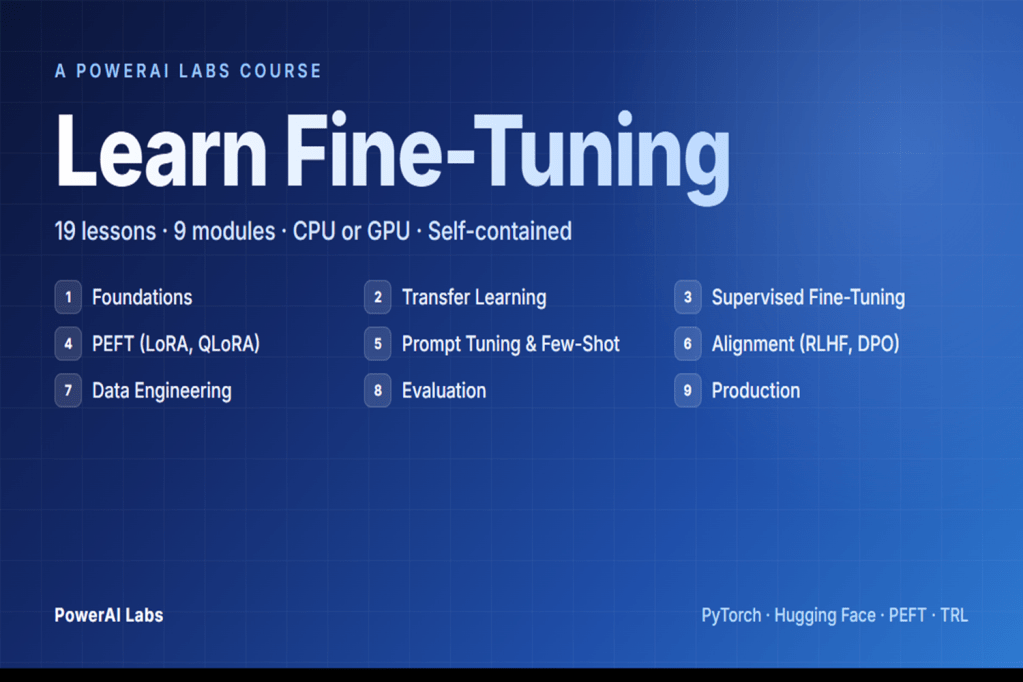
So I built what I wanted to read. Nineteen lessons across nine modules, each one in three formats — a long-form markdown explanation, a clean Python script, and a runnable notebook. Every script generates its own synthetic data and runs on a laptop. I’m publishing it because the next person learning this shouldn’t have to start where I started.
The four design principles
Self-contained. No API keys, no cloud accounts, no external datasets. The single biggest reason fine-tuning tutorials fall over is that the dataset link rots, the API quota expires, or the notebook assumes a paid runtime. Every lesson here generates its own synthetic data and runs end-to-end on whatever machine you already own. The friction between “I want to learn this” and “I’m seeing a result” is as close to zero as I could make it.
Concept first, code second. Every lesson opens with the theory — the maths, the trade-offs, the analogies, the ASCII diagrams — and only then introduces code. This was the principle I worked hardest on. The temptation when writing a fine-tuning lesson is to lead with from peft import LoraConfig and explain as you go. I forced myself to do the opposite: explain what a low-rank decomposition is, why it works as an approximation, what you’re giving up in exchange for the parameter savings — and only then write the line that imports the library.
Three formats per lesson. Markdown for reading, Python script for skimming the clean code, Jupyter notebook for running cell-by-cell. The three formats aren’t redundancy. They map to three different learning modes — reading to understand, running to see, and editing to internalise — and I wanted each lesson to support all three without asking the learner to context-switch between sources.
Small models, real patterns. Every lesson uses a model between 60M and 124M parameters — distilbert-base-uncased, bert-base-uncased, gpt2, t5-small. You can train all 19 lessons on a CPU. The point isn’t that you’d fine-tune a 66M-parameter encoder in production; the point is that the patterns — LoRA, QLoRA, DPO, the SFTTrainer pipeline — are identical at 66M and at 70B. Learn them on something that fits in your laptop’s RAM, then apply them where they need to go.
What’s in the course (at a glance)
The shape of it: foundations → transfer learning → supervised fine-tuning → PEFT (LoRA, QLoRA) → prompt tuning and few-shot → alignment (RLHF, DPO) → data engineering → evaluation → production. Nine modules, nineteen lessons, each one building on the last.
I’m deliberately not walking through them one by one here — that’s what the Project page on PowerAI Labs is for, and the repo README has the full lesson-by-lesson breakdown with topics, models, and the papers behind each one.
The three things I learned that surprised me
LoRA’s rank is less sensitive than the papers suggest — but the target modules are everything
I expected rank to be the lever I’d spend the most time tuning. It isn’t. On the tasks I worked through in the course, rank 4, rank 8, and rank 16 produced results that were within noise of each other. Above rank 16 the gains were small enough that I struggled to justify the extra parameters; below rank 4 the model would start to underfit, but the transition wasn’t dramatic.
What did matter, by a long way, was which modules the LoRA adapters were attached to. Adapting only q_proj left obvious capacity on the table. Adapting q_proj and v_proj — the original LoRA paper’s recommendation — was a meaningful step up. Adapting all linear layers was a further step up again, at a parameter cost that was still tiny relative to full fine-tuning. The rank-vs-target-modules trade-off is the one I now reach for first when a LoRA run isn’t doing what I want, and it’s the opposite of what I’d have guessed before I built the course.
DPO is genuinely simpler than RLHF, and the implicit reward is the real insight
I’d read the DPO paper before I built Module 6, and I thought I understood it. I didn’t, not properly. The insight that survives once you’ve worked through both a full RLHF pipeline and a DPO pipeline back-to-back is that DPO doesn’t replace the reward model — it absorbs it. The Bradley-Terry preference equation can be rearranged so that the reward score is expressed as a log-ratio of policy probabilities to a reference policy, and once you make that substitution the entire reward-model-then-PPO machinery collapses into a single supervised loss over preference pairs.
The practical consequence is that DPO is dramatically less code than RLHF, has no reward-model overfitting failure mode, and trains stably with a single hyperparameter — beta — that you can actually reason about. The conceptual consequence is harder to express but more important: once you see that the reward signal is implicit in the policy itself, you start to see alignment as a property of the model rather than a separate system bolted on top. You cannot unsee it.
Quantisation and PEFT compose better than I expected
QLoRA’s claim — fine-tune a billion-parameter model on a single consumer GPU at near-LoRA accuracy — sounded like marketing. It isn’t. In the lessons where I ran the comparison properly, QLoRA was within a percentage point of standard LoRA on the same task at a fraction of the VRAM. The two ideas — 4-bit NF4 quantisation of the base model, low-rank adaptation on top — compose almost orthogonally, and you genuinely lose very little to the quantisation when the adapters are doing the work.
The practical implication isn’t subtle. Production-ready LoRA fine-tuning on a single consumer GPU is real, today, with the libraries on the install list at the top of the course. That was true in research a year ago and it’s true on a laptop now, and it changes the economics of what an individual engineer can do without asking finance for a cluster.
Who this is for
For engineers who want to learn by running code. For architects who need to understand what the abstractions hide before they sign off on a design that depends on them. For master’s students working on adjacent topics who want a concrete codebase next to the papers. For anyone who has felt the gap between “the code works” and “I understand what it did” and wants to close it.
Not for people who want to call an API and move on — there are great products for that, and you don’t need this course to use them. Not for people who want a polished, certificate-bearing online course with video lectures and a discussion forum. This is self-paced, open-source, and rough-edged. The rough edges are part of the learning.
What’s next
The course lives at its Project page on PowerAI Labs, with the code on GitHub. Clone it, star it, fork it, file issues with corrections — I read every one, and corrections from people working through the material are the single best signal I get on what to tighten next.
Over the next few months I’ll publish a deep-dive blog post per module on PowerAI Labs, starting with LoRA — the rank-versus-target-modules result above is going to need its own post to do it justice. Subscribe if that’s useful and I’ll link them here as they go live.
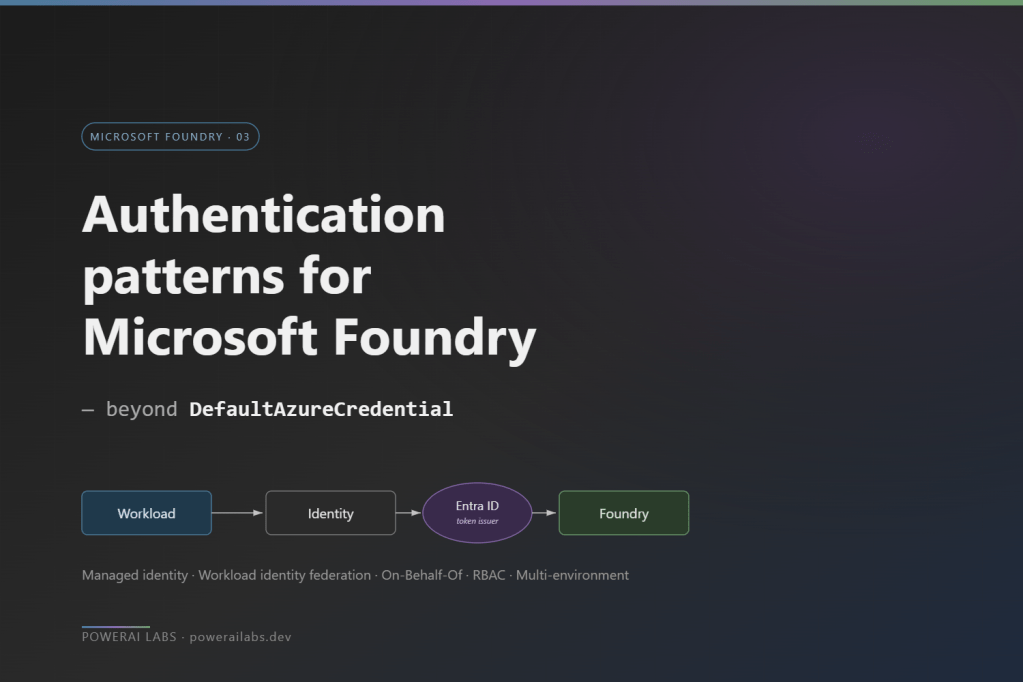
DefaultAzureCredential is the right default, and I said as much in the getting-started guide that this post follows. It walks an ordered chain — environment variables, managed identity, Azure CLI, VS Code, interactive browser — and the same line of code works on a laptop, in CI, and on production compute. That is exactly why it earns its place on day one.
The trouble starts by the time you hit production, when the questions get more specific. Your production workload needs to authenticate as something stronger than “whichever managed identity the host happens to provide.” Your CI/CD pipeline has to deploy agents, model deployments, and role assignments without a client secret sitting on the build agent. Your app calls Foundry on behalf of a signed-in user, and the user’s own identity has to reach Foundry — both for RBAC and for audit. And a security review asks for a complete inventory of who can call what, and “DefaultAzureCredential” is not an answer to that question.
What follows is the auth pattern catalogue I wish I had when I went from prototype to production on Foundry. Five patterns, a per-environment role assignment model, the multi-environment story, and the four things that will bite you.
The big picture — one diagram
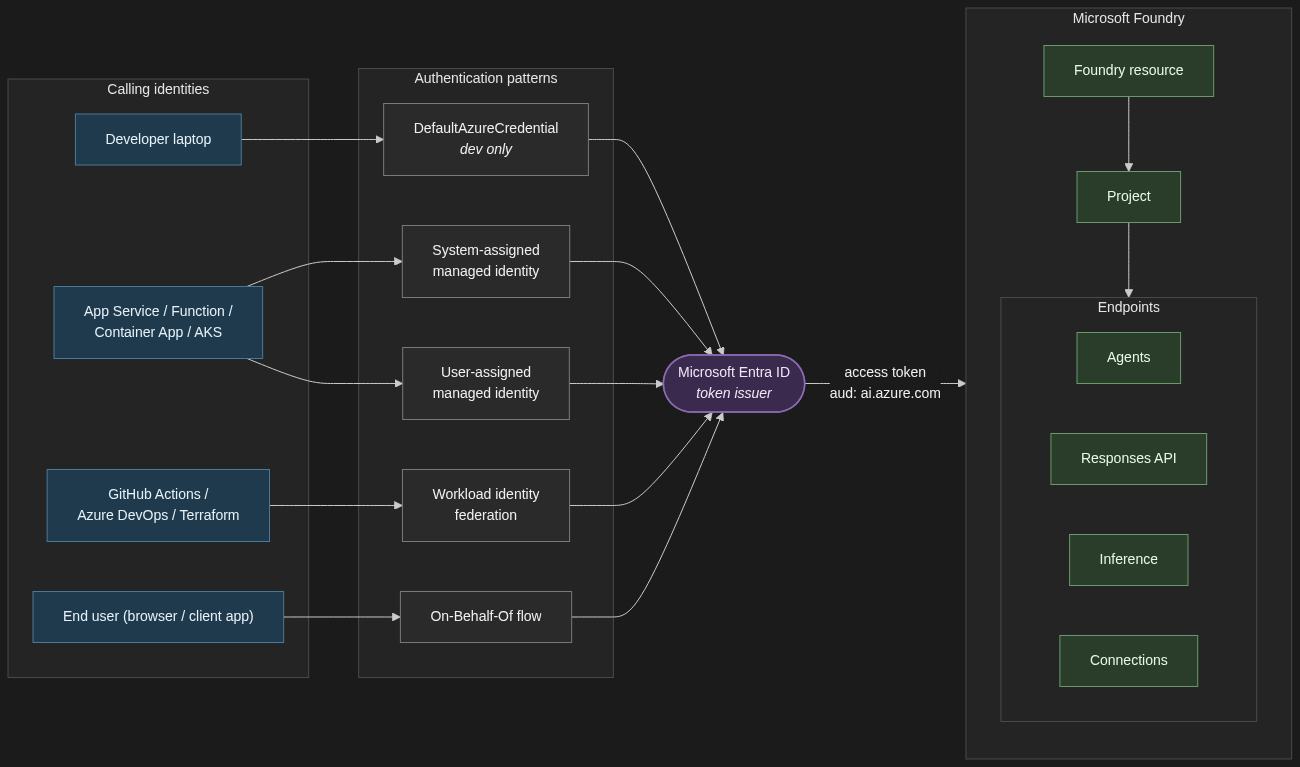
Before the catalogue, the one diagram that summarises the relationships. Every identity — a developer’s laptop, a signed-in end user, a workload on Azure compute, a CI/CD pipeline — reaches Foundry by way of an Entra-issued access token. The pattern you pick determines how that token is minted, not whether Entra is in the loop.
Authentication architecture for Microsoft Foundry. Every calling identity reaches Foundry via an Entra-issued access token.
1. The auth pattern catalogue
1.1 System-assigned managed identity for single-resource workloads
When to use it. A single App Service, Function, or Container App that calls one Foundry resource, has no shared identity needs with anything else, and never has to outlive its host.
When not. Anything where two compute resources need the same identity, or where the identity must persist across redeploys.
Trade-off. System-assigned managed identities are created and deleted with their host. Zero lifecycle work, zero secrets, and zero portability. If you delete the App Service, the identity is gone — along with every role assignment that ever referenced it.
resource app 'Microsoft.Web/sites@2023-12-01' = {
name: 'app-foundry-prod'
location: location
identity: { type: 'SystemAssigned' }
properties: { serverFarmId: plan.id }
}
// Assign Foundry User on the project (not the resource)
// Foundry User role ID — stable across the rename
roleDefinitionId: subscriptionResourceId(
'Microsoft.Authorization/roleDefinitions',
'53ca6127-db72-4b80-b1b0-d745d6d5456d'
)
}
}
System-assigned managed identity lifecycle. The identity is created with the host and deleted with it — taking every role assignment with it.
1.2 User-assigned managed identity for shared and durable workloads
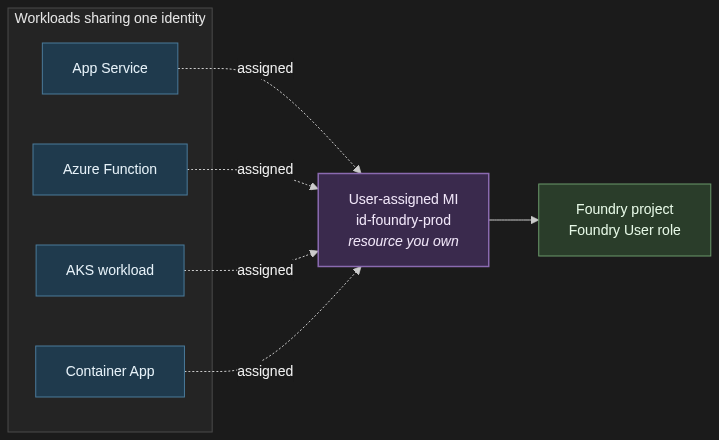
When to use it. Multiple compute resources sharing one identity (App Service plus a Function, two AKS workloads, a Container App plus a Logic App). Or anywhere the identity must survive a redeploy of the compute.
When not. A single transient workload — system-assigned is simpler, and you do not have an identity hanging around with no host.
Trade-off. Durable and shareable, but you own the lifecycle. Think of it as identity-as-a-resource: it gets its own Bicep module, its own naming convention, and its own teardown plan.
User-assigned managed identity shared across App Service, Function, AKS, and Container Apps — one identity, one role assignment, multiple workloads.
For anything in production, my default is user-assigned. The first time you redeploy a Container App and discover every role assignment has gone with it, you will thank yourself.
1.3 Workload identity federation for GitHub Actions and other federated CI/CD
When to use it. Any pipeline that deploys Foundry agents, model deployments, role assignments, or any other RBAC-protected operation. GitHub Actions, Azure DevOps with OIDC, Terraform Cloud, AKS workload identity — all federated subjects.
When not. There is not a good “when not.” If your GitHub Actions workflow still has AZURE_CLIENT_SECRET in its repository secrets, you should be migrating off it.
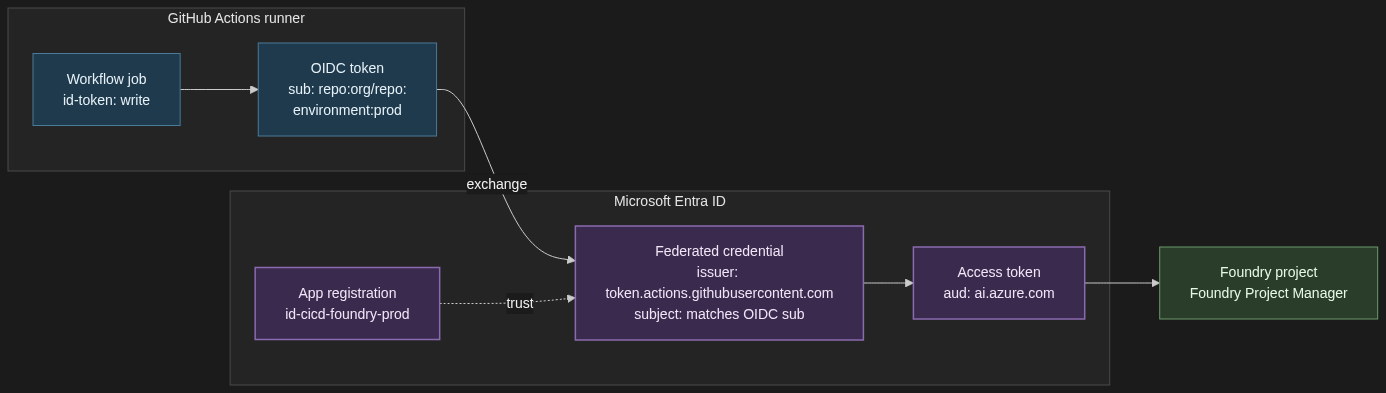
Trade-off. A bit of configuration up front — a federated credential on the app registration with the right subject claim and audience. Zero credential rotation forever after. The external identity provider (GitHub, Kubernetes, etc.) is trusted to assert the workload’s identity, and Entra exchanges that assertion for a token. No client secret ever crosses the wire.
# Create the federated credential on an app registration
Workload identity federation trust between GitHub Actions and Microsoft Entra ID. The runner sends an OIDC token, Entra validates it against the federated credential, and returns a Foundry-scoped access token.
The pattern generalises. AKS workload identity uses the same federation primitive with the cluster’s OIDC issuer as the subject. Terraform Cloud has its own. The configuration changes; the model does not.
1.4 On-Behalf-Of flow for apps that call Foundry as the signed-in user
When to use it. A web app or API where the end user’s identity must reach Foundry — because the user’s own RBAC determines what they can see, because audit logs need the user not the app, or because a compliance regime requires per-user attribution all the way to the model call.
When not. Pure machine-to-machine workloads. If there is no signed-in human in the loop, you want a managed identity, not OBO.
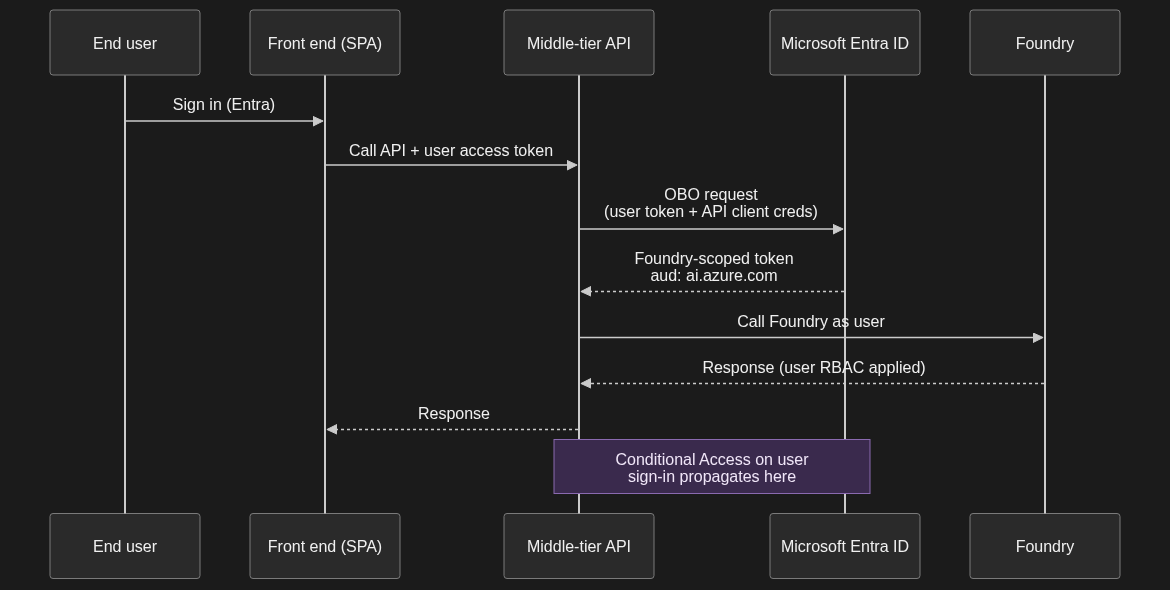
Trade-off. More moving parts. The user signs into the front end, the front end calls your API with their access token, the API exchanges that token for a downstream token scoped to Foundry, and only then does the call go through. It is the only correct answer for user-scoped operations.
# Middle-tier API: exchange the incoming user token for a Foundry-scoped token
import msal
app = msal.ConfidentialClientApplication(
client_id=API_CLIENT_ID,
client_credential=API_CLIENT_SECRET, # or a certificate / federated credential
# incoming_user_token comes from the Authorization header on the request
result = app.acquire_token_on_behalf_of(
user_assertion=incoming_user_token,
scopes=["https://ai.azure.com/.default"],
)
foundry_access_token = result["access_token"]
On-Behalf-Of flow. The middle-tier API exchanges the user token for a Foundry-scoped token, and the call runs under the user identity with their RBAC and Conditional Access applied.
One implication worth calling out: any Conditional Access policy on the user’s original sign-in propagates through the OBO exchange. If your CA policy says “no Foundry access from non-compliant devices,” the downstream Foundry call inherits that. That is almost always what you want.
1.5 Application registrations with client secrets — when (rarely) still appropriate
When to use it. Local developer machines that are not on a corporate-managed laptop with Entra-joined credentials. Genuinely headless scripts that cannot use a managed identity or federated workload identity. Third-party integrations that do not yet support OIDC federation. That is it.
When not. Anything in production on Azure compute — use a managed identity. Anything in CI/CD on a platform that supports federation — use workload identity federation. Anything an auditor will ever look at.
Trade-off. Simplest to set up, hardest to govern. Secrets rotate, they leak, they accumulate. If you have more than a handful, you have a secret-sprawl problem and you do not yet know it.
If you must use one: short expiry (90 days), stored in Key Vault, never in a .env checked into a repo, and the role assigned to the app’s service principal is the minimum it needs — Foundry User scoped to the project, never Contributor scoped to the subscription.
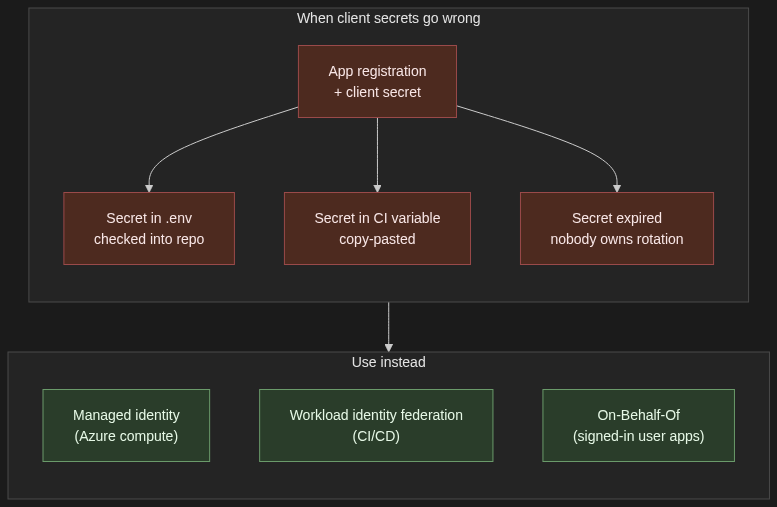
The hard line: if you are putting a client secret on a production workload, you have taken a wrong turn. Go back and use one of the four patterns above.
Client secrets in production are an anti-pattern. Replace with managed identity for Azure compute, workload identity federation for CI/CD, or On-Behalf-Of for signed-in user apps.
2. The role assignment model — least privilege without the spreadsheet
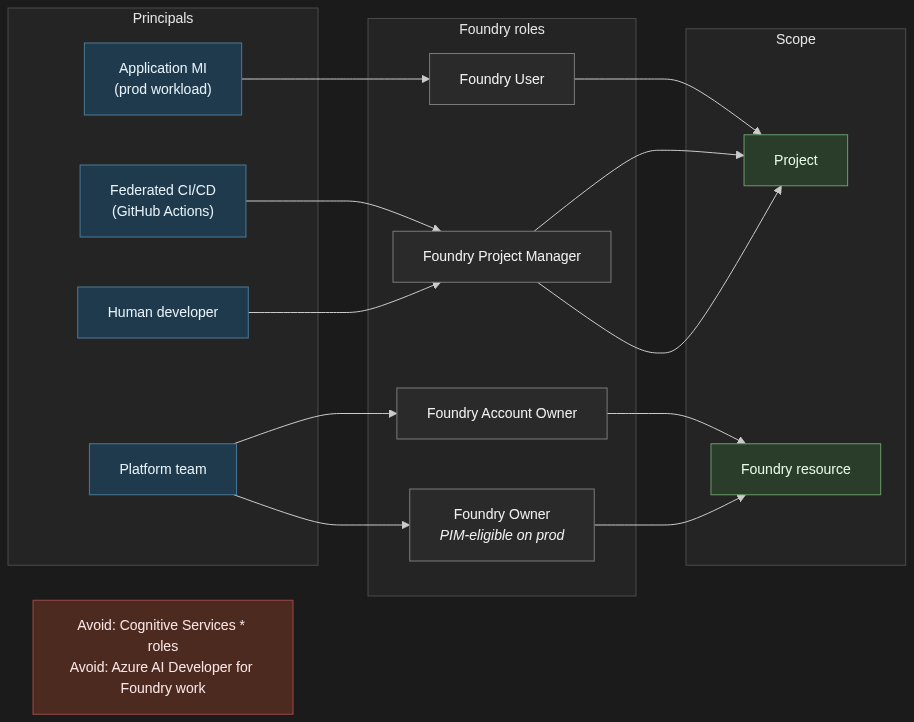
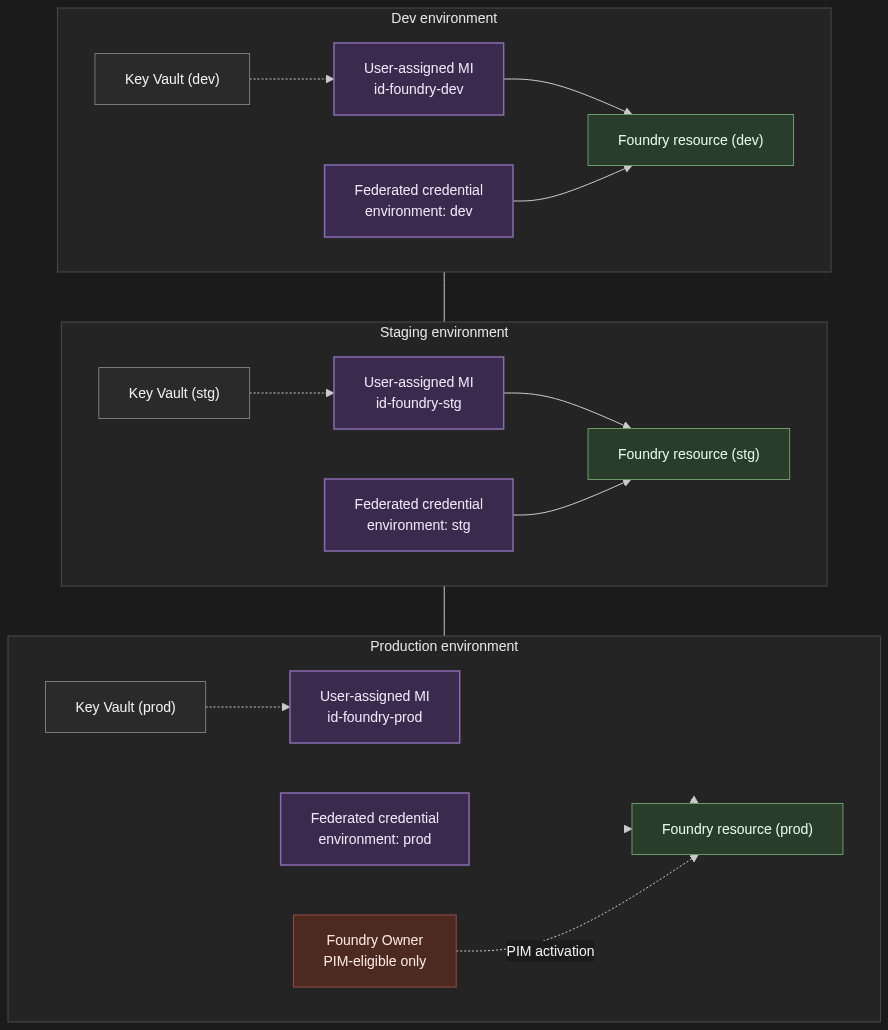
Two principles. Roles are assigned to principals — managed identities, user accounts, Entra groups — at a scope. The scope can be project, Foundry resource, resource group, or subscription. Get the scope right and least privilege follows naturally. Get it wrong and you will be re-assigning Contributor every six months because somebody got blocked at a demo.
In prose, here is the model I deploy:
Application principals — the managed identity that the production app authenticates as, the federated workload identity the AKS pod assumes — get the Foundry User role, scoped to the project, not the resource. Project-scoped assignments mean a misconfigured app cannot accidentally see another project’s agents, threads, or connections.
Build and deploy principals — the federated CI/CD identity that runs your GitHub Actions workflow — get Foundry Project Manager scoped to the project. If the same pipeline also creates projects, then it needs a resource-level role for that one operation; keep it as narrow as you can get away with.
Human developers get Foundry Project Manager on the dev project, Foundry User on staging, and read-only on prod. Production changes go through the pipeline; they do not go through individual developer accounts.
Resource-level roles — Foundry Account Owner and Foundry Owner — are platform-team territory, and even there they should be PIM-eligible rather than standing assignments. These are the roles that can create new projects, configure guardrails, and conditionally hand out other roles. Treat them accordingly.
A few practical notes the docs are explicit about. Do not assign built-in roles that start with Cognitive Services for Foundry work — Microsoft’s RBAC documentation calls this out directly. Those roles are for accessing AI Services resources directly and do not apply to Foundry scenarios, even though Foundry sits on the Microsoft.CognitiveServices resource provider. Also avoid the Azure AI Developer role for Foundry — despite the name, it is scoped to Azure Machine Learning workspaces and Foundry hubs, not to Foundry projects or resources.
One more practical note: reference role definition GUIDs in Bicep and Azure CLI, not display names. The Foundry roles were recently renamed from their Azure AI predecessors (Azure AI User → Foundry User, Azure AI Project Manager → Foundry Project Manager, Azure AI Account Owner → Foundry Account Owner). The GUIDs are stable; the display names are still mid-rollout across the portal and tooling.
Role assignment model. Application principals get Foundry User on the project, CI/CD and developer principals get Foundry Project Manager, and resource-level Foundry Account Owner / Foundry Owner stay with the platform team. Avoid Cognitive Services * roles and Azure AI Developer for Foundry work.
3. The multi-environment story
Dev, staging, and prod each get their own Foundry resource — not just their own project. Quotas are resource-scoped. Network configuration is resource-scoped. The blast radius of a misconfigured role assignment is resource-scoped. All of those argue for full resource separation between non-prod and prod, even if it means three sets of Bicep modules and three Application Insights workspaces. The cost of running an under-utilised dev resource is far less than the cost of an intern accidentally pointing a load test at a prod deployment.
Each environment gets its own user-assigned managed identity for the application principal, its own federated credential on the CI/CD app registration (one per environment, with a distinct subject claim — environment:dev, environment:prod — so prod deploys only run from protected branches and reviewed environments), and its own Entra group for human access. Group membership rather than direct user assignment, always — that is how you get clean joiner/mover/leaver flows without a quarterly spreadsheet review.
Secrets that genuinely have to exist — third-party API keys, database connection strings — live in a per-environment Key Vault, accessed by the per-environment managed identity. Foundry credentials themselves are never in Key Vault. They are token exchanges via the patterns in Section 1.
Elevated roles on the prod resource go through Privileged Identity Management. The platform team holds Foundry Owner on prod as PIM-eligible, not as a standing assignment. Activation requires justification, a time window, and an audit trail. If your auditor asks “who could have changed the prod guardrails on this date,” you want PIM logs to answer that, not Azure Activity Log archaeology.
Per-environment isolation. Dev, staging, and production each get their own Foundry resource, user-assigned managed identity, federated credential, and Key Vault. Elevated roles on prod are PIM-eligible only.
4. The four things that will bite you
Token caching. The Azure SDK clients cache tokens for the lifetime of the credential object. Long-lived processes — anything stateful, anything that processes a queue, anything with a connection pool — need to handle credential refresh correctly. The right pattern is usually to reuse a single credential instance across all clients in the process, not to recreate DefaultAzureCredential() (or its successor) per call. Recreating it per call defeats the cache and, on a busy worker, will get you rate-limited at the IMDS endpoint before you have shipped a single completion.
Cross-tenant scenarios. Foundry resources live in a single tenant. If you have a partner tenant whose users need to call your Foundry workload, you are in B2B territory and the patterns above need adapting. Managed identities do not cross tenants without explicit federation, and OBO has its own constraints when the user is a guest. Do not discover this two weeks before a launch — design for the tenant model on day one.
Private endpoints and DNS. Authentication works, the call still fails. If you have put Foundry behind a private endpoint, the DNS for the resource FQDN must resolve to the private IP from the calling network. Public DNS will look correct, your nslookup from a different network will look correct, and the call from inside the VNet will time out with no useful error. Always check resolution from the calling subnet, not from your laptop.
Role propagation latency. New role assignments take up to ten minutes to propagate. Pipelines that create a user-assigned managed identity and immediately use it against Foundry will hit 403s on the first run. Options: insert a wait step after role assignment, retry with exponential backoff in the calling code, or assign roles ahead of provisioning the compute they are attached to. I prefer the third — the assignment is declarative and the compute picks it up when it comes online.
Four things that will bite you in production: stale tokens in long-lived processes, cross-tenant scenarios needing multi-tenant app registrations, private-endpoint DNS failures, and the up-to-ten-minute delay before new role assignments take effect.
5. When NOT to add another auth pattern
Counterweight, briefly. If your workload is one App Service calling one Foundry resource for one tenant’s users, deployed by one GitHub Actions workflow, you do not need four patterns. You need a user-assigned managed identity on the App Service and a federated workload identity for the pipeline. Stop there. Adding OBO, custom token exchange, or a second managed identity because “we might need it later” is the kind of architecture work that looks responsible in a design doc and creates three years of operational debt.
And if you find yourself building a custom token-exchange layer — your own service that sits in front of Foundry and stamps tokens on requests — you are almost certainly reinventing something Entra already does. Read the workload identity federation and OBO docs again before you write more code. The thing you are about to build is probably a federated credential with the wrong subject claim.
6. Closing
DefaultAzureCredential is how you start. The patterns in this post are how you scale. Pick the right managed identity flavour for the workload’s lifecycle. Federate your CI/CD so no client secret ever lives on a build agent. Use OBO where the user’s identity has to reach Foundry, and do not use it where it does not. Get the role scope right at the project level. Separate environments by resource, not just by project.
Most “getting started with Foundry” content is a screenshot tour of the portal. You watch someone click “Create resource,” pick a region from a dropdown, and end the post with a chat playground saying “Hello, world.” None of that helps you on Monday morning when you have to commit to a region, an auth pattern, and a project topology that you’ll be living with for the next year.
This is the post I wish I’d had open in another tab when I started TrafficIQ, our multi-agent supply-chain transport intelligence build on Foundry Agent Service. Five decisions you make before you click Create, the auth pattern you should adopt from day one, a first-sprint checklist, and the three things that will bite you.
1. The naming maze — what Foundry actually is in 2026
Eighteen months ago you had four products: Azure OpenAI, Azure AI Studio, Azure AI Services, and a sprawling Cognitive Services back catalogue. Today you have one Azure resource type — kind: AIServices with allowProjectManagement: true — and Microsoft calls it Microsoft Foundry (formerly Azure AI Foundry). Single resource, single ARM object, and three FQDNs hanging off it: the Azure OpenAI-compatible inference endpoint, the cognitive-services endpoint, and the Foundry project endpoint your agents and Responses API code talks to.
There are also two portals. Foundry (classic) is the hub-based experience that grew out of Azure AI Studio. Foundry (new) is the project-first experience built around the consolidated resource. Both still work. Classic is in maintenance mode. If you are starting a new project in 2026, start in the new portal and create a Foundry project — not a hub project. Hub projects still exist for backwards compatibility, but everything Microsoft is investing in — agent service, evaluations, the new model catalogue, observability — is wired up around Foundry projects first.
One more piece of context before you create anything: the Assistants API retirement deadline of 26 August 2026 is real. If you are building anything new today, do not start on Assistants — go directly to Foundry Agent Service and the Responses API. I’ll cover the migration path in a dedicated post; for now, treat Assistants as legacy.
2. The five decisions you make before you click Create
2.1. Foundry resource vs upgrading an existing Azure OpenAI resource
Decision: create a brand-new Foundry resource, or upgrade an existing Azure OpenAI resource in place. Trade-off: the in-place upgrade keeps your existing endpoint, deployments, network config, and RBAC bindings — but it requires a system-assigned managed identity on the source resource and is one-way once you commit (rollback exists but is a support operation, not a button).
For TrafficIQ: new resource. The repo was greenfield, I wanted a clean project boundary, and I didn’t want to inherit eighteen months of ad-hoc role assignments from the old Azure OpenAI resource.
2.2. Region
Decision: which Azure region hosts the resource. Trade-off: model availability is not uniform. Sweden Central, East US 2, and France Central each have meaningfully different model catalogues, and frontier models often land in one region weeks before the others. Pick the wrong region and you’ll either rewrite code against a different deployment or pay cross-region latency. For TrafficIQ: Sweden Central. TrafficIQ shipped on gpt-4.1 and gpt-4.1-mini, and Sweden Central was the region that aligned with both the model availability I needed and my EU data-residency obligations. Starting fresh today, I’d still default to Sweden Central but I’d evaluate gpt-5-mini for the router/orchestrator.
2.3. New portal vs classic portal
Decision: which portal you do your work in. Trade-off: classic gives you hub projects (good if you have an existing hub and shared compute), new gives you Foundry projects (better isolation, simpler RBAC, where all the new features land first).
For TrafficIQ: new portal, Foundry project. No hub.
2.4. Single project vs multiple projects per resource
Decision: how many projects to carve out of one Foundry resource. Trade-off: projects are the isolation and RBAC boundary in Foundry — a project owns its agents, threads, evaluations, connections, and the people who can see them. One project is simpler; multiple projects are how you separate prod from dev, or two workloads that should never see each other’s data.
For TrafficIQ: I started with a single project and split as soon as evaluations grew enough to need their own connections and quotas. The pattern I’d recommend day one: two projects per environment — one for the agent runtime, one for evaluations and offline experiments — and prod in a separate Foundry resource entirely from non-prod, so a misconfigured RBAC binding can never reach production data.
2.5. Direct Foundry-billed models vs Azure Marketplace third-party models
Decision: how you procure non-OpenAI models — Anthropic, Cohere, Mistral, Meta, and the rest. Trade-off:direct (first-party in the Foundry catalogue, billed on your Azure invoice, full enterprise SLA, no separate contract) versus Azure Marketplace (third-party publisher, often the only way to get the very latest version of a partner model, but it’s a separate offer you have to accept and the billing line lands differently).
For TrafficIQ: direct for everything I could, marketplace only where a specific model version wasn’t available first-party. One Azure invoice is worth real money in procurement time.
3. Authentication and authorisation — the day-one setup
If you take one thing from this post, take this: don’t use API keys. Foundry resources support Entra ID (Azure AD) authentication everywhere, and DefaultAzureCredential from azure-identity is the right pattern from day one. Keys feel quick on day one and become a rotation, secrets-sprawl, and audit nightmare by month three.
The pattern I use in TrafficIQ, lifted down to its essentials:
from azure.identity import DefaultAzureCredential
from azure.ai.projects import AIProjectClient
# DefaultAzureCredential walks an ordered chain:
# env vars -> managed identity -> Azure CLI -> VS Code -> interactive
# Same line of code works locally, in CI, and in production.
# Now you can use Agents, Responses, evaluations, connections —
# all authenticated as the principal the host environment provides.
agents = project.agents
There are three roles you’ll actually find yourself assigning in the first week. Microsoft renamed these in the last release wave; both old and new names still appear across the portal and docs during the rollout, but the new names are what you should write into runbooks.
Foundry User (formerly Azure AI User) — read/use existing agents, run inference, call the Responses API. This is the role for your application’s managed identity in production, and for engineers who consume but don’t author. Role ID: 53ca6127-db72-4b80-b1b0-d745d6d5456d.
Foundry Project Manager (formerly Azure AI Project Manager) — create and modify agents, manage connections, deploy models into the project. The role for developers actually building. Role ID: eadc314b-1a2d-4efa-be10-5d325db5065e.
Foundry Account Owner (formerly Azure AI Account Owner) — resource-level operations like creating new Foundry resources and configuring guardrails. The elevated tier. Don’t grant casually.
Two practical notes. In Azure CLI and Bicep, use the role definition GUIDs, not the names — names are still mid-rename and the GUIDs are stable. And don’t grant any role that starts with “Cognitive Services” for Foundry work. The Microsoft Learn RBAC doc explicitly calls these out as not applicable to Foundry, even though Foundry sits on the Microsoft.CognitiveServices provider under the hood.
In production, the application principal is a managed identity — a user-assigned managed identity attached to your App Service, Container App, AKS workload identity, or Function. App registrations with client secrets are for local development and headless CI/CD only. If you find yourself putting an app registration secret on a production workload, you’ve taken a wrong turn — go back and attach a managed identity instead.
Secrets that genuinely have to exist — third-party API keys, database connection strings, anything that isn’t a Foundry credential — live in Azure Key Vault and are injected at build time, not runtime where possible. TrafficIQ uses a Vite Key Vault plugin pattern for the frontend so that the bundle never contains a literal secret and the build agent’s managed identity is the only thing that ever touches the vault.
One last thing the docs bury and I wish someone had said louder: private endpoints are the most-forgotten production step, and you have to recreate them after an in-place upgrade from Azure OpenAI to Foundry. The upgrade preserves most of your network configuration, but private endpoints targeting the new Foundry sub-resources need to be re-provisioned, and DNS will be wrong until you do. Put it on the upgrade runbook.
In order. One line on what to do, one line on the trap.
Create the Foundry resource. Use kind: AIServices, allowProjectManagement: true, system-assigned managed identity on. Trap: if you let someone create it as a vanilla Azure OpenAI resource “for now,” you’ll be doing an upgrade migration in week three.
Create the first Foundry project. Give it a name that survives renames — <workload-<env works. Trap: project name is in the endpoint URL, so renaming later means client config changes everywhere.
Assign roles, not keys. Azure AI Project Manager for builders, Azure AI User for the app’s managed identity. Trap: don’t grant subscription-level Contributor “just to unblock the demo” — it never gets revoked.
Set up Key Vault and managed identity. One vault per environment, user-assigned managed identity attached to your compute. Trap: system-assigned MIs disappear when you delete the compute resource; use user-assigned for anything you care about.
Deploy a model. A reasonable default in 2026: gpt-5-mini for router/orchestrator agents and gpt-4.1 for specialists with heavier tool-calling. Trap: model availability is regional — check the catalogue in your target region before you write code against a specific deployment name.
Wire a connection for any external data source. Foundry “connections” are the project-scoped credential store for storage accounts, search indexes, and tools. Trap: connections live inside the project — copy them when you split prod from dev, don’t share.
Call the Responses API from a smoke-test script.AIProjectClient → get inference client → responses.create. Trap: if you copy a sample using the legacy chat-completions endpoint, you’ll miss the new tool-calling and reasoning surface entirely.
Stand up your first agent in Foundry Agent Service. Tools, instructions, model — keep it boring. Trap: don’t start with a mega-agent; start with one narrow agent and add a second before you make the first one cleverer.
Turn on Guardrails and review the defaults. They are on by default at “medium” across categories. Trap: defaults block legitimate enterprise content — see Section 5.
Wire up observability before you ship. Application Insights connection on the project, distributed tracing through opentelemetry, Foundry’s built-in run/thread tracing on. Trap: adding observability after the fact is two orders of magnitude harder than turning it on now.
5. The three things that will bite you in the first sprint
Quota. Tokens-per-minute (TPM) and requests-per-minute (RPM) limits are per-deployment and per-region, and the default quota you get on a fresh subscription is sized for demos, not production. The day you flip a real workload on, you will hit 429s. Mitigations: request quota increases early (the form is slow), spread deployments across multiple regions if your latency budget allows, and put Provisioned Throughput Units (PTU) under anything customer-facing where you cannot tolerate rate-limit jitter.
Guardrails (formerly content filters). Foundry’s Guardrails system is on by default with sensible consumer settings — and it will block legitimate enterprise content. Customer-complaint emails trip the harm filter. Security logs trip the violence filter. Code review of an exploit-handling library trips multiple. You can tune controls per-model and per-agent under Guardrails in the portal, define custom guardrails with their own controls, and apply them at four intervention points: user input, tool call, tool response, and output (the final completion returned to the user). Audit the defaults the day you deploy your first model, not the day a business user shows you a screenshot of a blocked legitimate prompt.
Observability. Foundry exposes distributed traces, per-run token accounting, evaluation hooks, and a thread/run viewer in the portal — but only if you wire it up. Wire it up on day one. The cost of adding tracing to a quiet new system is an afternoon. The cost of adding tracing to a live multi-agent system with real users is a sprint and a half, plus the customer trust you spend debugging the bug you can’t see.
6. When NOT to use Foundry
I’m bullish on Foundry, but it isn’t the answer to every question.
If you have exactly one OpenAI model in production and a stable PTU reservation on it, defer the upgrade. The in-place upgrade is non-trivial, and you get nothing from it if you aren’t using agents, evaluations, or the broader catalogue. Revisit when one of those becomes a “yes.”
If you need offline or on-device inference — air-gapped environments, edge devices, sub-10ms latency budgets — you want Foundry Local, not cloud Foundry. Same model story, very different deployment shape, and trying to make cloud Foundry pretend to be local will end badly.
If you have a price-sensitive, non-enterprise workload with no Entra or Azure compliance requirement — a side project, a hobby tool, a community OSS app — going direct to OpenAI’s or Anthropic’s API is still cheaper and operationally simpler. Foundry’s value is enterprise: SSO, RBAC, private networking, compliance attestations, one invoice. If you don’t need those, you’re paying for them anyway.
7. Closing — and what’s next
Foundry rewards a small amount of up-front thinking. Pick the region for the models you actually need. Use Entra and managed identities from line one of code. Multi-project from the start if you’re going to run more than one environment. Turn on observability before the first user hits the first endpoint. Re-do your private endpoints after any upgrade. Most of the pain I see on Foundry projects is pain that comes from skipping one of those.
Two follow-ups coming next on this blog: Foundry Agent Service migration from the Assistants API (with code from TrafficIQ) and an authentication-patterns deep-dive that goes well past DefaultAzureCredential into workload identity federation, on-behalf-of flows, and the per-environment role assignments I actually deploy. Subscribe if that’s useful — I’ll link them here as they go live.
Image credits
Diagrams in this post are reused from Microsoft Learn with attribution to Microsoft:
I had two design choices for TrafficIQ: one super-agent holding 56 tools, or six specialist agents sharing them. I picked six. Here is what the one-agent path gets right, where it breaks, and the six lessons I took into production.
TrafficIQ went on to win Best Use of Microsoft Foundry at the AI Dev Days Hackathon — chosen from 401 projects and 2,041 registrants. The architecture choices below are what made that possible, and what I would actually defend in front of an enterprise architecture review board.
Why one-agent is genuinely tempting
The one-agent design is the simpler mental model. One assistant. One system prompt. One thread. One place to debug.
When you are sketching the first prototype, this is almost always the right move. Orchestration is not free — you have to write a router, define handoff contracts, manage cross-agent state. Skipping all of that gets you to a working demo in an afternoon. Most enterprise teams default here, and for a 10-tool assistant, they are right to.
The trouble starts later. It starts when the surface area grows past what a single model can hold in its head.
Where one-agent breaks
In my experience tool-selection accuracy degrades non-linearly past around 15 to 20 tools. The model does not fail loudly. It fails subtly. It picks get_shipment_status when the user clearly needed check_shipment_status, because the names overlap and the descriptions rhyme. It calls track_shipment when the right answer was get_proof_of_delivery.
The system prompt becomes the second symptom. To compensate for the confusion, you add disambiguation rules. “Use tool X only when the user mentions Y.” The prompt grows. By the time you have 40 tools, you are nursing a 4,000-token monolith that nobody on the team wants to touch.
And then there is context-window pressure. Every tool’s JSON schema, every parameter description, every example — it all lives in the agent’s context on every turn. With 56 tools, that alone is enough to crowd out the actual conversation.
A super-agent does not just get slower. It gets less correct. The failure mode is “looks plausible, called the wrong tool.”
The architecture I chose
Six specialist agents, each with a tight tool set scoped to its domain. One orchestrator on top. One router inside the orchestrator. GPT-4.1 under each agent. The whole orchestration layer is built on the Microsoft Foundry SDK — the MultiAgentOrchestrator, the specialists, and the RouterAgent are all SDK-native, using the Foundry Assistants pattern (agent, thread, message, run) end to end.
TrafficIQ multi-agent architecture — 6 specialist agents and the orchestrator.
The split is the part most people skip past, so it is worth being concrete:
Plus 2 shared tools (navigate_to_page, show_input_form) that every agent can call. That is 56 tools total, none of which any single agent actually has to reason over.
Coordination sits in a MultiAgentOrchestrator. It runs a three-tier router: sticky → keyword → LLM classifier (the RouterAgent). Each specialist holds its own Foundry thread so its context stays clean. The orchestrator handles handoff when the user pivots from one domain to another.
The rest of this post is the six lessons that fell out of building it.
Lesson 1 — route in tiers, not in one LLM call
The naive multi-agent router is “ask GPT which agent should handle this.” It works. It is also slow and expensive on every single turn, including the easy ones.
I run three tiers in order. First, sticky: if the user is mid-thread with the Supply Chain Agent and the next message is “and the one after that?”, stay put. Conversations are usually continuous. The default should be continuity, not re-evaluation.
Second, keyword. Each agent registers a small set of high-signal terms — “shipment”, “warehouse”, “geofence”, “technician”. A keyword match is effectively free. For roughly the queries you would expect — the obvious ones — this resolves the routing decision in microseconds with no token spend.
Only when both tiers miss do I fall back to the LLM classifier. That is the RouterAgent, and it is the only model call dedicated to routing. The result is a router that is fast on the common path, accurate on the ambiguous one, and cheap in aggregate. Putting the cheap checks first is the entire trick.
Lesson 2 — each agent owns its own thread
This one took me a while to land on, and I think it is the most underrated decision in the whole architecture.
The obvious approach is to share a single conversation thread across all agents, and have the orchestrator switch which agent reads from it. Do not do this. It is the worst of both worlds. Each agent now sees every tool’s history, including tools it does not own. The tool-set bleed contaminates selection. You also get token bloat: every agent re-reads the entire shared history on every run.
In TrafficIQ each specialist owns its own thread via the Microsoft Foundry SDK. The Supply Chain Agent’s thread only ever contains Supply Chain turns. Its tool schemas, its system prompt, its prior tool calls — none of it touches the Fleet Agent’s context. Each agent is, effectively, a tightly scoped assistant that does not know the others exist. The SDK’s thread primitive is what makes that isolation cheap to enforce.
The orchestrator is the only component that knows there are multiple agents. The agents themselves are blissfully ignorant. That isolation is what makes them stay accurate as the system grows.
Lesson 3 — context handoff is the hard problem, not routing
Once you have isolated threads, the next question is the obvious one: what happens when the user pivots? “What’s the ETA on that shipment?” — Supply Chain handles it. Then: “And dispatch a tech to the warehouse.” — that is Field Service, and Field Service has no idea what “that shipment” refers to.
You cannot dump the entire Supply Chain thread on Field Service. That would re-introduce every problem isolated threads were meant to solve. You also cannot hand over nothing — the user is mid-thought and expects continuity.
What I settled on is a small, deliberate handoff payload: a summary of the last N messages from the source agent, written into the destination agent’s thread as a context message before the user’s new turn lands. Enough grounding to resolve “that shipment”. Not enough to confuse tool selection. The summary is generated by the same Azure OpenAI deployment the agents use, with a tight system prompt — give me entities, IDs, and the last user intent. No prose.
Routing gets the headlines. Handoff is what actually breaks in production if you get it wrong.
Lesson 4 — tools must be MECE within an agent, not across all agents
MECE — mutually exclusive, collectively exhaustive. It is the rule I borrowed from consulting, and it is the cleanest way to think about tool design in a multi-agent system.
Across the whole platform, similar-sounding tools exist. Traffic’s plan_journey and Supply Chain’s optimize_delivery_route both compute routes. That is fine. They live in different agents and serve different intents — a personal commute is not a multi-stop delivery plan. The router decides which world the user is in. The agent never has to choose between them.
The rule that actually matters: within one agent, no two tools should be confusable. The Traffic Agent has 17 tools, and I spent more time on their names and descriptions than on any other part of the system. get_traffic_incidents queries an area. monitor_saved_journey watches a specific route. suggest_reroute triggers a recompute. Different verbs, different objects, no overlap.
If you cannot explain to a junior engineer in one sentence what makes two tools different, the model will not get it right either.
Lesson 5 — make agents observable from day one
You cannot debug a multi-agent system from the response text alone. You need to see which agent answered and which tool fired. So the chat panel in TrafficIQ shows both.
TRAFI chat panel with agent badges and tool-call indicators.
Every message carries an agent badge — colour-coded per domain. Every tool call streams in real time as a small inline indicator: tool name, parameters, status. When something looks off, I can see immediately whether the routing was wrong, the tool selection was wrong, or the tool itself returned bad data. Three different failure modes, three different fixes, and you cannot tell them apart without the visibility.
This is not UI polish. I would argue it is the single most important user-trust feature in the product. Users are sceptical of agents — rightly. When they can see “Supply Chain Agent → check_shipment_status → D365 F&O”, the agent stops being a black box. It becomes a transparent process they can audit.
Build the observability before you build the second agent. You will need it the moment routing decisions start mattering.
Lesson 6 — ground on enterprise data, not the LLM’s memory
Every tool in TrafficIQ resolves against a real system of record. D365 F&O via the MCP Server for shipments, inventory, work orders. Azure Maps for routing, traffic, weather, POI. Azure IoT Hub for device health and telemetry. Dataverse for application state.
The agents never “remember” entities. They look them up. If the user asks about shipment SH-10042, the agent does not summarise what it thinks it knows — it calls check_shipment_status and reads the live record. If GPT-4.1 hallucinates an ETA, the tool result overwrites it.
That single discipline is what separates a hackathon demo from something an enterprise IT team can own. The model is the reasoning surface. The tools are the truth surface. Keep them strictly separated and the agent’s answers become defensible, auditable, and — most importantly — refreshable when the underlying data changes.
What I would do differently next time
Two honest ones.
First, I would build the router evaluation harness before writing the router. I built it last. I now have a CSV of representative queries with the expected target agent, and it runs as a test suite — but I had to retrofit it after the architecture was already set. If I had started with the eval, I would have caught two keyword collisions weeks earlier.
Second, I would put a hard token budget on per-agent system prompts from day one. The Traffic Agent’s prompt drifted from 600 tokens to nearly 1,400 over the course of the build, because every new tool came with “and remember to use this when…” instructions. A budget forces the discipline of writing better tool descriptions instead of patching the prompt. Treat the system prompt like a constitution, not a notepad.
Closing
The headline is small but the implication is large: when a single agent’s tool surface grows past where its selection accuracy holds, the answer is not a smarter prompt. It is a smaller agent.
Six specialists with clear scopes, isolated threads, tiered routing, MECE tools, visible execution, and grounded data — that is the recipe that survived production hardening in TrafficIQ. None of it is exotic. All of it is boring engineering applied carefully.
🥈 1st Runner Up — Microsoft Hackathon: Dynamics 365 Customer Insights (ITeS) · Feb–Mar 2021
In early 2021, our ITC Infotech team was selected as the 1st Runner Up at the Microsoft Dynamics 365 Customer Insights ITeS Hackathon — a four-week build challenge judged by an eight-member Microsoft jury. The objective: solve a stated business problem within four weeks, leveraging Microsoft Azure and Dynamics 365 — Customer Insights, Power BI / Power Apps. Solutions were validated against industry coverage, number of data sources, ideation of measures, integration breadth and presentation quality.
The Microsoft / ITC Infotech announcement — 1st Runner Up, Dynamics 365 Customer Insights ITeS Hackathon, Feb–March 2021.
The team
Pradeep Bhaganna — Sr. Principal Consultant
Shanthi Chenna Reddy — Technical Architect
Astha Jaggi — Data Scientist
Raghav Mishra — Technical Consultant
The business challenge — Financial Crime
The business area we focused on was Financial Crime in banking — a domain under constant regulatory stress. The core problem: banks were drowning in compliance alerts. More than 80% of those alerts turned out to be false positives, and banks did not have an effective single risk view of a customer, forcing large compliance teams to manually triage and investigate cases that mostly went nowhere.
The solution — Intelligent automation on the Microsoft stack
We built an intelligent-automation financial-crime solution on top of ITC Infotech’s CIP Digital Banking Capability, combining a machine-learning model developed in Azure ML Studio with Dynamics 365 Customer Insights to create a single risk view of each customer. The solution then used Dynamics 365 case management to identify true and false positive alerts, automating the alert-triage process.
The stack
Azure ML Studio — the financial-crime classification model
Dynamics 365 case management — automated alert triage and investigation workflow
Power BI / Power Apps — the operations dashboards and compliance UI
ITC Infotech CIP Digital Banking + E² Framework — the underlying delivery accelerator
The impact (modelled)
✅ 30% improvement in case resolution time through automated triage
✅ 35% improvement in SAR (Suspicious Activity Report) disclosure rate
✅ Significant reduction in manual human effort for compliance investigators
✅ Improved customer and colleague experience on the compliance journey
What Microsoft said
Congratulations ITC Infotech team! Great performance and brilliant solutioning. We should immediately think about taking this solution to market via AppSource.
Nitin Santosh — Global Partner Technology Strategist, Microsoft
Congratulations Team ITC Infotech! Learning, ideating and building — and finally winning! Let us build on this success and bring in some early customer wins together!
Srividya Lakshminaraghavan — Director, Partner Technology, Microsoft India
Looking back
This was my first major Microsoft hackathon recognition — and a defining moment in shaping how I think about enterprise AI. The lesson that stuck with me: AI is only as valuable as the business workflow it lives inside. A model that classifies financial-crime alerts is interesting; a model wired into Dynamics 365 case management with a clear human-in-the-loop is shipped value.
Five years and two hackathon wins later, that thesis still drives what I build today — most recently TrafficIQ on the modern Microsoft AI Foundry / Agent Framework stack.