
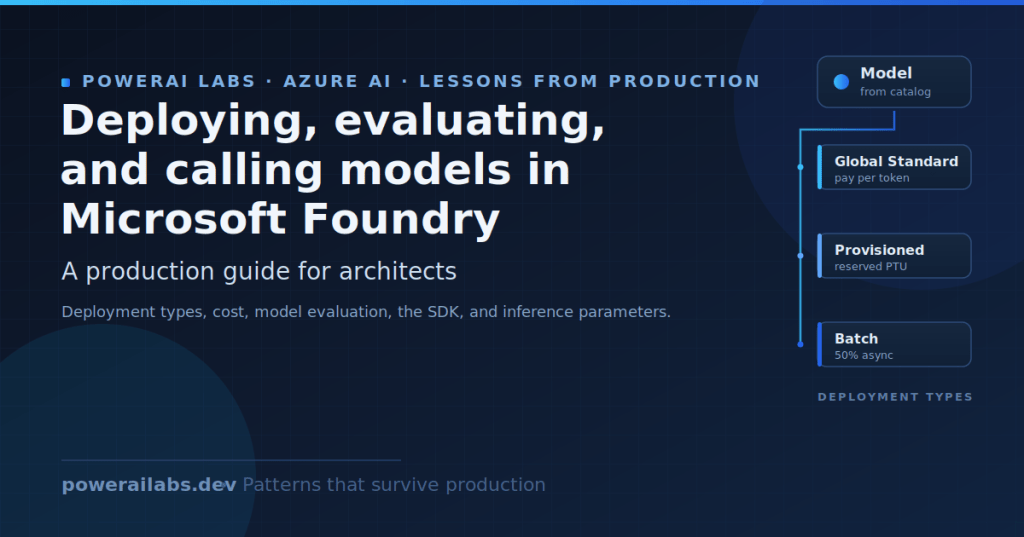
I have spent the last few programmes wiring Microsoft Foundry models into real workloads, and the same confusions keep surfacing in design reviews. People conflate the model with the deployment, pick a deployment type by habit, and discover the cost implications only when the first invoice lands. This post is the guide I wish my teams had read first.
I have deliberately left out resource and project creation, RBAC setup, and quota-increase mechanics, because those sit in the getting-started post. Here I focus on the four decisions that actually move cost and behaviour: what a deployment is, which deployment type to choose, how to evaluate before you commit, and how to call the model cleanly from the SDK.
One caveat up front. Foundry naming and feature status move quickly, and pricing on Azure renders dynamically. Treat every number below as something to verify on the Azure pricing calculator before you budget, and check the (preview) tag on the specific Learn page before you depend on a feature.

What “deploying a model” actually means
The mental model that saved my teams the most time is to separate four things. The resource is the Microsoft.CognitiveServices account of kind AIServices: it is the governance, quota, and networking boundary. The project is the RBAC and isolation boundary inside it, and it owns agents, connections, evaluations, and threads.
The model is an item in the catalogue, whether an Azure OpenAI model, a Microsoft model, or a partner model from Anthropic, Meta, Mistral, Cohere, DeepSeek, xAI, and others. The deployment is what you get when you deploy a model into the resource with a chosen deployment type (the SKU) and quota. It has a deployment name that you choose, and that name, not the underlying model name, is the addressable unit for inference.
This matters in code. Microsoft’s quickstart is explicit: the model parameter requires the model deployment name, and if your deployment name differs from the underlying model name you adjust your code accordingly. An agent definition references the same deployment name through its model field.
There is a useful exception since early 2026. Instant models (preview) let you call a supported model by name with no deployment at all, drawing on a separate global quota pool. They route to the latest evergreen version by default (pin a version by appending a date suffix), and during preview they are available only in West US 3 projects. Microsoft frames deployments as something you level up to, not a gate you must pass first. I reach for a deployment when I need reserved throughput, custom content filters, data residency, or enterprise configuration.
Deployment types: the decision that fixes everything else
The deployment type is the single biggest choice. It fixes data residency, latency variance, the quota model, and how you pay. Microsoft groups the types into standard (pay-per-token), provisioned (reserved PTU), and batch (async, 50% off), each available at global, data-zone, or regional scope. Data stored at rest always remains in the designated Azure geography: the differences below are about where inference is processed and how throughput is guaranteed.
| Deployment type | SKU code | Data processing scope | Billing model | SLA / latency | Best for |
|---|---|---|---|---|---|
| Instant (preview) | N/A (no deployment) | Any Azure region | Pay-per-token (global quota pool) | Best-effort, no SLA | Getting started, prototyping |
| Global Standard | GlobalStandard | Any Azure region | Pay-per-token | Best-effort, highest default quota | General workloads, highest quota |
| Data Zone Standard | DataZoneStandard | Within US or EU data zone | Pay-per-token | Best-effort, higher quota than regional | EU/US data-zone compliance |
| Standard (regional) | Standard | Single deployment region | Pay-per-token | Best-effort, limited regional capacity | Regional compliance, low to medium volume |
| Global Provisioned | GlobalProvisionedManaged | Any Azure region | Reserved PTU (hourly or reservation) | Guaranteed throughput, low latency variance | Predictable high throughput |
| Data Zone Provisioned | DataZoneProvisionedManaged | Within US or EU data zone | Reserved PTU | Guaranteed throughput plus data-zone | Data-zone plus predictable throughput |
| Regional Provisioned | ProvisionedManaged | Single deployment region | Reserved PTU | Guaranteed throughput, strict residency | Regional compliance plus throughput |
| Global Batch | GlobalBatch | Any Azure region | 50% off Global Standard | No real-time SLA, 24-hour target | Large async jobs |
| Data Zone Batch | DataZoneBatch | Within US or EU data zone | 50% off | No real-time SLA, 24-hour target | Large async jobs with data-zone |
| Developer | DeveloperTier | Any Azure region | Pay-per-token | No SLA, no residency guarantee, 24-hour lifetime then auto-deleted | Fine-tuned model evaluation only |
A few notes from Learn that bite teams in production. Not all models support all types, so check “Foundry Models sold by Azure” for availability. With Global Standard and Data Zone Standard, a primary-region interruption affects all traffic initially routed there. Developer deployments self-delete after 24 hours, so they are for evaluating fine-tuned models, not for anything that needs to persist.
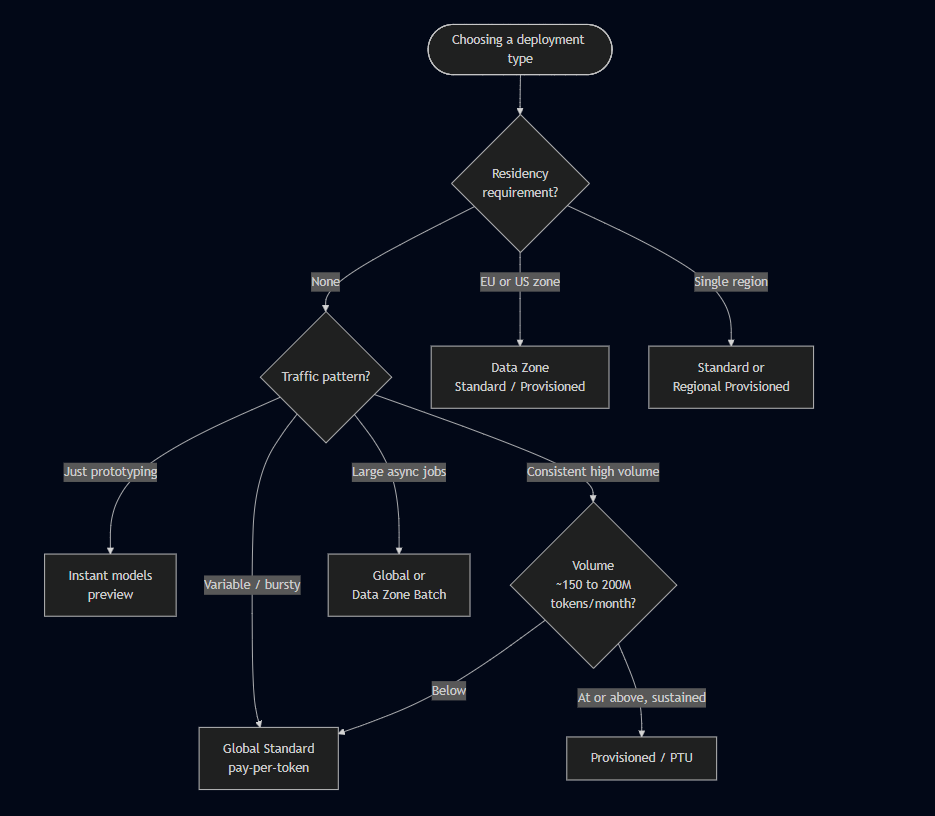
Choosing by requirement is usually faster than reading the full matrix.
| If you need | Use |
|---|---|
| No residency restriction | Global Standard or Global Provisioned |
| EU or US data-zone compliance | Data Zone Standard / Data Zone Provisioned |
| Single-region residency | Standard or Regional Provisioned |
| Quick start or prototype | Instant models (preview) |
| Variable, bursty traffic | Standard or Global Standard (pay-per-token) |
| Consistent high volume | Provisioned types |
| Large, non-time-sensitive jobs | Global Batch or Data Zone Batch |
| Low latency variance | Provisioned types |
| Fine-tuned model evaluation | Developer |
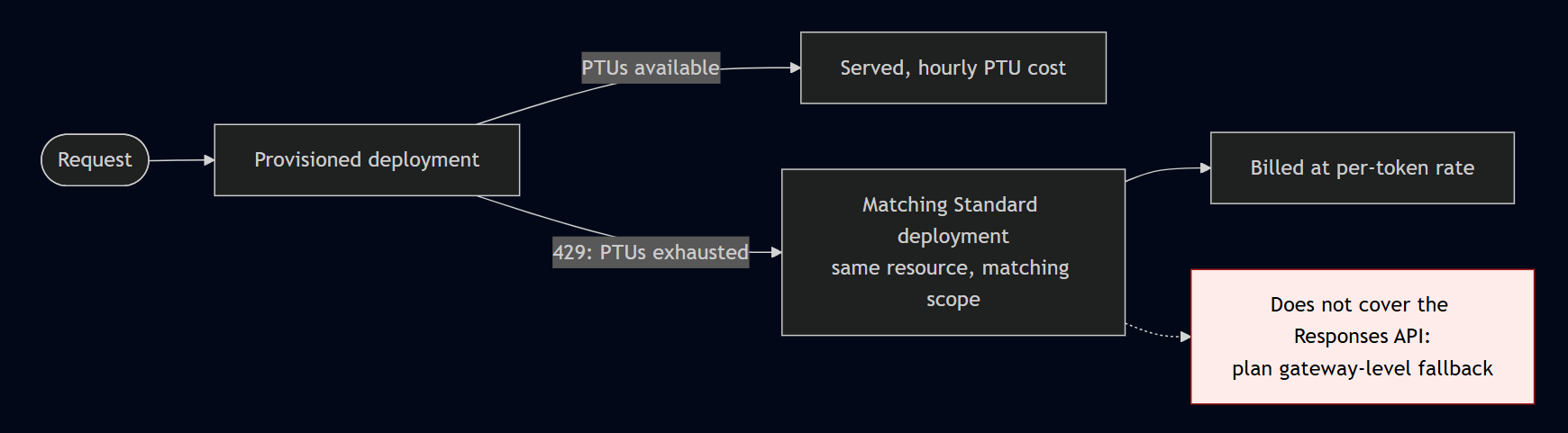
Three platform features are worth knowing before you commit. Spillover (GA, 2026) routes overflow from a provisioned deployment (a 429 when PTUs are exhausted, for example) to a matching Standard deployment in the same resource, billed at the standard per-token rate. The data-processing level must match (global provisioned to global standard), and it works with the Foundry Agent Service but not the Responses API, so plan gateway-level fallback there. Priority processing (GA, 2026) is a pay-per-call fast lane for latency-sensitive Standard workloads at a premium over Standard. Model router is a deployable chat model that picks an underlying model per prompt, and it now supports the GPT-5 series.
Cost: the three levers, and the free money teams forget
Per-token rates on Azure match OpenAI’s direct API. The premium you pay buys compliance, private networking, Entra authentication, support, and a single invoice. The deployment type changes how you pay, not the underlying token rate for a given scope.
Indicative pay-as-you-go rates follow, for Global Standard, per 1M tokens. Verify these on the Azure pricing calculator: they are correct as of June 2026 per third-party aggregators (PricePerToken.com, last updated 14 June 2026) consistent with OpenAI list prices, not guaranteed Microsoft figures.
| Model | Input / 1M | Output / 1M | Notes |
|---|---|---|---|
| GPT-4.1 | \$2.00 | \$8.00 | 1M-token context |
| GPT-4.1-mini | \$0.40 | \$1.60 | strong cost/quality for routers |
| GPT-5 | \$1.25 | \$10.00 | flagship reasoning, ~272,000-token context |
| GPT-5-mini | \$0.25 | \$2.00 | |
| GPT-5-nano | \$0.05 | \$0.40 | cheapest |

The three cost levers are pay-as-you-go, Provisioned Throughput Units (PTU), and Batch. Pay-as-you-go wins for variable traffic. Batch runs at 50% of Global Standard with a 24-hour target turnaround and a separate enqueued-token quota, so async jobs do not disrupt online traffic. Input is JSONL, one request per line with a unique custom_id, and you pay only for completed work.
PTU is reserved capacity, billed hourly per deployed unit regardless of tokens consumed. The GPT-4o-class Global provisioned rate is roughly \$1/hour per PTU. Reservations give large term discounts: per Microsoft Learn’s onboarding page, a 1-month reservation is around 64% off and a 1-year around 70% off for GPT-4o-class, with example rates stamped “Azure pricing as of January 1, 2025”. Minimums matter too: Global and Data Zone Provisioned require 15 PTU, Regional Provisioned requires 25 PTU for mini/nano-class and 50 PTU for larger models.
Two scope and discount rules round this out. For a given model, Data Zone is roughly +10% over Global and Regional is roughly +10% to +25%. Cached input tokens receive an automatic discount (roughly 50% to 90% off the input rate on repeated prefixes), so keep system prompts byte-identical across requests to trigger it.
On the PTU break-even, do not commit on a calculator estimate. Third-party analysis (AZ365.ai, 2026) puts break-even at roughly 150 to 200 million tokens per month for GPT-5, but that assumes 100% sustained utilisation. I run pay-as-you-go for 30 to 60 days, measure P95 hourly throughput, then size PTU against real telemetry. One more trap: rate limiting estimates max processed tokens at request time including max_tokens, so an over-large max_tokens can self-throttle you.
Evaluating a model before you commit
Before deployment I shortlist with the Foundry model leaderboard (preview), which ranks catalogue models on quality, safety, cost, and throughput with trade-off charts and side-by-side comparison of up to three models. Cost benchmarks assume a 3:1 input-to-output ratio. This narrows the field cheaply before I spend on my own evaluation.
Then I evaluate on my own data. Model and dataset evaluation is GA (agent evaluation remains preview), runnable from the portal or via the azure-ai-evaluation SDK. AI-assisted evaluators need an Azure OpenAI deployment as the judge, and Microsoft recommends gpt-5-mini for a good cost/quality balance.
For a RAG system, GroundednessEvaluator is the first one I set up, because it is the leading indicator of hallucination risk. I pair it with RelevanceEvaluator and the safety evaluators (ViolenceEvaluator, SelfHarmEvaluator, HateUnfairnessEvaluator, and similar). Quality evaluators such as CoherenceEvaluator and FluencyEvaluator use a 1 to 5 Likert scale with a default pass threshold of 3. Different evaluators have different data needs: groundedness needs the source context, ROUGE-style evaluators need ground-truth references, and tool-call accuracy needs the full agent message trace. Results publish to Azure Monitor and Application Insights, so I alert on groundedness regressions. The decision rule is simple: shortlist with the leaderboard, evaluate the top two or three on your own data, and pick the cheapest model that clears your thresholds.
Using a deployed model in an agent
An agent references the deployment by name through its model field. In Azure AI Projects 2.x:
from azure.identity import DefaultAzureCredentialfrom azure.ai.projects import AIProjectClientfrom azure.ai.projects.models import PromptAgentDefinitionproject = AIProjectClient( endpoint="https://<resource>.services.ai.azure.com/api/projects/<project>", credential=DefaultAzureCredential(),)agent = project.agents.create_version( agent_name="my-agent", definition=PromptAgentDefinition( model="gpt-5-mini", # the DEPLOYMENT name (or an instant-model name) instructions="You are a helpful assistant that answers general questions", ),)
To converse, create an OpenAI-compatible client and use the Responses API with an agent reference:
openai = project.get_openai_client()conversation = openai.conversations.create()response = openai.responses.create( conversation=conversation.id, extra_body={"agent_reference": {"name": "my-agent"}}, input="...",)
The Foundry Agent Service went GA in March 2026. The teaching point worth repeating in reviews: the agent’s model is the deployment name, which you find under Models + Endpoints in the portal.
Calling the model via the Foundry SDK
The SDK consolidated. azure-ai-projects 2.x is now the single Foundry SDK, covering agents, inference, evaluations, and memory, with the standalone azure-ai-agents dependency folded in. The 2.0.0 stable release shipped on 6 March 2026 and current PyPI is 2.2.0. Code written for 2.x is incompatible with 1.x: the old from_connection_string and .inference.get_chat_completions_client() patterns were removed, so budget a refactor sprint if you built against the beta.
Authenticate with DefaultAzureCredential from azure-identity. The recommended current pattern is to get an OpenAI-compatible client from the project:
from azure.identity import DefaultAzureCredentialfrom azure.ai.projects import AIProjectClientproject = AIProjectClient( endpoint="https://<resource>.services.ai.azure.com/api/projects/<project>", credential=DefaultAzureCredential(),)with project.get_openai_client() as client: response = client.responses.create( model="gpt-5-mini", # deployment name input="What is the size of France in square miles?", ) print(response.output_text)
For OpenAI-style chat completions specifically:
with project.get_openai_client() as client: resp = client.chat.completions.create( model="gpt-4.1", # deployment name messages=[{"role": "user", "content": "How many feet are in a mile?"}], temperature=0.7, max_tokens=500, ) print(resp.choices[0].message.content)
Use the project endpoint and Responses API for Foundry features (agents, evaluations, tracing, content filters). Use the direct /openai/v1 endpoint for maximum OpenAI compatibility, lowest latency, or embeddings, which the project endpoint does not currently route. On .NET the equivalents are Azure.AI.Projects, Azure.AI.Extensions.OpenAI, and Azure.Identity, with the same pattern: construct AIProjectClient, get a chat or responses client, and pass the deployment name. One gotcha: do not install the preview Azure.AI.Projects.OpenAI alongside the GA Azure.AI.Extensions.OpenAI, because duplicate types cause ambiguous references.
Inference parameters, and why reasoning models break the rules
These are standard OpenAI parameters on the chat-completions and responses calls.
| Parameter | What it does | Range / default | Notes |
|---|---|---|---|
temperature | Scales the whole distribution | 0 to 2, default 1.0 | Tune this or top_p, not both |
top_p | Nucleus sampling | 0 to 1, default 1.0 | 0.9 a common safety net; no top_k exposed |
max_tokens / max_completion_tokens | Caps output tokens | set conservatively | Reasoning models require max_completion_tokens |
frequency_penalty | Penalises repeated tokens | -2.0 to 2.0, default 0 | Leave at 0 for code/JSON |
presence_penalty | Encourages new topics | -2.0 to 2.0, default 0 | Harmful for structured output |
stop | Stop sequences | list of strings | |
seed | Best-effort reproducibility | integer | Not guaranteed, pin model version too |
response_format | text, json_object, or JSON schema | ||
reasoning_effort | Reasoning models only | low / medium / high | Higher means more tokens, latency, cost |
The guidance on temperature versus top_p is consistent across Microsoft and OpenAI: alter one or the other, not both. My default is to leave top_p at its default and tune temperature, reaching for top_p only when I want to keep temperature fixed for style but trim the occasional weird token. A common enterprise default for GPT-style chat is temperature 0.2 to 0.3 with top_p 0.8 to 0.95.
Reasoning models behave differently and this catches teams out. The GPT-5 series and o-series (o1, o3, o3-mini, o4-mini) reject temperature, top_p, presence_penalty, frequency_penalty, logprobs, logit_bias, and max_tokens. Sending temperature typically returns a 400 “Unsupported parameter”. Instead you use reasoning_effort (low/medium/high, with newer models adding none/minimal/xhigh) and max_completion_tokens on chat completions or max_output_tokens on the Responses API. A wrinkle to watch: gpt-5.1 defaults reasoning_effort to none, so migrating from an earlier reasoning model may require you to pass an effort level explicitly to get any reasoning at all. System messages are treated as developer messages on the o-series.
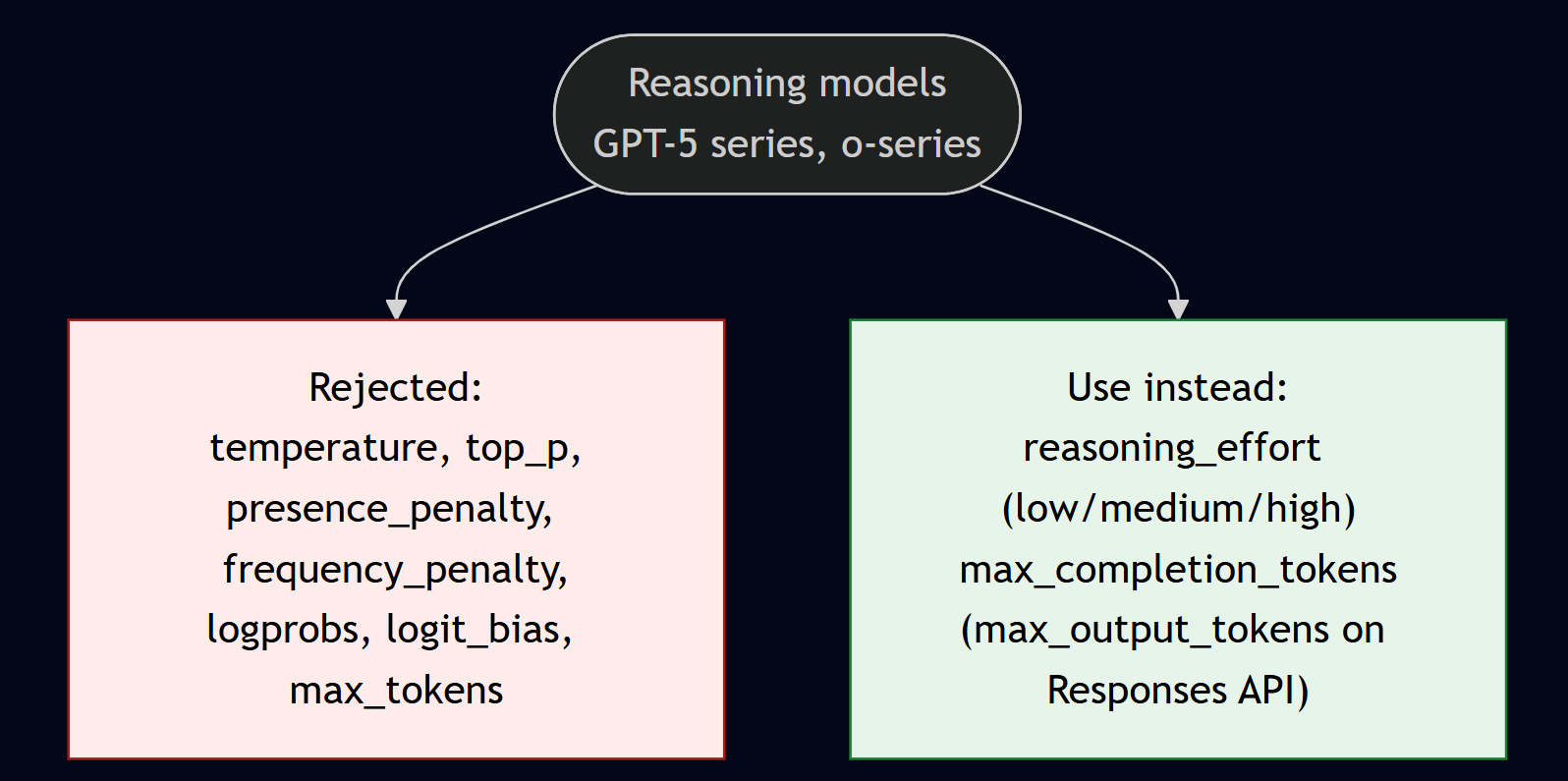
The practical fix is a shared wrapper that branches on model family and strips unsupported parameters before the call. That one piece of plumbing prevents most of the 400 errors that bite teams moving to GPT-5.
What I would actually do
Default to Global Standard, then narrow only for a reason: Data Zone when EU or US residency is required (accept roughly +10%), Regional only for strict single-region residency (accept +10% to +25% and smaller capacity). Do not buy PTU on a guess: run pay-as-you-go for 30 to 60 days, measure P95 hourly throughput, and commit to a 1-year reservation only once sustained volume sits in the 150 to 200M tokens/month range for GPT-5-class.
Turn on the free discounts. Route anything async to Batch, make system prompts byte-identical for cached-input savings, and send routing, extraction, and classification to a mini or nano model while reserving flagships for the hard cases. Add spillover to any provisioned customer-facing deployment, but remember it does not cover the Responses API.
Gate model choice on evaluation, not vibes, and make parameter handling model-aware. Those two habits, plus standardising on azure-ai-projects 2.x with DefaultAzureCredential, have removed most of the surprises my teams used to hit in production.
References
- Deployment types for Microsoft Foundry Models — Microsoft Learn
- Instant models (preview) — Microsoft Learn
- Provisioned throughput concepts — Microsoft Learn
- Provisioned throughput billing — Microsoft Learn
- Provisioned throughput onboarding — Microsoft Learn
- Spillover traffic management — Microsoft Learn
- Global Batch — Microsoft Learn
- Azure OpenAI pricing
- Quotas and limits — Microsoft Learn
- Model benchmarks — Microsoft Learn
- Benchmark a model in the catalog — Microsoft Learn
- Run evaluations (portal) — Microsoft Learn
- General-purpose evaluators — Microsoft Learn
- RAG evaluators — Microsoft Learn
- Agent evaluators — Microsoft Learn
- Evaluate AI agents (SDK) — Microsoft Learn
- SDK overview and endpoints — Microsoft Learn
- Foundry quickstart (code) — Microsoft Learn
- azure-ai-projects — PyPI
- Reasoning models — Microsoft Learn
- What’s new in Microsoft Foundry — Microsoft Learn
- What’s new in Microsoft Foundry, Build 2026 — Microsoft Developer Blog
Image credits
All diagrams in this post are my own. They illustrate concepts documented on Microsoft Learn (linked in the References above); pricing figures shown are indicative and should be verified on the Azure pricing calculator.


Leave a comment