Category: AI Engineering

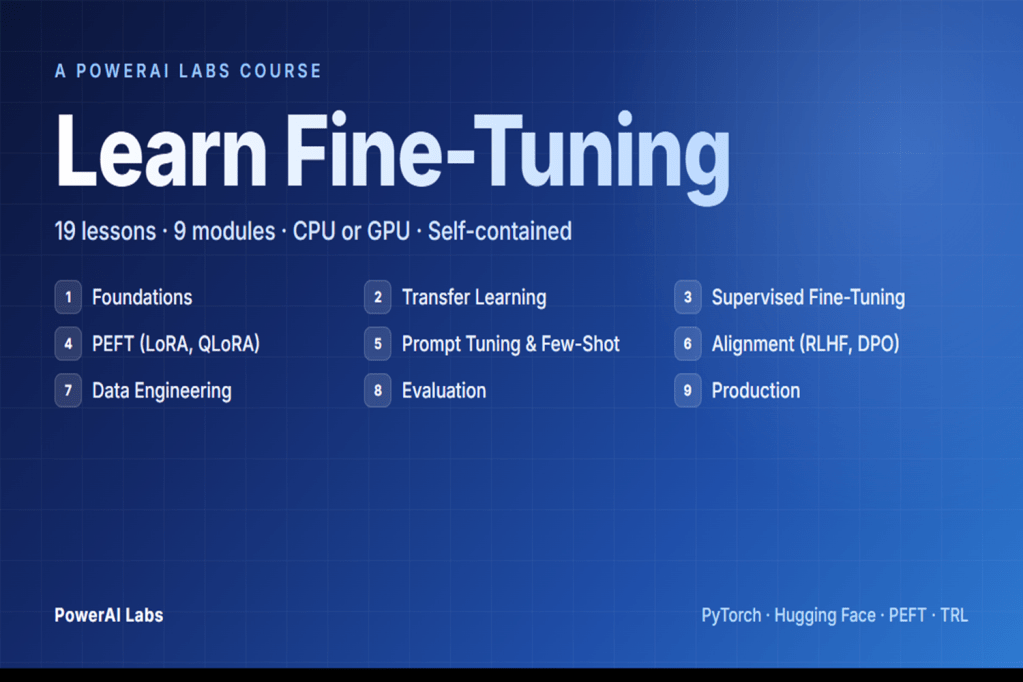
  • Learn Fine-Tuning — the hands-on course I’m building during my master’s

    Learn Fine-Tuning — the hands-on course I’m building during my master’s

    Why I built this

    I was halfway through my master’s when I realised I didn’t actually understand fine-tuning. I could call trainer.train(). I could read a loss curve. I could tell you the difference between LoRA and full fine-tuning at a cocktail-party depth. But if you’d asked me to explain why low-rank adaptation works — what the rank actually constrains, why some target modules matter more than others — I’d have hand-waved you through it and hoped you didn’t follow up.

    So I went looking for something that would close the gap. I read papers. I watched courses. I ran a dozen tutorials. Half of them assumed I already knew the maths and just walked me through API calls. The other half wrapped everything in a hosted notebook with a button that said “Run cell” and skipped the maths entirely. Nothing I found taught the intuition and the code together in a way that respected the fact that I wanted to understand what I was running, not just watch it run.

    So I built what I wanted to read. Nineteen lessons across nine modules, each one in three formats — a long-form markdown explanation, a clean Python script, and a runnable notebook. Every script generates its own synthetic data and runs on a laptop. I’m publishing it because the next person learning this shouldn’t have to start where I started.

    The four design principles

    Self-contained. No API keys, no cloud accounts, no external datasets. The single biggest reason fine-tuning tutorials fall over is that the dataset link rots, the API quota expires, or the notebook assumes a paid runtime. Every lesson here generates its own synthetic data and runs end-to-end on whatever machine you already own. The friction between “I want to learn this” and “I’m seeing a result” is as close to zero as I could make it.

    Concept first, code second. Every lesson opens with the theory — the maths, the trade-offs, the analogies, the ASCII diagrams — and only then introduces code. This was the principle I worked hardest on. The temptation when writing a fine-tuning lesson is to lead with from peft import LoraConfig and explain as you go. I forced myself to do the opposite: explain what a low-rank decomposition is, why it works as an approximation, what you’re giving up in exchange for the parameter savings — and only then write the line that imports the library.

    Three formats per lesson. Markdown for reading, Python script for skimming the clean code, Jupyter notebook for running cell-by-cell. The three formats aren’t redundancy. They map to three different learning modes — reading to understand, running to see, and editing to internalise — and I wanted each lesson to support all three without asking the learner to context-switch between sources.

    Small models, real patterns. Every lesson uses a model between 60M and 124M parameters — distilbert-base-uncased, bert-base-uncased, gpt2, t5-small. You can train all 19 lessons on a CPU. The point isn’t that you’d fine-tune a 66M-parameter encoder in production; the point is that the patterns — LoRA, QLoRA, DPO, the SFTTrainer pipeline — are identical at 66M and at 70B. Learn them on something that fits in your laptop’s RAM, then apply them where they need to go.

    What’s in the course (at a glance)

    The shape of it: foundations → transfer learning → supervised fine-tuning → PEFT (LoRA, QLoRA) → prompt tuning and few-shot → alignment (RLHF, DPO) → data engineering → evaluation → production. Nine modules, nineteen lessons, each one building on the last.

    I’m deliberately not walking through them one by one here — that’s what the Project page on PowerAI Labs is for, and the repo README has the full lesson-by-lesson breakdown with topics, models, and the papers behind each one.

    The three things I learned that surprised me

    LoRA’s rank is less sensitive than the papers suggest — but the target modules are everything

    I expected rank to be the lever I’d spend the most time tuning. It isn’t. On the tasks I worked through in the course, rank 4, rank 8, and rank 16 produced results that were within noise of each other. Above rank 16 the gains were small enough that I struggled to justify the extra parameters; below rank 4 the model would start to underfit, but the transition wasn’t dramatic.

    What did matter, by a long way, was which modules the LoRA adapters were attached to. Adapting only q_proj left obvious capacity on the table. Adapting q_proj and v_proj — the original LoRA paper’s recommendation — was a meaningful step up. Adapting all linear layers was a further step up again, at a parameter cost that was still tiny relative to full fine-tuning. The rank-vs-target-modules trade-off is the one I now reach for first when a LoRA run isn’t doing what I want, and it’s the opposite of what I’d have guessed before I built the course.

    DPO is genuinely simpler than RLHF, and the implicit reward is the real insight

    I’d read the DPO paper before I built Module 6, and I thought I understood it. I didn’t, not properly. The insight that survives once you’ve worked through both a full RLHF pipeline and a DPO pipeline back-to-back is that DPO doesn’t replace the reward model — it absorbs it. The Bradley-Terry preference equation can be rearranged so that the reward score is expressed as a log-ratio of policy probabilities to a reference policy, and once you make that substitution the entire reward-model-then-PPO machinery collapses into a single supervised loss over preference pairs.

    The practical consequence is that DPO is dramatically less code than RLHF, has no reward-model overfitting failure mode, and trains stably with a single hyperparameter — beta — that you can actually reason about. The conceptual consequence is harder to express but more important: once you see that the reward signal is implicit in the policy itself, you start to see alignment as a property of the model rather than a separate system bolted on top. You cannot unsee it.

    Quantisation and PEFT compose better than I expected

    QLoRA’s claim — fine-tune a billion-parameter model on a single consumer GPU at near-LoRA accuracy — sounded like marketing. It isn’t. In the lessons where I ran the comparison properly, QLoRA was within a percentage point of standard LoRA on the same task at a fraction of the VRAM. The two ideas — 4-bit NF4 quantisation of the base model, low-rank adaptation on top — compose almost orthogonally, and you genuinely lose very little to the quantisation when the adapters are doing the work.

    The practical implication isn’t subtle. Production-ready LoRA fine-tuning on a single consumer GPU is real, today, with the libraries on the install list at the top of the course. That was true in research a year ago and it’s true on a laptop now, and it changes the economics of what an individual engineer can do without asking finance for a cluster.

    Who this is for

    For engineers who want to learn by running code. For architects who need to understand what the abstractions hide before they sign off on a design that depends on them. For master’s students working on adjacent topics who want a concrete codebase next to the papers. For anyone who has felt the gap between “the code works” and “I understand what it did” and wants to close it.

    Not for people who want to call an API and move on — there are great products for that, and you don’t need this course to use them. Not for people who want a polished, certificate-bearing online course with video lectures and a discussion forum. This is self-paced, open-source, and rough-edged. The rough edges are part of the learning.

    What’s next

    The course lives at its Project page on PowerAI Labs, with the code on GitHub. Clone it, star it, fork it, file issues with corrections — I read every one, and corrections from people working through the material are the single best signal I get on what to tighten next.

    Over the next few months I’ll publish a deep-dive blog post per module on PowerAI Labs, starting with LoRA — the rank-versus-target-modules result above is going to need its own post to do it justice. Subscribe if that’s useful and I’ll link them here as they go live.

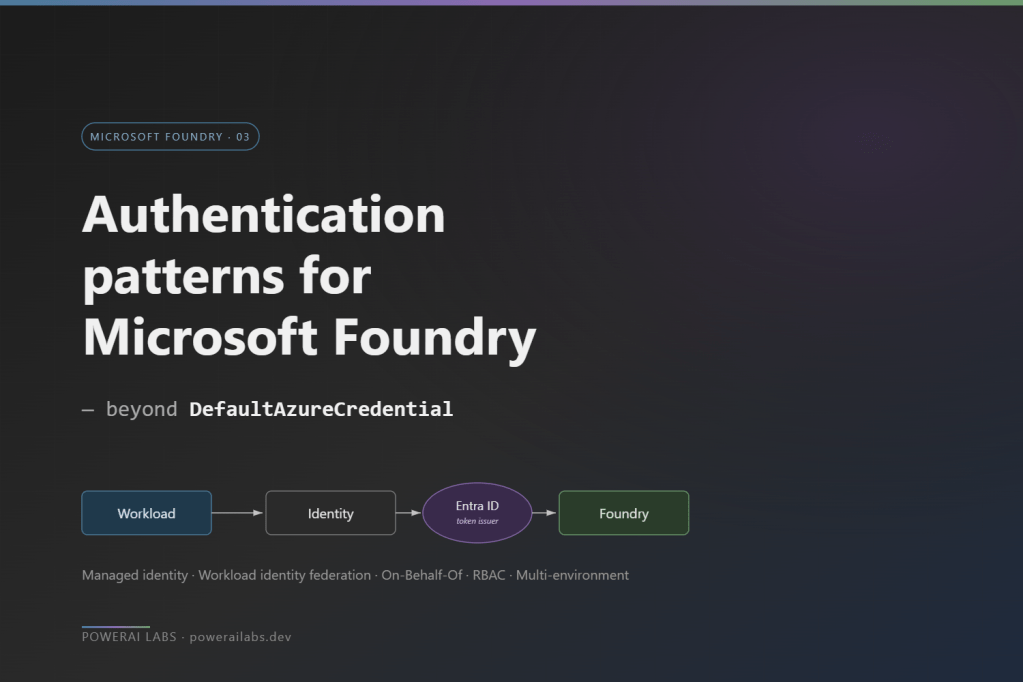
  • Authentication patterns for Microsoft Foundry — beyond DefaultAzureCredential

    Authentication patterns for Microsoft Foundry — beyond DefaultAzureCredential

    DefaultAzureCredential is the right default, and I said as much in the getting-started guide that this post follows. It walks an ordered chain — environment variables, managed identity, Azure CLI, VS Code, interactive browser — and the same line of code works on a laptop, in CI, and on production compute. That is exactly why it earns its place on day one.

    The trouble starts by the time you hit production, when the questions get more specific. Your production workload needs to authenticate as something stronger than “whichever managed identity the host happens to provide.” Your CI/CD pipeline has to deploy agents, model deployments, and role assignments without a client secret sitting on the build agent. Your app calls Foundry on behalf of a signed-in user, and the user’s own identity has to reach Foundry — both for RBAC and for audit. And a security review asks for a complete inventory of who can call what, and “DefaultAzureCredential” is not an answer to that question.

    What follows is the auth pattern catalogue I wish I had when I went from prototype to production on Foundry. Five patterns, a per-environment role assignment model, the multi-environment story, and the four things that will bite you.

    The big picture — one diagram

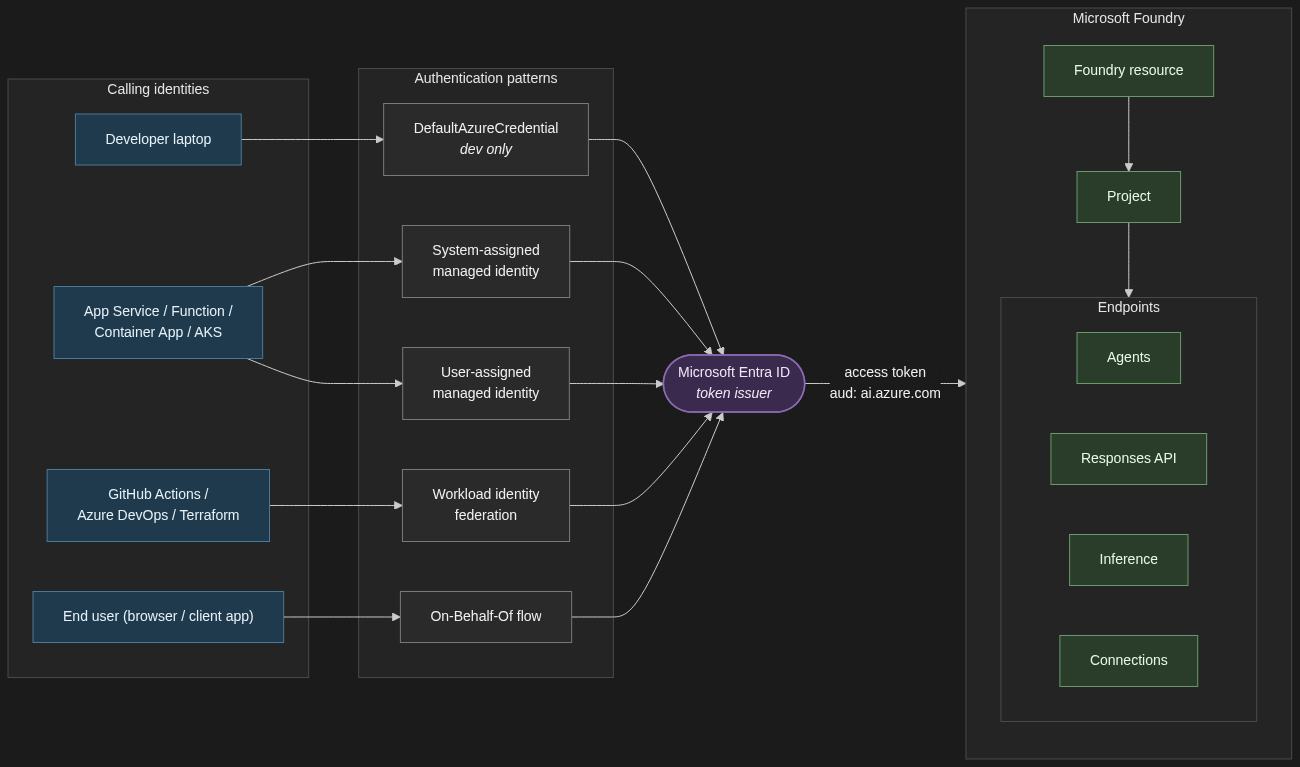
    Before the catalogue, the one diagram that summarises the relationships. Every identity — a developer’s laptop, a signed-in end user, a workload on Azure compute, a CI/CD pipeline — reaches Foundry by way of an Entra-issued access token. The pattern you pick determines how that token is minted, not whether Entra is in the loop.

    Authentication architecture for Microsoft Foundry — calling identities flow through Entra ID via one of five auth patterns to reach the Foundry project and its endpoints.
    Authentication architecture for Microsoft Foundry. Every calling identity reaches Foundry via an Entra-issued access token.

    1. The auth pattern catalogue

    1.1 System-assigned managed identity for single-resource workloads

    When to use it. A single App Service, Function, or Container App that calls one Foundry resource, has no shared identity needs with anything else, and never has to outlive its host.

    When not. Anything where two compute resources need the same identity, or where the identity must persist across redeploys.

    Trade-off. System-assigned managed identities are created and deleted with their host. Zero lifecycle work, zero secrets, and zero portability. If you delete the App Service, the identity is gone — along with every role assignment that ever referenced it.

    resource app 'Microsoft.Web/sites@2023-12-01' = {
    name: 'app-foundry-prod'
    location: location
    identity: { type: 'SystemAssigned' }
    properties: { serverFarmId: plan.id }
    }
    // Assign Foundry User on the project (not the resource)
    resource roleAssignment 'Microsoft.Authorization/roleAssignments@2022-04-01' = {
    name: guid(project.id, app.id, foundryUserRoleId)
    scope: project
    properties: {
    principalId: app.identity.principalId
    principalType: 'ServicePrincipal'
    // Foundry User role ID — stable across the rename
    roleDefinitionId: subscriptionResourceId(
    'Microsoft.Authorization/roleDefinitions',
    '53ca6127-db72-4b80-b1b0-d745d6d5456d'
    )
    }
    }
    System-assigned managed identity lifecycle. The identity is created with the host, lives only as long as the App Service, and dies with it — taking every role assignment with it.
    System-assigned managed identity lifecycle. The identity is created with the host and deleted with it — taking every role assignment with it.

    1.2 User-assigned managed identity for shared and durable workloads

    When to use it. Multiple compute resources sharing one identity (App Service plus a Function, two AKS workloads, a Container App plus a Logic App). Or anywhere the identity must survive a redeploy of the compute.

    When not. A single transient workload — system-assigned is simpler, and you do not have an identity hanging around with no host.

    Trade-off. Durable and shareable, but you own the lifecycle. Think of it as identity-as-a-resource: it gets its own Bicep module, its own naming convention, and its own teardown plan.

    resource uami 'Microsoft.ManagedIdentity/userAssignedIdentities@2023-01-31' = {
    name: 'id-foundry-app-prod'
    location: location
    }
    resource app 'Microsoft.Web/sites@2023-12-01' = {
    name: 'app-foundry-prod'
    location: location
    identity: {
    type: 'UserAssigned'
    userAssignedIdentities: { '${uami.id}': {} }
    }
    properties: { serverFarmId: plan.id }
    }
    resource projectRole 'Microsoft.Authorization/roleAssignments@2022-04-01' = {
    name: guid(project.id, uami.id, foundryUserRoleId)
    scope: project
    properties: {
    principalId: uami.properties.principalId
    principalType: 'ServicePrincipal'
    roleDefinitionId: subscriptionResourceId(
    'Microsoft.Authorization/roleDefinitions',
    '53ca6127-db72-4b80-b1b0-d745d6d5456d'
    )
    }
    }
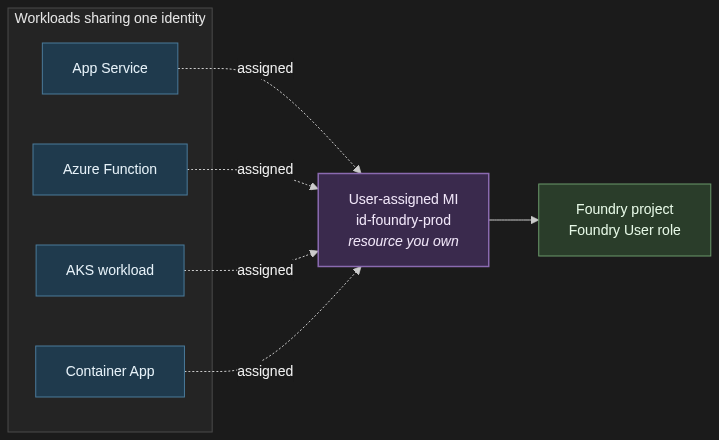
    User-assigned managed identity shared across App Service, Function, AKS, and Container Apps — one identity, one Foundry role assignment, multiple workloads.
    User-assigned managed identity shared across App Service, Function, AKS, and Container Apps — one identity, one role assignment, multiple workloads.

    For anything in production, my default is user-assigned. The first time you redeploy a Container App and discover every role assignment has gone with it, you will thank yourself.

    1.3 Workload identity federation for GitHub Actions and other federated CI/CD

    When to use it. Any pipeline that deploys Foundry agents, model deployments, role assignments, or any other RBAC-protected operation. GitHub Actions, Azure DevOps with OIDC, Terraform Cloud, AKS workload identity — all federated subjects.

    When not. There is not a good “when not.” If your GitHub Actions workflow still has AZURE_CLIENT_SECRET in its repository secrets, you should be migrating off it.

    Trade-off. A bit of configuration up front — a federated credential on the app registration with the right subject claim and audience. Zero credential rotation forever after. The external identity provider (GitHub, Kubernetes, etc.) is trusted to assert the workload’s identity, and Entra exchanges that assertion for a token. No client secret ever crosses the wire.

    # Create the federated credential on an app registration
    az ad app federated-credential create \
    --id $APP_ID \
    --parameters '{
    "name": "github-main-prod",
    "issuer": "https://token.actions.githubusercontent.com",
    "subject": "repo:my-org/my-repo:ref:refs/heads/main",
    "audiences": ["api://AzureADTokenExchange"]
    }'
    # .github/workflows/deploy.yml
    permissions:
    id-token: write # required to mint the OIDC token
    contents: read
    jobs:
    deploy:
    runs-on: ubuntu-latest
    steps:
    - uses: actions/checkout@v4
    - uses: azure/login@v2
    with:
    client-id: ${{ secrets.AZURE_CLIENT_ID }}
    tenant-id: ${{ secrets.AZURE_TENANT_ID }}
    subscription-id: ${{ secrets.AZURE_SUBSCRIPTION_ID }}
    enable-AzPSSession: false
    - run: az deployment group create ...
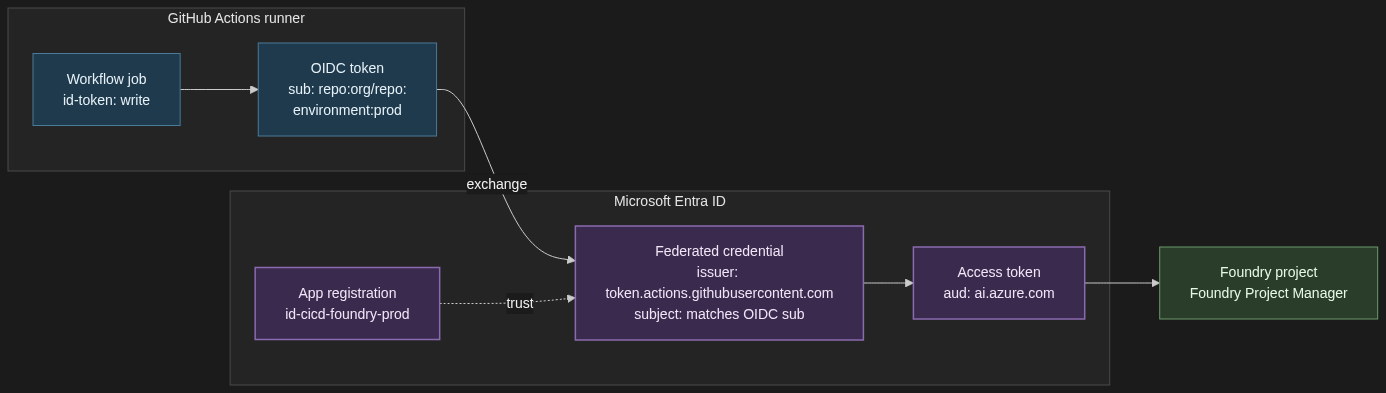
    Workload identity federation trust between GitHub Actions and Microsoft Entra ID. The runner sends an OIDC token, Entra validates it against the federated credential on the app registration, and returns a Foundry-scoped access token.
    Workload identity federation trust between GitHub Actions and Microsoft Entra ID. The runner sends an OIDC token, Entra validates it against the federated credential, and returns a Foundry-scoped access token.

    The pattern generalises. AKS workload identity uses the same federation primitive with the cluster’s OIDC issuer as the subject. Terraform Cloud has its own. The configuration changes; the model does not.

    1.4 On-Behalf-Of flow for apps that call Foundry as the signed-in user

    When to use it. A web app or API where the end user’s identity must reach Foundry — because the user’s own RBAC determines what they can see, because audit logs need the user not the app, or because a compliance regime requires per-user attribution all the way to the model call.

    When not. Pure machine-to-machine workloads. If there is no signed-in human in the loop, you want a managed identity, not OBO.

    Trade-off. More moving parts. The user signs into the front end, the front end calls your API with their access token, the API exchanges that token for a downstream token scoped to Foundry, and only then does the call go through. It is the only correct answer for user-scoped operations.

    # Middle-tier API: exchange the incoming user token for a Foundry-scoped token
    import msal
    app = msal.ConfidentialClientApplication(
    client_id=API_CLIENT_ID,
    client_credential=API_CLIENT_SECRET, # or a certificate / federated credential
    authority=f"https://login.microsoftonline.com/{TENANT_ID}",
    )
    # incoming_user_token comes from the Authorization header on the request
    result = app.acquire_token_on_behalf_of(
    user_assertion=incoming_user_token,
    scopes=["https://ai.azure.com/.default"],
    )
    foundry_access_token = result["access_token"]
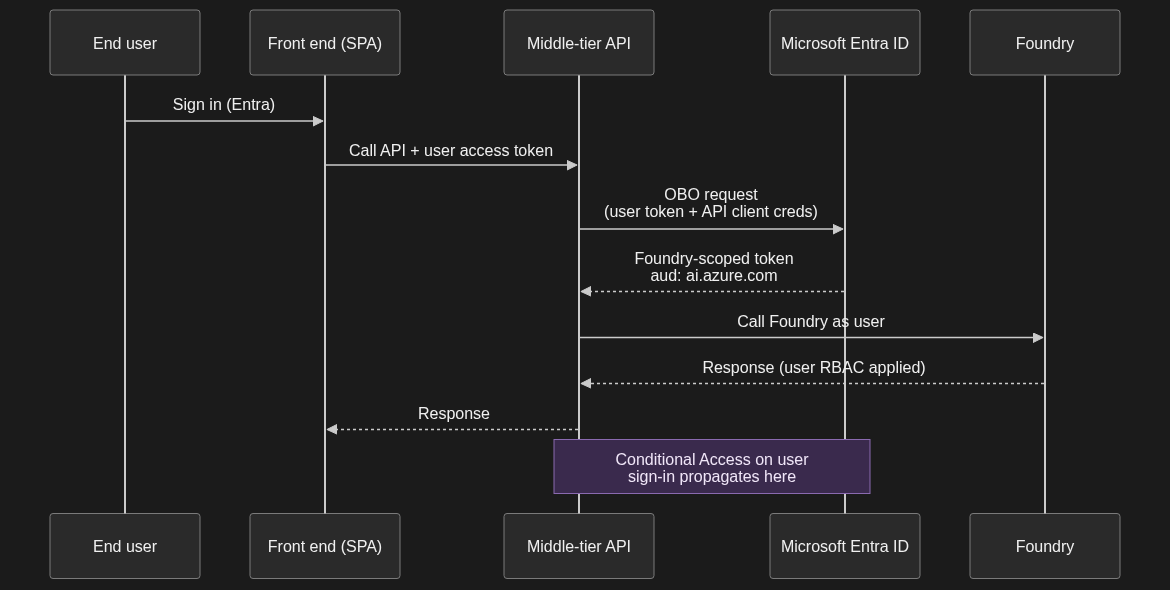
    On-Behalf-Of flow sequence — end user signs into the front end, the middle-tier API exchanges the user token for a Foundry-scoped token, and the call to Foundry runs under the user identity with their RBAC and Conditional Access applied.
    On-Behalf-Of flow. The middle-tier API exchanges the user token for a Foundry-scoped token, and the call runs under the user identity with their RBAC and Conditional Access applied.

    One implication worth calling out: any Conditional Access policy on the user’s original sign-in propagates through the OBO exchange. If your CA policy says “no Foundry access from non-compliant devices,” the downstream Foundry call inherits that. That is almost always what you want.

    1.5 Application registrations with client secrets — when (rarely) still appropriate

    When to use it. Local developer machines that are not on a corporate-managed laptop with Entra-joined credentials. Genuinely headless scripts that cannot use a managed identity or federated workload identity. Third-party integrations that do not yet support OIDC federation. That is it.

    When not. Anything in production on Azure compute — use a managed identity. Anything in CI/CD on a platform that supports federation — use workload identity federation. Anything an auditor will ever look at.

    Trade-off. Simplest to set up, hardest to govern. Secrets rotate, they leak, they accumulate. If you have more than a handful, you have a secret-sprawl problem and you do not yet know it.

    If you must use one: short expiry (90 days), stored in Key Vault, never in a .env checked into a repo, and the role assigned to the app’s service principal is the minimum it needs — Foundry User scoped to the project, never Contributor scoped to the subscription.

    The hard line: if you are putting a client secret on a production workload, you have taken a wrong turn. Go back and use one of the four patterns above.

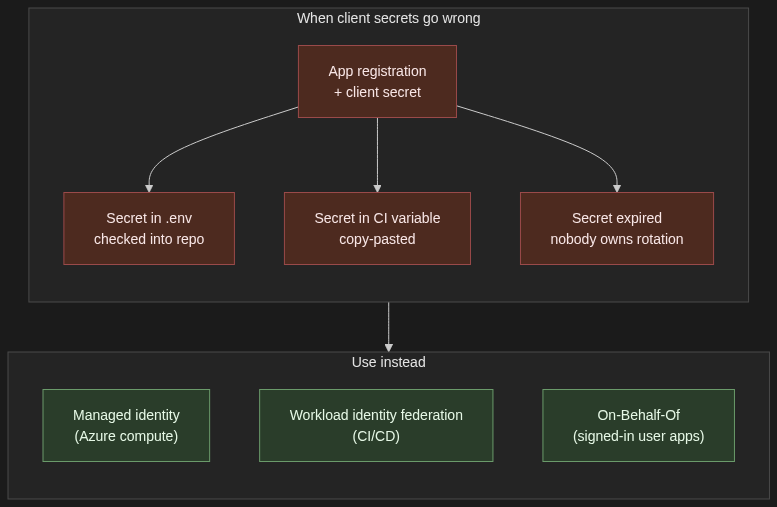
    Client secrets as an anti-pattern in production — secrets leak via .env files, copied CI variables, and expire without an owner. Replace with managed identity, workload identity federation, or On-Behalf-Of.
    Client secrets in production are an anti-pattern. Replace with managed identity for Azure compute, workload identity federation for CI/CD, or On-Behalf-Of for signed-in user apps.

    2. The role assignment model — least privilege without the spreadsheet

    Two principles. Roles are assigned to principals — managed identities, user accounts, Entra groups — at a scope. The scope can be project, Foundry resource, resource group, or subscription. Get the scope right and least privilege follows naturally. Get it wrong and you will be re-assigning Contributor every six months because somebody got blocked at a demo.

    In prose, here is the model I deploy:

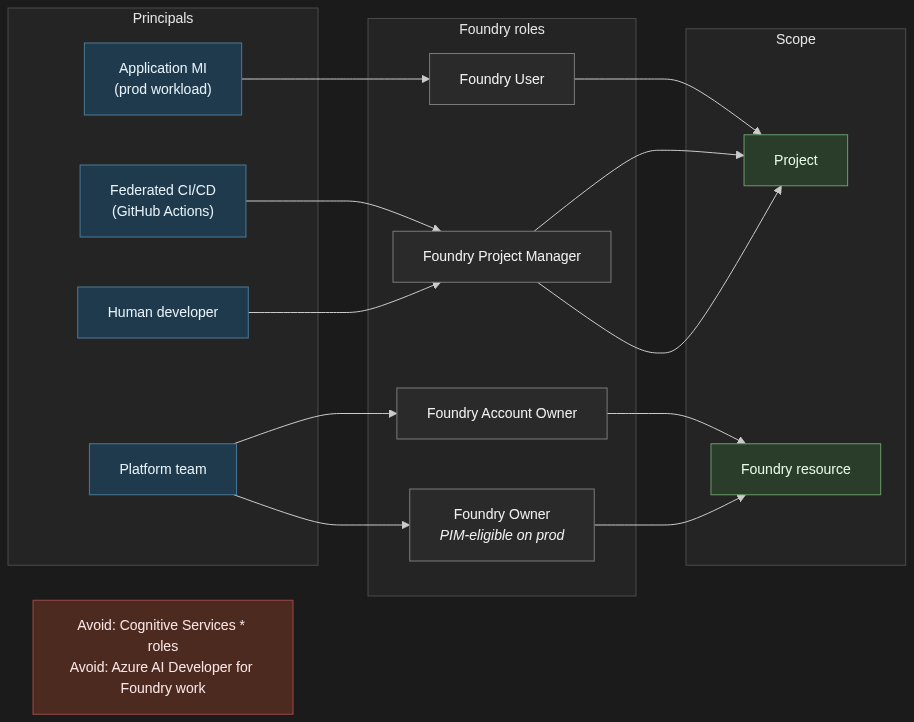
    Application principals — the managed identity that the production app authenticates as, the federated workload identity the AKS pod assumes — get the Foundry User role, scoped to the project, not the resource. Project-scoped assignments mean a misconfigured app cannot accidentally see another project’s agents, threads, or connections.

    Build and deploy principals — the federated CI/CD identity that runs your GitHub Actions workflow — get Foundry Project Manager scoped to the project. If the same pipeline also creates projects, then it needs a resource-level role for that one operation; keep it as narrow as you can get away with.

    Human developers get Foundry Project Manager on the dev project, Foundry User on staging, and read-only on prod. Production changes go through the pipeline; they do not go through individual developer accounts.

    Resource-level roles — Foundry Account Owner and Foundry Owner — are platform-team territory, and even there they should be PIM-eligible rather than standing assignments. These are the roles that can create new projects, configure guardrails, and conditionally hand out other roles. Treat them accordingly.

    A few practical notes the docs are explicit about. Do not assign built-in roles that start with Cognitive Services for Foundry work — Microsoft’s RBAC documentation calls this out directly. Those roles are for accessing AI Services resources directly and do not apply to Foundry scenarios, even though Foundry sits on the Microsoft.CognitiveServices resource provider. Also avoid the Azure AI Developer role for Foundry — despite the name, it is scoped to Azure Machine Learning workspaces and Foundry hubs, not to Foundry projects or resources.

    One more practical note: reference role definition GUIDs in Bicep and Azure CLI, not display names. The Foundry roles were recently renamed from their Azure AI predecessors (Azure AI User → Foundry User, Azure AI Project Manager → Foundry Project Manager, Azure AI Account Owner → Foundry Account Owner). The GUIDs are stable; the display names are still mid-rollout across the portal and tooling.

    Role assignment model. Application principals get Foundry User at project scope, CI/CD and developer principals get Foundry Project Manager at project scope, and resource-level Foundry Account Owner and Foundry Owner roles stay with the platform team. Avoid Cognitive Services * roles and Azure AI Developer for Foundry work.
    Role assignment model. Application principals get Foundry User on the project, CI/CD and developer principals get Foundry Project Manager, and resource-level Foundry Account Owner / Foundry Owner stay with the platform team. Avoid Cognitive Services * roles and Azure AI Developer for Foundry work.

    3. The multi-environment story

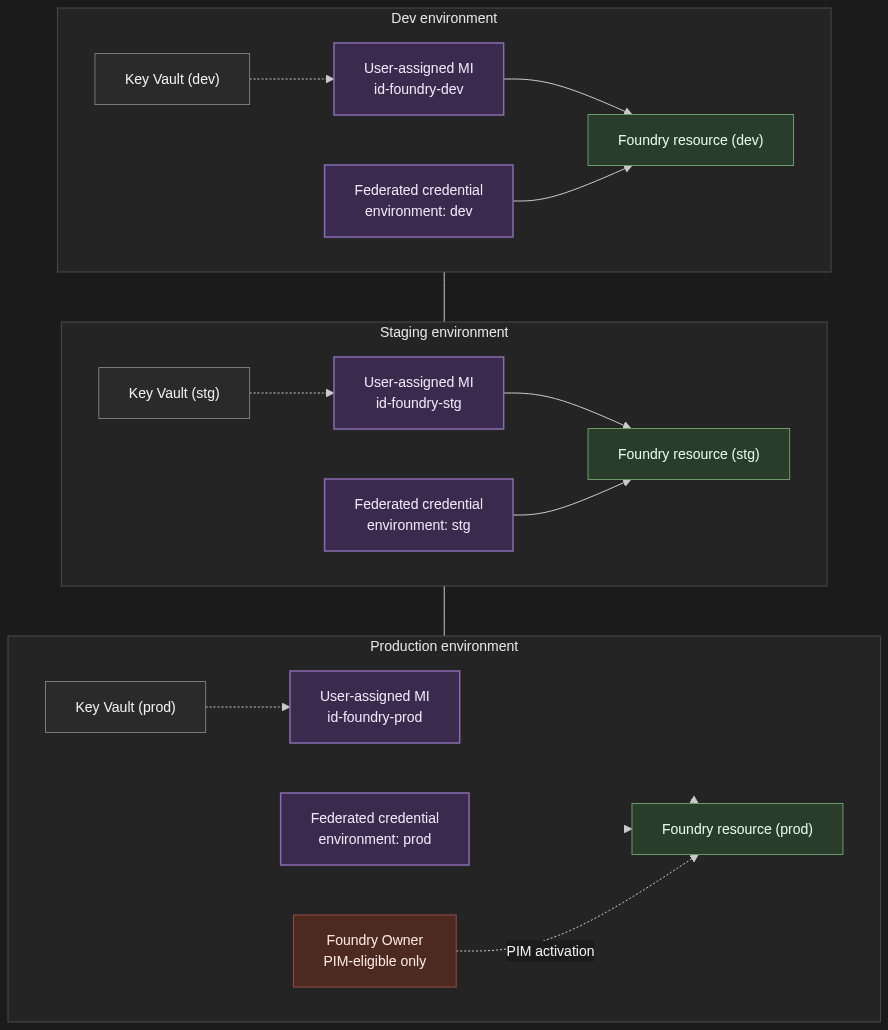
    Dev, staging, and prod each get their own Foundry resource — not just their own project. Quotas are resource-scoped. Network configuration is resource-scoped. The blast radius of a misconfigured role assignment is resource-scoped. All of those argue for full resource separation between non-prod and prod, even if it means three sets of Bicep modules and three Application Insights workspaces. The cost of running an under-utilised dev resource is far less than the cost of an intern accidentally pointing a load test at a prod deployment.

    Each environment gets its own user-assigned managed identity for the application principal, its own federated credential on the CI/CD app registration (one per environment, with a distinct subject claim — environment:dev, environment:prod — so prod deploys only run from protected branches and reviewed environments), and its own Entra group for human access. Group membership rather than direct user assignment, always — that is how you get clean joiner/mover/leaver flows without a quarterly spreadsheet review.

    Secrets that genuinely have to exist — third-party API keys, database connection strings — live in a per-environment Key Vault, accessed by the per-environment managed identity. Foundry credentials themselves are never in Key Vault. They are token exchanges via the patterns in Section 1.

    Elevated roles on the prod resource go through Privileged Identity Management. The platform team holds Foundry Owner on prod as PIM-eligible, not as a standing assignment. Activation requires justification, a time window, and an audit trail. If your auditor asks “who could have changed the prod guardrails on this date,” you want PIM logs to answer that, not Azure Activity Log archaeology.

    Multi-environment isolation. Dev, staging, and production each get their own Foundry resource, user-assigned managed identity, federated credential, and Key Vault. Elevated roles on prod are PIM-eligible only.
    Per-environment isolation. Dev, staging, and production each get their own Foundry resource, user-assigned managed identity, federated credential, and Key Vault. Elevated roles on prod are PIM-eligible only.

    4. The four things that will bite you

    Token caching. The Azure SDK clients cache tokens for the lifetime of the credential object. Long-lived processes — anything stateful, anything that processes a queue, anything with a connection pool — need to handle credential refresh correctly. The right pattern is usually to reuse a single credential instance across all clients in the process, not to recreate DefaultAzureCredential() (or its successor) per call. Recreating it per call defeats the cache and, on a busy worker, will get you rate-limited at the IMDS endpoint before you have shipped a single completion.

    Cross-tenant scenarios. Foundry resources live in a single tenant. If you have a partner tenant whose users need to call your Foundry workload, you are in B2B territory and the patterns above need adapting. Managed identities do not cross tenants without explicit federation, and OBO has its own constraints when the user is a guest. Do not discover this two weeks before a launch — design for the tenant model on day one.

    Private endpoints and DNS. Authentication works, the call still fails. If you have put Foundry behind a private endpoint, the DNS for the resource FQDN must resolve to the private IP from the calling network. Public DNS will look correct, your nslookup from a different network will look correct, and the call from inside the VNet will time out with no useful error. Always check resolution from the calling subnet, not from your laptop.

    Role propagation latency. New role assignments take up to ten minutes to propagate. Pipelines that create a user-assigned managed identity and immediately use it against Foundry will hit 403s on the first run. Options: insert a wait step after role assignment, retry with exponential backoff in the calling code, or assign roles ahead of provisioning the compute they are attached to. I prefer the third — the assignment is declarative and the compute picks it up when it comes online.

    Four gotchas to watch for: stale tokens in long-lived processes, cross-tenant scenarios needing multi-tenant app registrations, private-endpoint DNS resolution failures, and the up-to-ten-minute delay before new role assignments take effect.
    Four things that will bite you in production: stale tokens in long-lived processes, cross-tenant scenarios needing multi-tenant app registrations, private-endpoint DNS failures, and the up-to-ten-minute delay before new role assignments take effect.

    5. When NOT to add another auth pattern

    Counterweight, briefly. If your workload is one App Service calling one Foundry resource for one tenant’s users, deployed by one GitHub Actions workflow, you do not need four patterns. You need a user-assigned managed identity on the App Service and a federated workload identity for the pipeline. Stop there. Adding OBO, custom token exchange, or a second managed identity because “we might need it later” is the kind of architecture work that looks responsible in a design doc and creates three years of operational debt.

    And if you find yourself building a custom token-exchange layer — your own service that sits in front of Foundry and stamps tokens on requests — you are almost certainly reinventing something Entra already does. Read the workload identity federation and OBO docs again before you write more code. The thing you are about to build is probably a federated credential with the wrong subject claim.

    6. Closing

    DefaultAzureCredential is how you start. The patterns in this post are how you scale. Pick the right managed identity flavour for the workload’s lifecycle. Federate your CI/CD so no client secret ever lives on a build agent. Use OBO where the user’s identity has to reach Foundry, and do not use it where it does not. Get the role scope right at the project level. Separate environments by resource, not just by project.

    References

  • Why I built 6 agents instead of 1 mega-agent — lessons from TrafficIQ

    I had two design choices for TrafficIQ: one super-agent holding 56 tools, or six specialist agents sharing them. I picked six. Here is what the one-agent path gets right, where it breaks, and the six lessons I took into production.

    TrafficIQ went on to win Best Use of Microsoft Foundry at the AI Dev Days Hackathon — chosen from 401 projects and 2,041 registrants. The architecture choices below are what made that possible, and what I would actually defend in front of an enterprise architecture review board.

    Why one-agent is genuinely tempting

    The one-agent design is the simpler mental model. One assistant. One system prompt. One thread. One place to debug.

    When you are sketching the first prototype, this is almost always the right move. Orchestration is not free — you have to write a router, define handoff contracts, manage cross-agent state. Skipping all of that gets you to a working demo in an afternoon. Most enterprise teams default here, and for a 10-tool assistant, they are right to.

    The trouble starts later. It starts when the surface area grows past what a single model can hold in its head.

    Where one-agent breaks

    In my experience tool-selection accuracy degrades non-linearly past around 15 to 20 tools. The model does not fail loudly. It fails subtly. It picks get_shipment_status when the user clearly needed check_shipment_status, because the names overlap and the descriptions rhyme. It calls track_shipment when the right answer was get_proof_of_delivery.

    The system prompt becomes the second symptom. To compensate for the confusion, you add disambiguation rules. “Use tool X only when the user mentions Y.” The prompt grows. By the time you have 40 tools, you are nursing a 4,000-token monolith that nobody on the team wants to touch.

    And then there is context-window pressure. Every tool’s JSON schema, every parameter description, every example — it all lives in the agent’s context on every turn. With 56 tools, that alone is enough to crowd out the actual conversation.

    A super-agent does not just get slower. It gets less correct. The failure mode is “looks plausible, called the wrong tool.”

    The architecture I chose

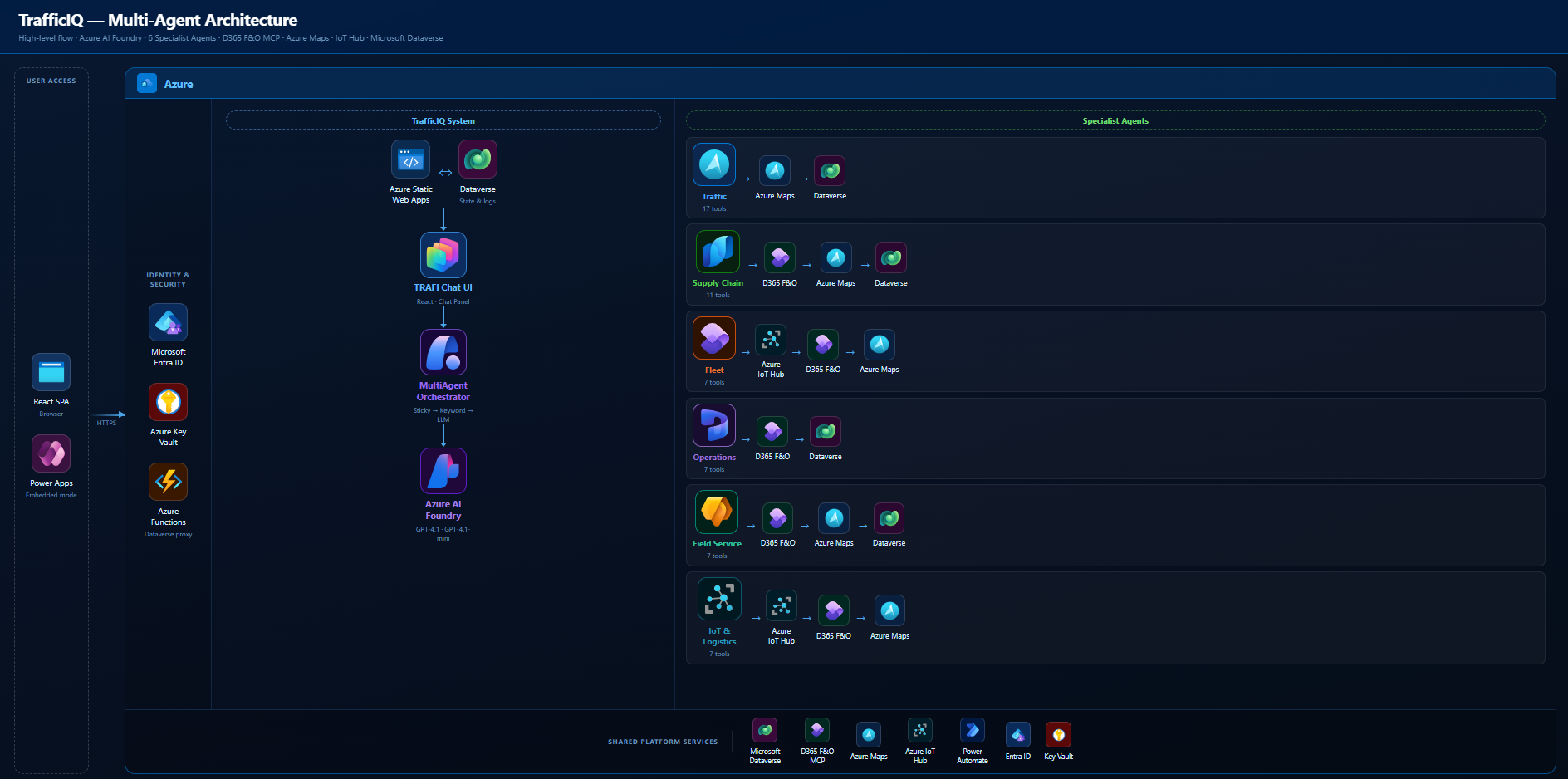
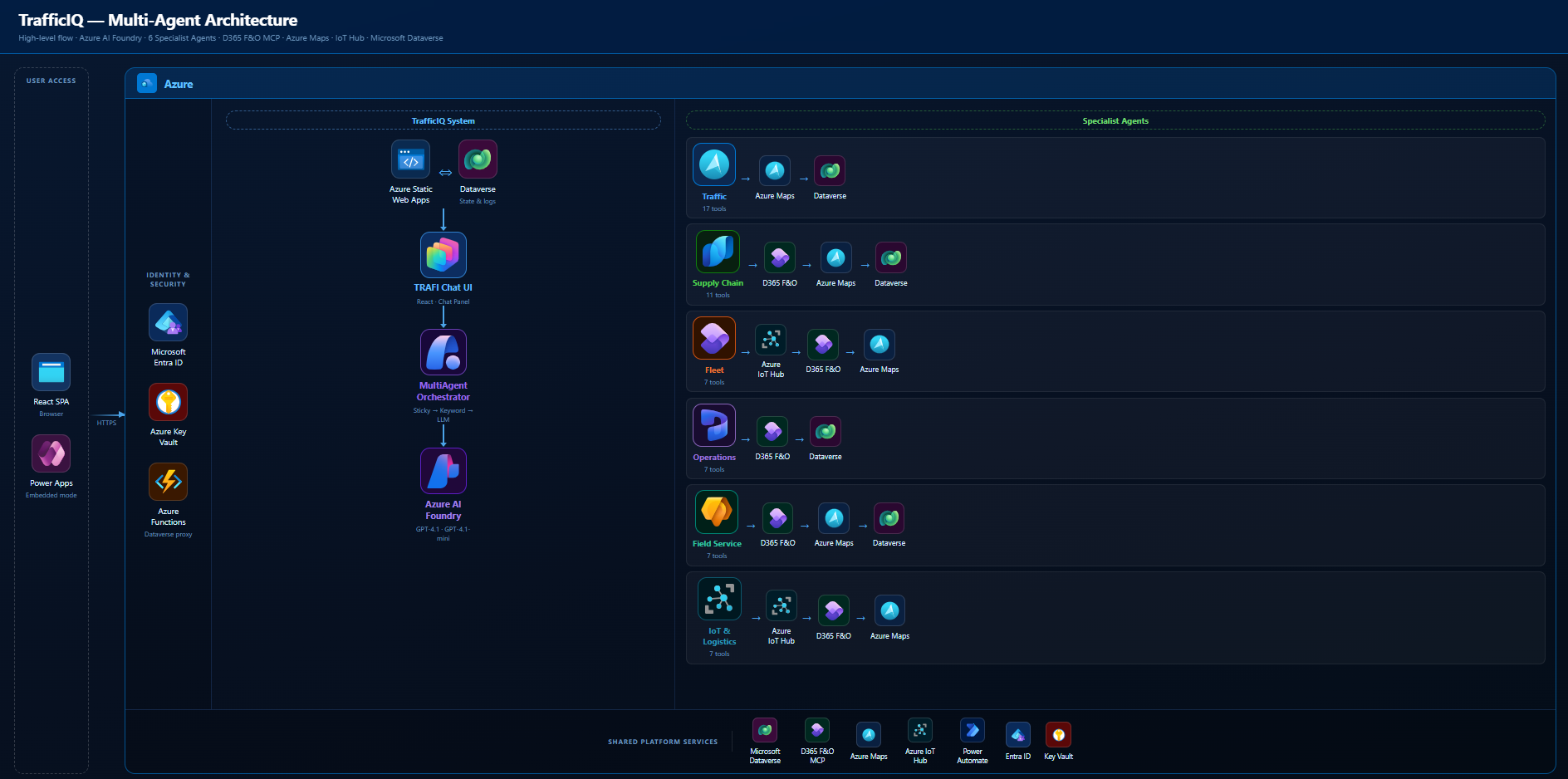
    Six specialist agents, each with a tight tool set scoped to its domain. One orchestrator on top. One router inside the orchestrator. GPT-4.1 under each agent. The whole orchestration layer is built on the Microsoft Foundry SDK — the MultiAgentOrchestrator, the specialists, and the RouterAgent are all SDK-native, using the Foundry Assistants pattern (agent, thread, message, run) end to end.

    TrafficIQ multi-agent architecture — 6 specialist agents and the orchestrator
    TrafficIQ multi-agent architecture — 6 specialist agents and the orchestrator.

    The split is the part most people skip past, so it is worth being concrete:

    • Traffic Agent — 17 tools. Routing, journeys, incidents, reroutes, weather, POI, isochrone, snap-to-road.
    • Supply Chain Agent — 11 tools. Shipments, deliveries, inventory, ETAs, KPIs, proof of delivery. Backed by D365 F&O via the MCP Server.
    • Fleet Agent — 7 tools. Vehicle positions, driver performance, health, maintenance.
    • Operations Agent — 7 tools. Work orders, technician availability, schedule optimisation, returns.
    • Field Service Agent — 7 tools. Service requests, customer assets, SLAs, dispatch, parts.
    • IoT & Logistics Agent — 7 tools. Device health, geofences, driving behaviour, connectivity, batch route alternatives.

    Plus 2 shared tools (navigate_to_page, show_input_form) that every agent can call. That is 56 tools total, none of which any single agent actually has to reason over.

    Coordination sits in a MultiAgentOrchestrator. It runs a three-tier router: sticky → keyword → LLM classifier (the RouterAgent). Each specialist holds its own Foundry thread so its context stays clean. The orchestrator handles handoff when the user pivots from one domain to another.

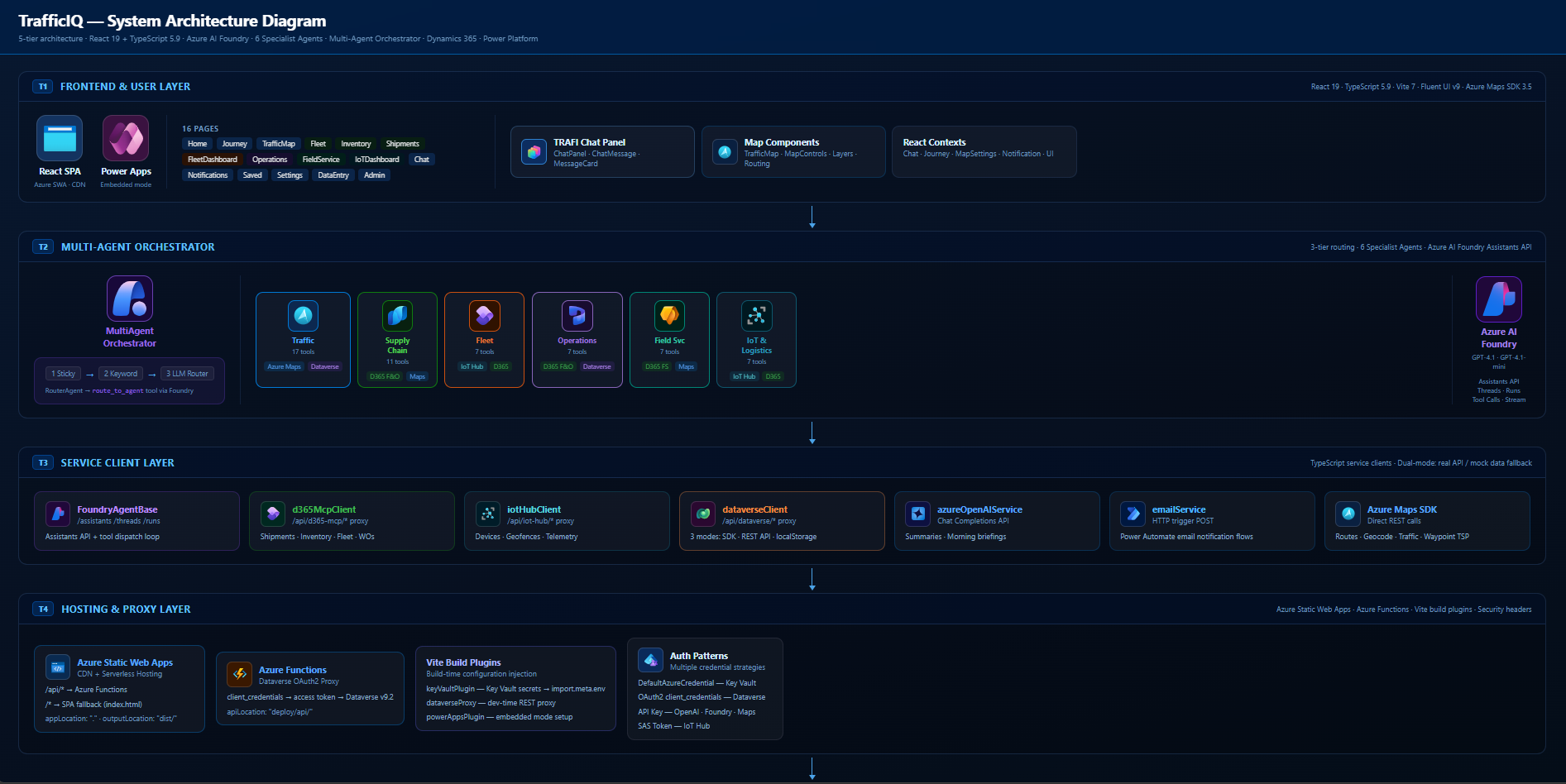
    Broader TrafficIQ architecture — agents, MCP, Azure services, Dataverse
    Broader TrafficIQ architecture — agents, MCP, Azure services, Dataverse.

    The rest of this post is the six lessons that fell out of building it.

    Lesson 1 — route in tiers, not in one LLM call

    The naive multi-agent router is “ask GPT which agent should handle this.” It works. It is also slow and expensive on every single turn, including the easy ones.

    I run three tiers in order. First, sticky: if the user is mid-thread with the Supply Chain Agent and the next message is “and the one after that?”, stay put. Conversations are usually continuous. The default should be continuity, not re-evaluation.

    Second, keyword. Each agent registers a small set of high-signal terms — “shipment”, “warehouse”, “geofence”, “technician”. A keyword match is effectively free. For roughly the queries you would expect — the obvious ones — this resolves the routing decision in microseconds with no token spend.

    Only when both tiers miss do I fall back to the LLM classifier. That is the RouterAgent, and it is the only model call dedicated to routing. The result is a router that is fast on the common path, accurate on the ambiguous one, and cheap in aggregate. Putting the cheap checks first is the entire trick.

    Lesson 2 — each agent owns its own thread

    This one took me a while to land on, and I think it is the most underrated decision in the whole architecture.

    The obvious approach is to share a single conversation thread across all agents, and have the orchestrator switch which agent reads from it. Do not do this. It is the worst of both worlds. Each agent now sees every tool’s history, including tools it does not own. The tool-set bleed contaminates selection. You also get token bloat: every agent re-reads the entire shared history on every run.

    In TrafficIQ each specialist owns its own thread via the Microsoft Foundry SDK. The Supply Chain Agent’s thread only ever contains Supply Chain turns. Its tool schemas, its system prompt, its prior tool calls — none of it touches the Fleet Agent’s context. Each agent is, effectively, a tightly scoped assistant that does not know the others exist. The SDK’s thread primitive is what makes that isolation cheap to enforce.

    The orchestrator is the only component that knows there are multiple agents. The agents themselves are blissfully ignorant. That isolation is what makes them stay accurate as the system grows.

    Lesson 3 — context handoff is the hard problem, not routing

    Once you have isolated threads, the next question is the obvious one: what happens when the user pivots? “What’s the ETA on that shipment?” — Supply Chain handles it. Then: “And dispatch a tech to the warehouse.” — that is Field Service, and Field Service has no idea what “that shipment” refers to.

    You cannot dump the entire Supply Chain thread on Field Service. That would re-introduce every problem isolated threads were meant to solve. You also cannot hand over nothing — the user is mid-thought and expects continuity.

    What I settled on is a small, deliberate handoff payload: a summary of the last N messages from the source agent, written into the destination agent’s thread as a context message before the user’s new turn lands. Enough grounding to resolve “that shipment”. Not enough to confuse tool selection. The summary is generated by the same Azure OpenAI deployment the agents use, with a tight system prompt — give me entities, IDs, and the last user intent. No prose.

    Routing gets the headlines. Handoff is what actually breaks in production if you get it wrong.

    Lesson 4 — tools must be MECE within an agent, not across all agents

    MECE — mutually exclusive, collectively exhaustive. It is the rule I borrowed from consulting, and it is the cleanest way to think about tool design in a multi-agent system.

    Across the whole platform, similar-sounding tools exist. Traffic’s plan_journey and Supply Chain’s optimize_delivery_route both compute routes. That is fine. They live in different agents and serve different intents — a personal commute is not a multi-stop delivery plan. The router decides which world the user is in. The agent never has to choose between them.

    The rule that actually matters: within one agent, no two tools should be confusable. The Traffic Agent has 17 tools, and I spent more time on their names and descriptions than on any other part of the system. get_traffic_incidents queries an area. monitor_saved_journey watches a specific route. suggest_reroute triggers a recompute. Different verbs, different objects, no overlap.

    If you cannot explain to a junior engineer in one sentence what makes two tools different, the model will not get it right either.

    Lesson 5 — make agents observable from day one

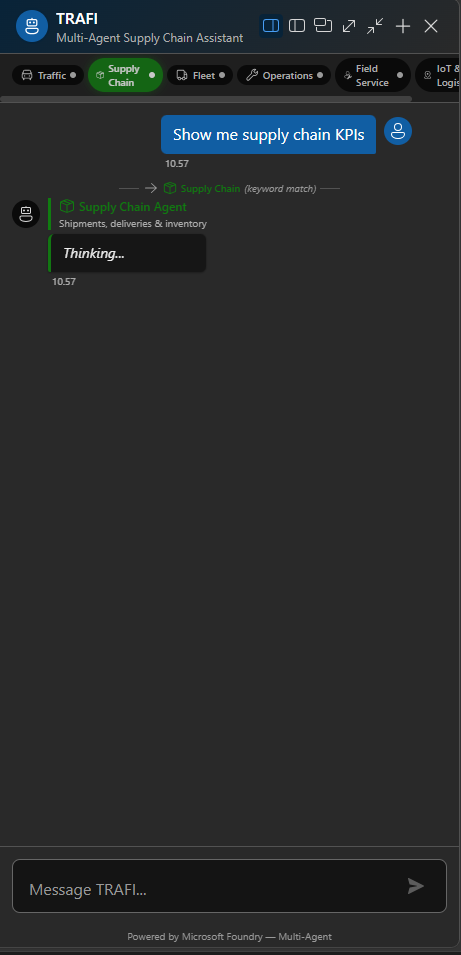
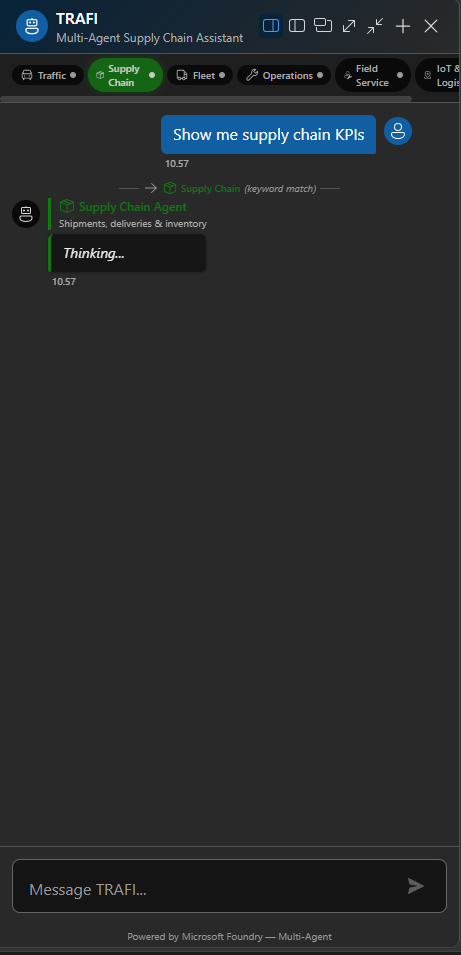
    You cannot debug a multi-agent system from the response text alone. You need to see which agent answered and which tool fired. So the chat panel in TrafficIQ shows both.

    TRAFI chat panel with agent badges and tool-call indicators
    TRAFI chat panel with agent badges and tool-call indicators.

    Every message carries an agent badge — colour-coded per domain. Every tool call streams in real time as a small inline indicator: tool name, parameters, status. When something looks off, I can see immediately whether the routing was wrong, the tool selection was wrong, or the tool itself returned bad data. Three different failure modes, three different fixes, and you cannot tell them apart without the visibility.

    This is not UI polish. I would argue it is the single most important user-trust feature in the product. Users are sceptical of agents — rightly. When they can see “Supply Chain Agent → check_shipment_status → D365 F&O”, the agent stops being a black box. It becomes a transparent process they can audit.

    Build the observability before you build the second agent. You will need it the moment routing decisions start mattering.

    Lesson 6 — ground on enterprise data, not the LLM’s memory

    Every tool in TrafficIQ resolves against a real system of record. D365 F&O via the MCP Server for shipments, inventory, work orders. Azure Maps for routing, traffic, weather, POI. Azure IoT Hub for device health and telemetry. Dataverse for application state.

    The agents never “remember” entities. They look them up. If the user asks about shipment SH-10042, the agent does not summarise what it thinks it knows — it calls check_shipment_status and reads the live record. If GPT-4.1 hallucinates an ETA, the tool result overwrites it.

    That single discipline is what separates a hackathon demo from something an enterprise IT team can own. The model is the reasoning surface. The tools are the truth surface. Keep them strictly separated and the agent’s answers become defensible, auditable, and — most importantly — refreshable when the underlying data changes.

    What I would do differently next time

    Two honest ones.

    First, I would build the router evaluation harness before writing the router. I built it last. I now have a CSV of representative queries with the expected target agent, and it runs as a test suite — but I had to retrofit it after the architecture was already set. If I had started with the eval, I would have caught two keyword collisions weeks earlier.

    Second, I would put a hard token budget on per-agent system prompts from day one. The Traffic Agent’s prompt drifted from 600 tokens to nearly 1,400 over the course of the build, because every new tool came with “and remember to use this when…” instructions. A budget forces the discipline of writing better tool descriptions instead of patching the prompt. Treat the system prompt like a constitution, not a notepad.

    Closing

    The headline is small but the implication is large: when a single agent’s tool surface grows past where its selection accuracy holds, the answer is not a smarter prompt. It is a smaller agent.

    Six specialists with clear scopes, isolated threads, tiered routing, MECE tools, visible execution, and grounded data — that is the recipe that survived production hardening in TrafficIQ. None of it is exotic. All of it is boring engineering applied carefully.

    If you want to see the code, the TrafficIQ repo is on GitHub. The Microsoft winner announcement is here. And the full demo video walks the router, the handoffs, and the tool execution in real time.

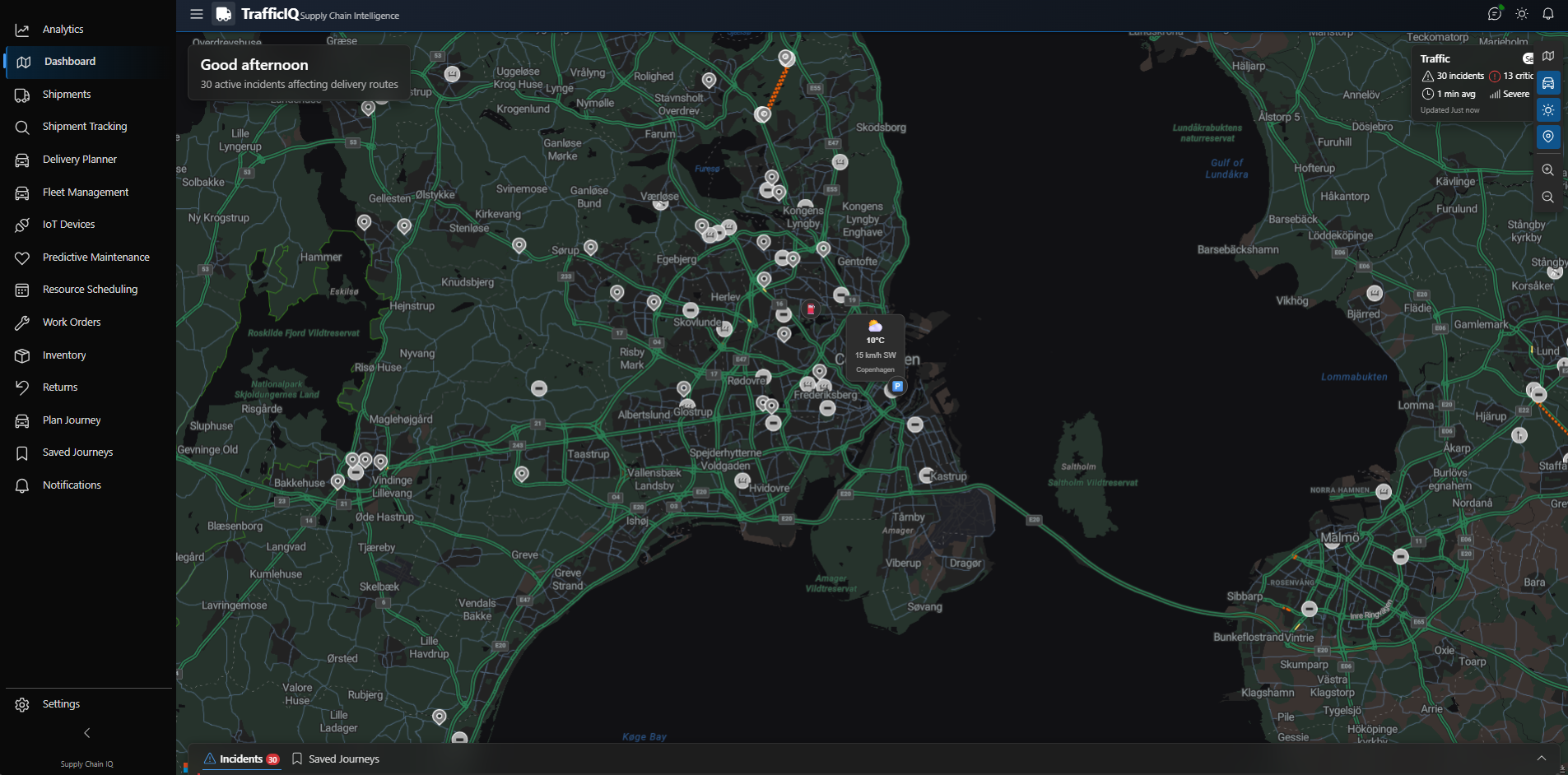
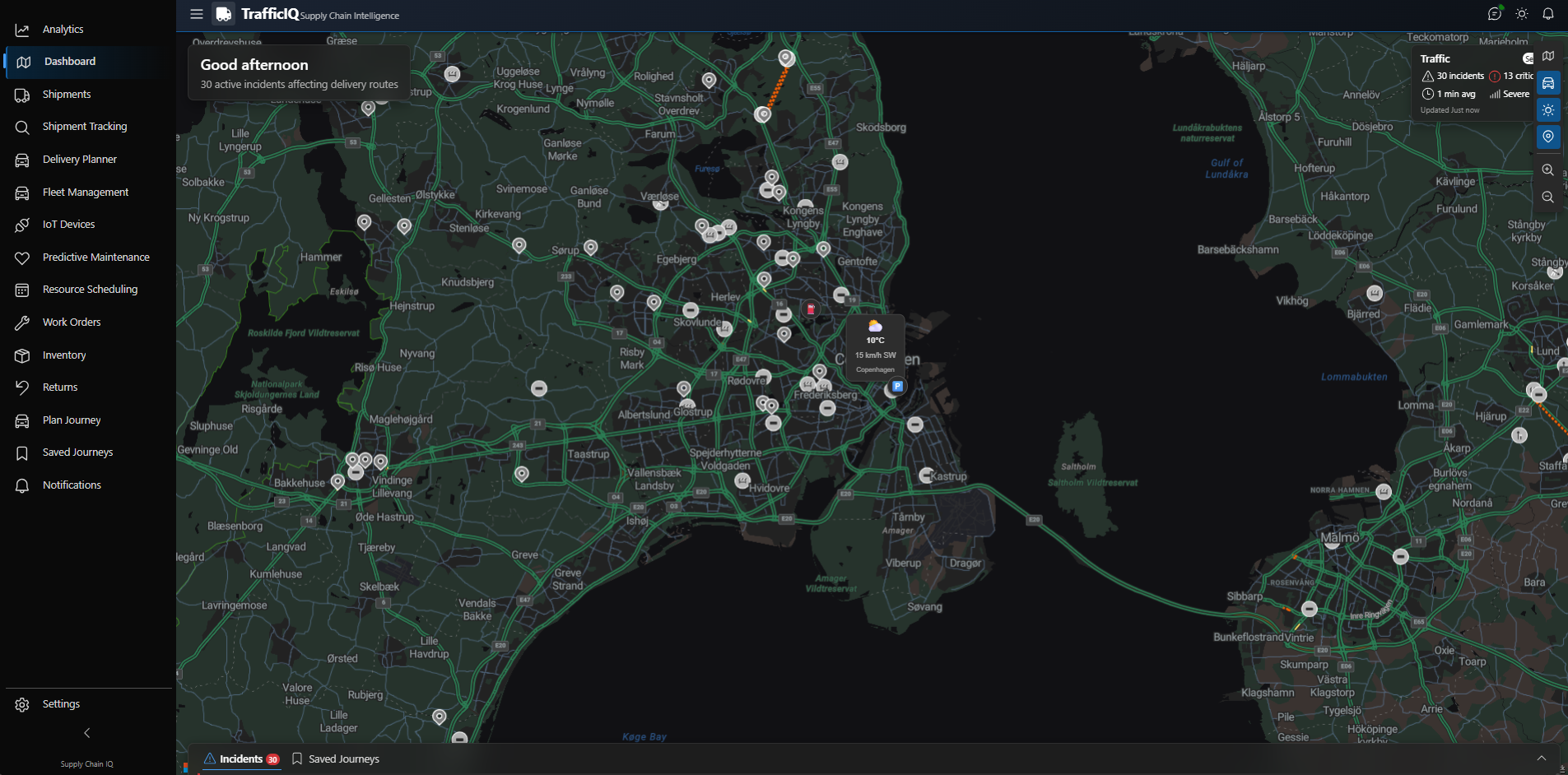
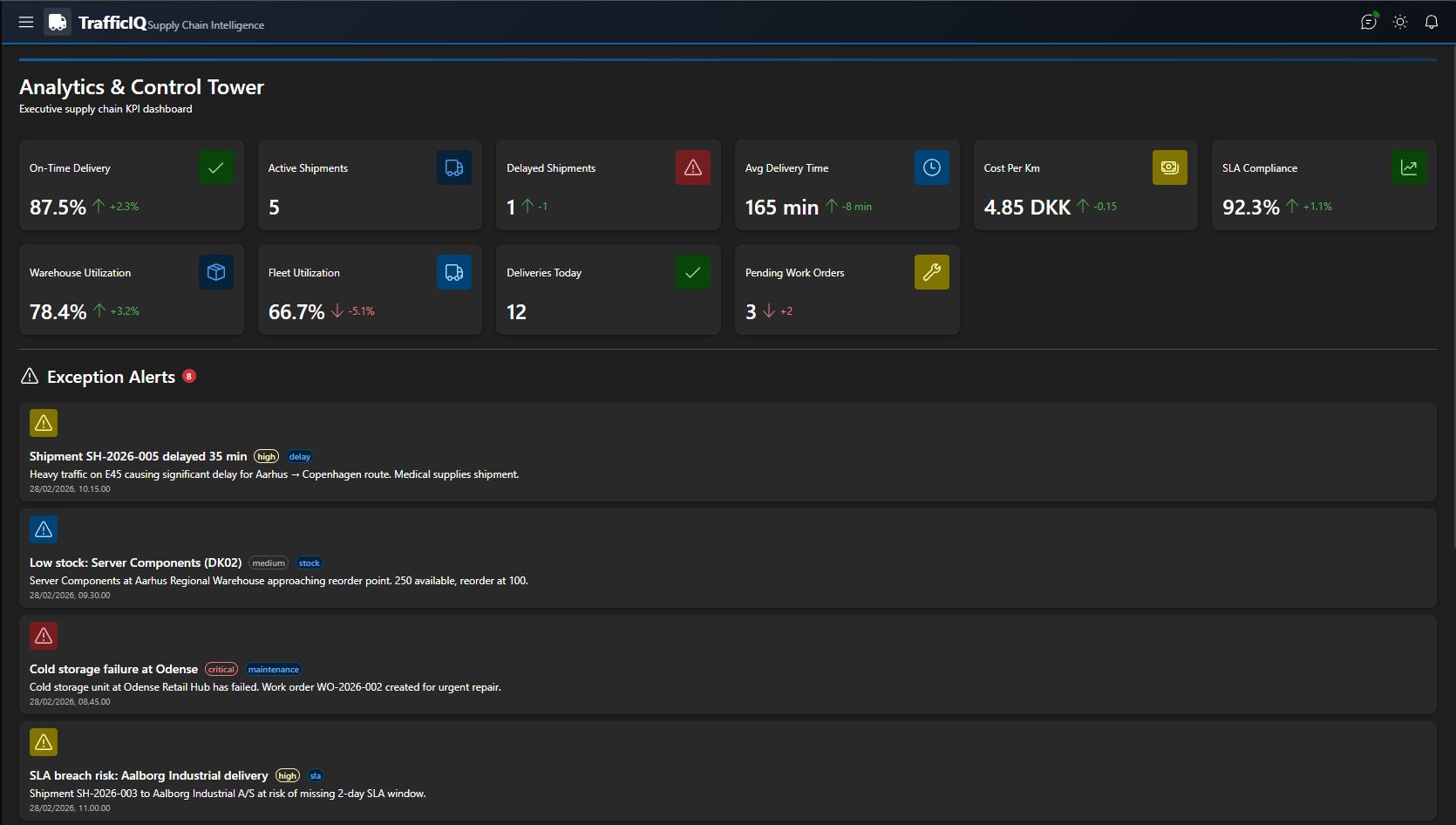
    TrafficIQ operational dashboard
    TrafficIQ operational dashboard.
  • 🏆 Winning Best Use of Microsoft Foundry at AI Dev Days Hackathon — TrafficIQ

    🏆 Winning Best Use of Microsoft Foundry at AI Dev Days Hackathon — TrafficIQ

    🏆 Best Use of Microsoft Foundry — Microsoft AI Dev Days Hackathon · 2026

    I am honored to share that TrafficIQ — Supply Chain Transport Intelligence won the Best Use of Microsoft Foundry Project award at Microsoft’s AI Dev Days Hackathon. The hackathon brought together a global community of 2,041 registrants and 401 submitted projects, with winners selected across two Grand Prize categories and four special category awards.

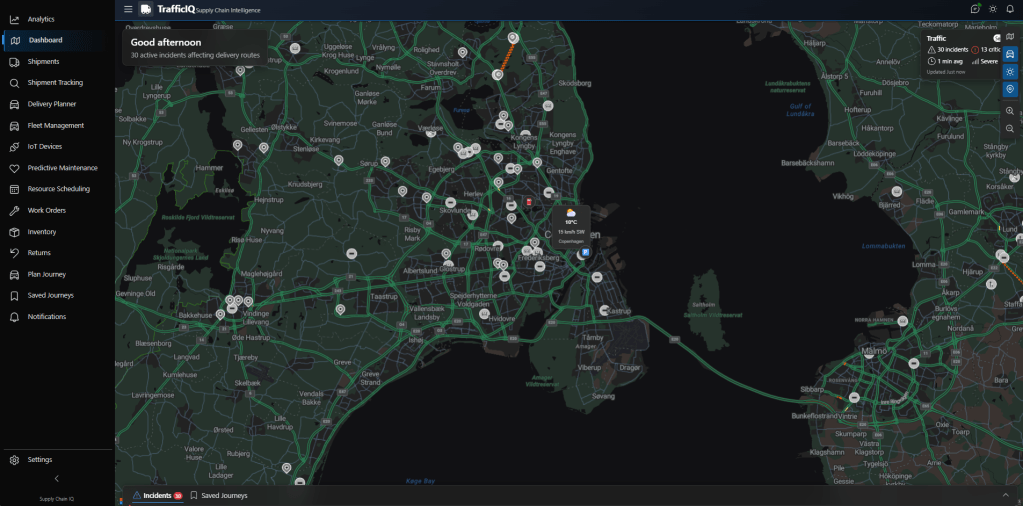
    TrafficIQ Dashboard
    TrafficIQ Dashboard — the operational command centre.

    What TrafficIQ does

    TrafficIQ is an enterprise-grade multi-agent AI platform built entirely on the Microsoft AI Platform. It brings real-time traffic intelligence into fleet, logistics and supply-chain workflows — so dispatchers, drivers and operations leaders can make smarter routing and delivery decisions before disruptions hit the bottom line.

    The Microsoft stack underneath

    • Azure AI Foundry — model hosting, agent orchestration and evaluation
    • Microsoft Agent Framework — multi-agent coordination and tool calling
    • Azure Maps — routing, traffic incidents and geospatial intelligence
    • Azure IoT Hub — fleet GPS telemetry and vehicle sensor streams
    • Dynamics 365 Finance & Operations — orders, shipments and field service
    • MCP (Model Context Protocol) — standardised tool integration across agents
    • Dataverse, Power Apps & Power Automate — the human-in-the-loop UI and workflow layer
    TrafficIQ Multi-Agent Architecture
    The TRAFI multi-agent architecture — 6 specialist agents, 49 composable tools.

    TRAFI — the multi-agent core

    At the heart of TrafficIQ is TRAFI, a multi-agent AI orchestration system with 6 specialist agents and 49 composable tools. The agents proactively monitor traffic incidents, optimise delivery routes, and reduce operational disruptions before they impact supply chains. Each agent owns a clear responsibility — incident monitoring, route planning, ETA recalculation, fleet health, customer notifications, escalation — and they coordinate through the Microsoft Agent Framework.

    What the platform delivers

    • ✅ Real-time traffic awareness across the fleet
    • ✅ Intelligent route optimisation with live re-planning
    • ✅ Fleet GPS visibility and IoT telemetry
    • ✅ Predictive maintenance insights
    • ✅ Automated ETA updates to customers
    • ✅ Field service & inventory management
    • ✅ Enterprise notifications and operational dashboards
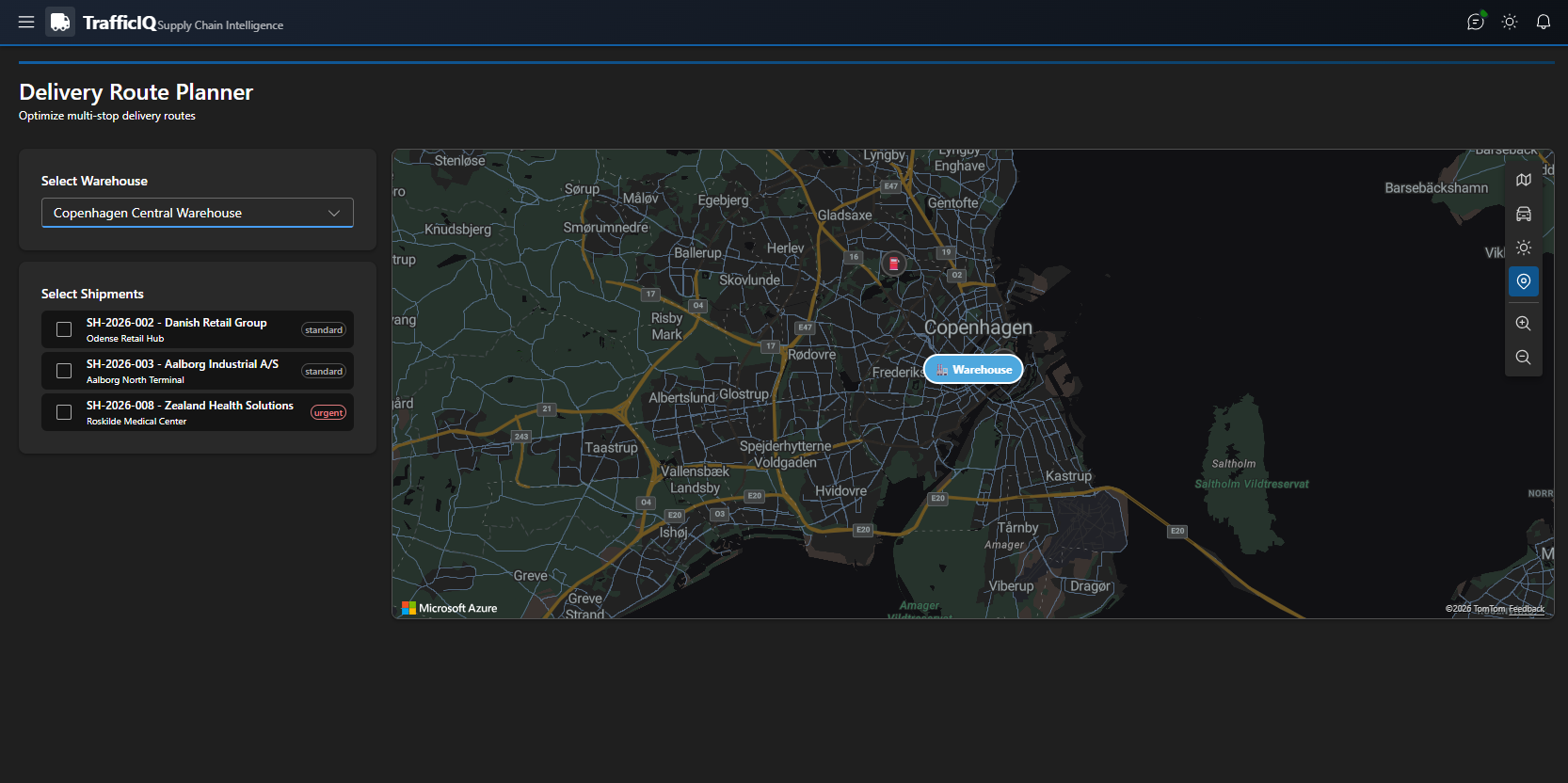
    TrafficIQ Delivery Planner
    Delivery Planner — AI-assisted scheduling and route optimisation.
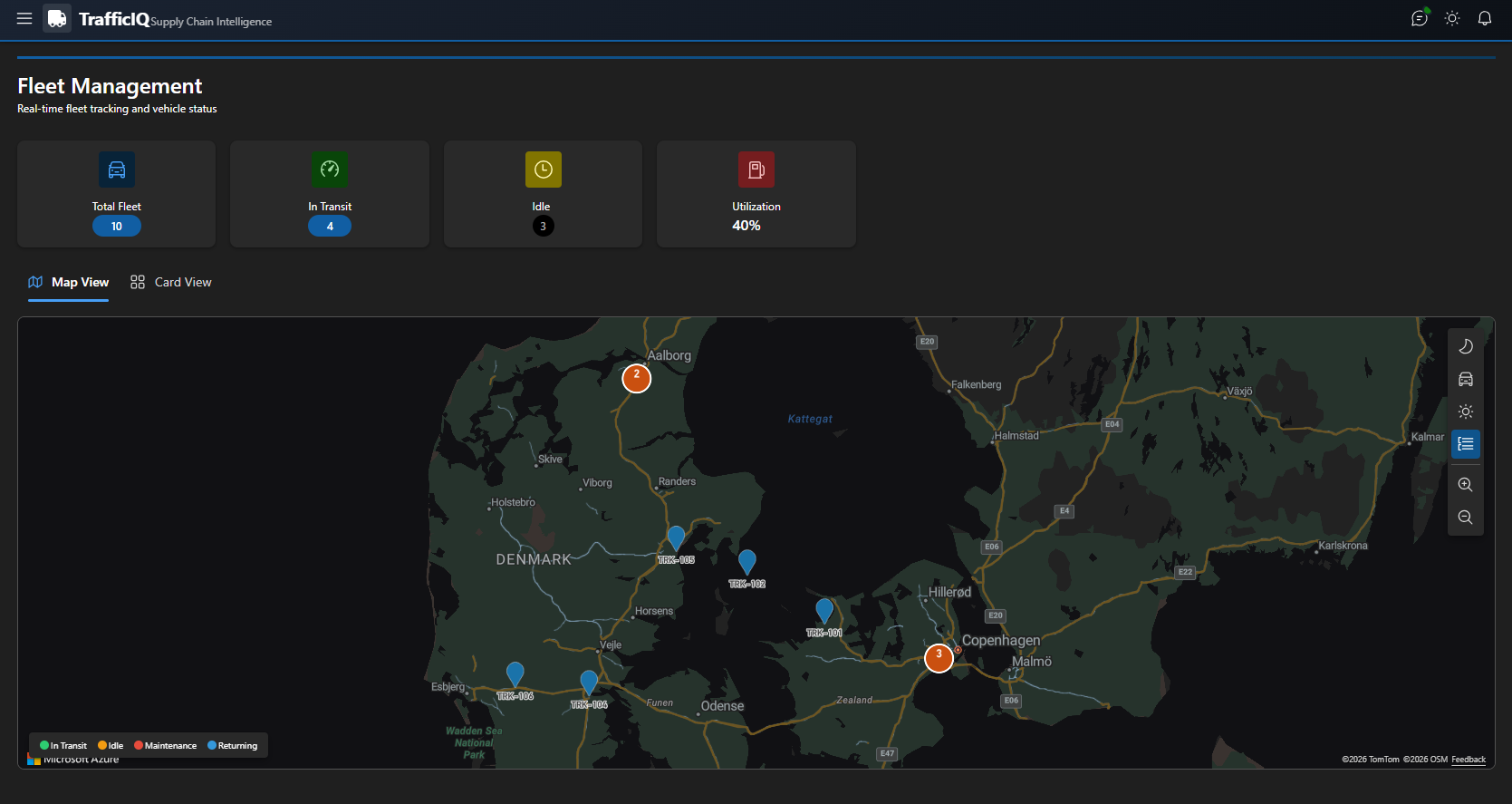
    TrafficIQ Fleet Management
    Fleet Management — live vehicle health and GPS telemetry.
    TrafficIQ Analytics
    Operational analytics — KPIs that decision-makers actually read.
    TrafficIQ AI Chat Agent
    The TRAFI chat agent — natural-language ops co-pilot for dispatchers.

    Why this project

    This project was focused on solving practical enterprise challenges using agentic-AI patterns and Microsoft technologies in a production-oriented architecture. Hackathon code often optimises for the demo. With TrafficIQ I tried to optimise for what would survive a 3-month production hardening cycle: typed contracts between agents, explicit human-in-the-loop checkpoints, and a Dataverse-backed operational model that an enterprise IT team could actually own.

    Links

  • Building LocalRAG — a fully local AI document search

    LocalRAG is a fully local Retrieval-Augmented Generation application I built to answer one question: how much of a useful enterprise RAG can you run without sending a single byte to a cloud LLM?

    The problem

    Most “build a chatbot over your documents” tutorials assume an OpenAI key, a managed vector database and a cloud orchestrator. That’s fine for prototypes — and a dead end the moment you talk to a customer in regulated banking, healthcare or government. They want answers on their data, on their hardware, with no egress.

    The shape of the solution

    LocalRAG uses local Ollama models for both embeddings and generation, FAISS for the vector index, and a content-type-aware ingestion pipeline that handles PDF, DOCX, CSV, Excel, XML and images. Everything runs on a laptop. The full demo is on YouTube.

    • Ingestion: multi-format extractors that preserve enough structure to chunk intelligently — tables stay together, lists stay together, headings become metadata.
    • Indexing: FAISS index with content-type tags so retrieval can prefer the right shape of content for the question.
    • Retrieval: semantic top-k with rate-limited retries and a simple fallback when a model is overloaded.
    • Generation: a local Ollama model with grounded prompts and source citations.

    What I’d do differently next time

    Two things. First, evaluation should be a first-class subsystem from day one, not bolted on later — even a small golden-question set saves you from regression panic during refactors. Second, content-type awareness is more important than fancy reranking; a boring extractor that respects document structure beats a clever reranker that received bad chunks.

    Repo: github.com/PowerAI-Labs/LocalRAG. Feedback and PRs welcome.

  • Welcome to PowerAI Labs

    Welcome to PowerAI Labs — my engineering notebook in public. This is where I’ll write down what I’m building, what I’m breaking, and what survives contact with production on the Microsoft AI stack.

    Why this site exists

    After more than fifteen years shipping enterprise solutions across Dynamics 365, Power Platform, Copilot Studio and Azure AI, I’ve collected a lot of architecture decisions, hard-won lessons and reusable patterns. Most of them live in private Confluence pages, customer engagements and my own notes. PowerAI Labs is where I’m pulling the ones I can share into the open.

    What you’ll find here

    • Architecture deep-dives — reference architectures, decision logs and trade-off analyses for AI agents, RAG, and Power Platform solutions at enterprise scale.
    • Lessons from production — the things that don’t make it into vendor docs: cost surprises, throttling, governance, prompt drift, eval pipelines.
    • Tutorials and walkthroughs — hands-on guides for Copilot Studio, Microsoft 365 Copilot agents, Azure AI Foundry and the rest of the stack.
    • Projects — open-source experiments like LocalRAG, TrafficIQ and MakeLifeEasy.

    The point of view

    AI in the enterprise is exciting and chaotic at the same time. The vendor demos are perfect; the customer environments are not. My bias is towards architectures that are boring on purpose — strongly typed contracts, explicit data lineage, evaluable agents, and a default of “make it observable before you make it autonomous”. Everything I publish here is filtered through that lens.

    Stay in touch

    If a post is useful, share it. If something is wrong, tell me — I’d rather be corrected than confident. You can reach me at contact@powerailabs.dev, on LinkedIn, or via GitHub.

    — Raghav