
I had two design choices for TrafficIQ: one super-agent holding 56 tools, or six specialist agents sharing them. I picked six. Here is what the one-agent path gets right, where it breaks, and the six lessons I took into production.
TrafficIQ went on to win Best Use of Microsoft Foundry at the AI Dev Days Hackathon — chosen from 401 projects and 2,041 registrants. The architecture choices below are what made that possible, and what I would actually defend in front of an enterprise architecture review board.
Why one-agent is genuinely tempting
The one-agent design is the simpler mental model. One assistant. One system prompt. One thread. One place to debug.
When you are sketching the first prototype, this is almost always the right move. Orchestration is not free — you have to write a router, define handoff contracts, manage cross-agent state. Skipping all of that gets you to a working demo in an afternoon. Most enterprise teams default here, and for a 10-tool assistant, they are right to.
The trouble starts later. It starts when the surface area grows past what a single model can hold in its head.
Where one-agent breaks
In my experience tool-selection accuracy degrades non-linearly past around 15 to 20 tools. The model does not fail loudly. It fails subtly. It picks get_shipment_status when the user clearly needed check_shipment_status, because the names overlap and the descriptions rhyme. It calls track_shipment when the right answer was get_proof_of_delivery.
The system prompt becomes the second symptom. To compensate for the confusion, you add disambiguation rules. “Use tool X only when the user mentions Y.” The prompt grows. By the time you have 40 tools, you are nursing a 4,000-token monolith that nobody on the team wants to touch.
And then there is context-window pressure. Every tool’s JSON schema, every parameter description, every example — it all lives in the agent’s context on every turn. With 56 tools, that alone is enough to crowd out the actual conversation.
A super-agent does not just get slower. It gets less correct. The failure mode is “looks plausible, called the wrong tool.”
The architecture I chose
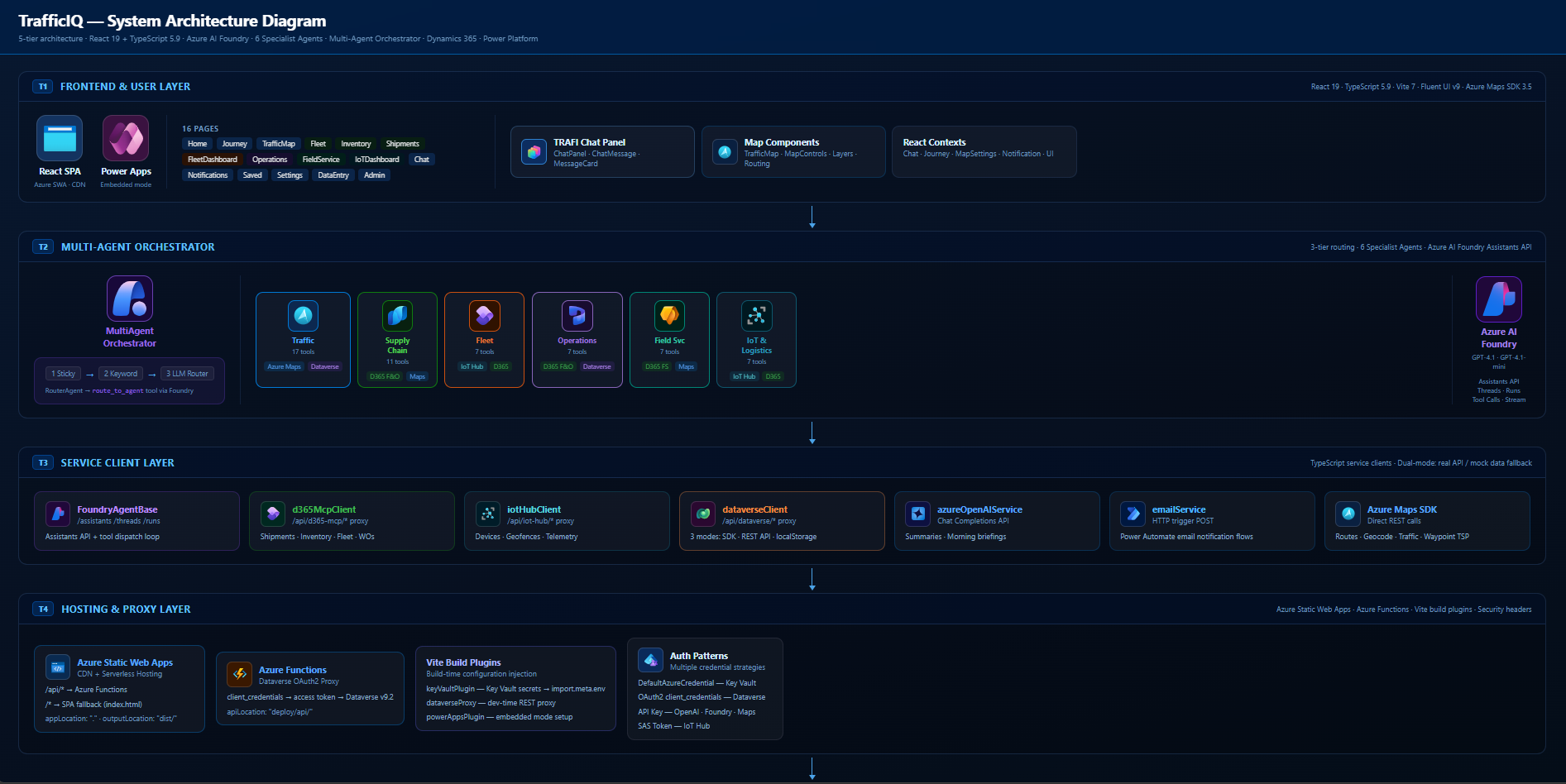
Six specialist agents, each with a tight tool set scoped to its domain. One orchestrator on top. One router inside the orchestrator. GPT-4.1 under each agent. The whole orchestration layer is built on the Microsoft Foundry SDK — the MultiAgentOrchestrator, the specialists, and the RouterAgent are all SDK-native, using the Foundry Assistants pattern (agent, thread, message, run) end to end.
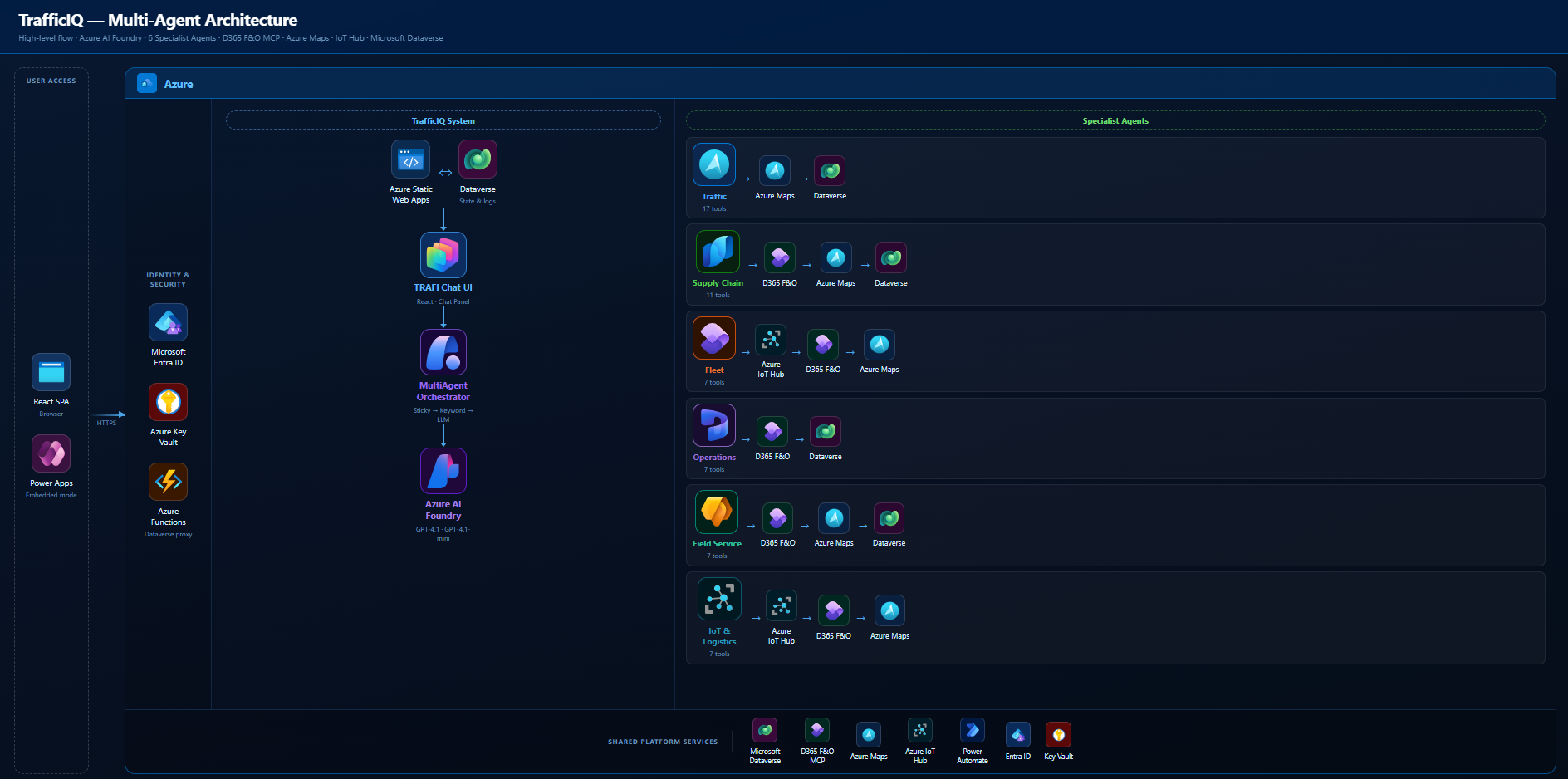
The split is the part most people skip past, so it is worth being concrete:
- Traffic Agent — 17 tools. Routing, journeys, incidents, reroutes, weather, POI, isochrone, snap-to-road.
- Supply Chain Agent — 11 tools. Shipments, deliveries, inventory, ETAs, KPIs, proof of delivery. Backed by D365 F&O via the MCP Server.
- Fleet Agent — 7 tools. Vehicle positions, driver performance, health, maintenance.
- Operations Agent — 7 tools. Work orders, technician availability, schedule optimisation, returns.
- Field Service Agent — 7 tools. Service requests, customer assets, SLAs, dispatch, parts.
- IoT & Logistics Agent — 7 tools. Device health, geofences, driving behaviour, connectivity, batch route alternatives.
Plus 2 shared tools (navigate_to_page, show_input_form) that every agent can call. That is 56 tools total, none of which any single agent actually has to reason over.
Coordination sits in a MultiAgentOrchestrator. It runs a three-tier router: sticky → keyword → LLM classifier (the RouterAgent). Each specialist holds its own Foundry thread so its context stays clean. The orchestrator handles handoff when the user pivots from one domain to another.
The rest of this post is the six lessons that fell out of building it.
Lesson 1 — route in tiers, not in one LLM call
The naive multi-agent router is “ask GPT which agent should handle this.” It works. It is also slow and expensive on every single turn, including the easy ones.
I run three tiers in order. First, sticky: if the user is mid-thread with the Supply Chain Agent and the next message is “and the one after that?”, stay put. Conversations are usually continuous. The default should be continuity, not re-evaluation.
Second, keyword. Each agent registers a small set of high-signal terms — “shipment”, “warehouse”, “geofence”, “technician”. A keyword match is effectively free. For roughly the queries you would expect — the obvious ones — this resolves the routing decision in microseconds with no token spend.
Only when both tiers miss do I fall back to the LLM classifier. That is the RouterAgent, and it is the only model call dedicated to routing. The result is a router that is fast on the common path, accurate on the ambiguous one, and cheap in aggregate. Putting the cheap checks first is the entire trick.
Lesson 2 — each agent owns its own thread
This one took me a while to land on, and I think it is the most underrated decision in the whole architecture.
The obvious approach is to share a single conversation thread across all agents, and have the orchestrator switch which agent reads from it. Do not do this. It is the worst of both worlds. Each agent now sees every tool’s history, including tools it does not own. The tool-set bleed contaminates selection. You also get token bloat: every agent re-reads the entire shared history on every run.
In TrafficIQ each specialist owns its own thread via the Microsoft Foundry SDK. The Supply Chain Agent’s thread only ever contains Supply Chain turns. Its tool schemas, its system prompt, its prior tool calls — none of it touches the Fleet Agent’s context. Each agent is, effectively, a tightly scoped assistant that does not know the others exist. The SDK’s thread primitive is what makes that isolation cheap to enforce.
The orchestrator is the only component that knows there are multiple agents. The agents themselves are blissfully ignorant. That isolation is what makes them stay accurate as the system grows.
Lesson 3 — context handoff is the hard problem, not routing
Once you have isolated threads, the next question is the obvious one: what happens when the user pivots? “What’s the ETA on that shipment?” — Supply Chain handles it. Then: “And dispatch a tech to the warehouse.” — that is Field Service, and Field Service has no idea what “that shipment” refers to.
You cannot dump the entire Supply Chain thread on Field Service. That would re-introduce every problem isolated threads were meant to solve. You also cannot hand over nothing — the user is mid-thought and expects continuity.
What I settled on is a small, deliberate handoff payload: a summary of the last N messages from the source agent, written into the destination agent’s thread as a context message before the user’s new turn lands. Enough grounding to resolve “that shipment”. Not enough to confuse tool selection. The summary is generated by the same Azure OpenAI deployment the agents use, with a tight system prompt — give me entities, IDs, and the last user intent. No prose.
Routing gets the headlines. Handoff is what actually breaks in production if you get it wrong.
Lesson 4 — tools must be MECE within an agent, not across all agents
MECE — mutually exclusive, collectively exhaustive. It is the rule I borrowed from consulting, and it is the cleanest way to think about tool design in a multi-agent system.
Across the whole platform, similar-sounding tools exist. Traffic’s plan_journey and Supply Chain’s optimize_delivery_route both compute routes. That is fine. They live in different agents and serve different intents — a personal commute is not a multi-stop delivery plan. The router decides which world the user is in. The agent never has to choose between them.
The rule that actually matters: within one agent, no two tools should be confusable. The Traffic Agent has 17 tools, and I spent more time on their names and descriptions than on any other part of the system. get_traffic_incidents queries an area. monitor_saved_journey watches a specific route. suggest_reroute triggers a recompute. Different verbs, different objects, no overlap.
If you cannot explain to a junior engineer in one sentence what makes two tools different, the model will not get it right either.
Lesson 5 — make agents observable from day one
You cannot debug a multi-agent system from the response text alone. You need to see which agent answered and which tool fired. So the chat panel in TrafficIQ shows both.
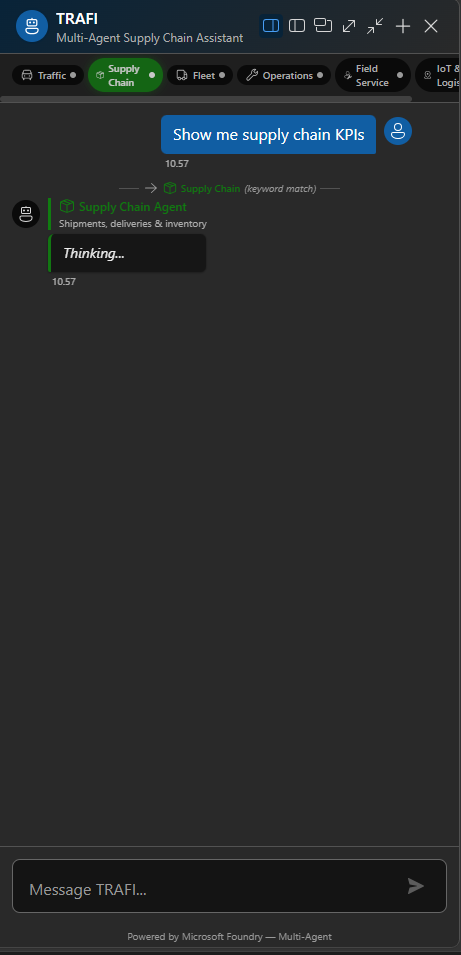
Every message carries an agent badge — colour-coded per domain. Every tool call streams in real time as a small inline indicator: tool name, parameters, status. When something looks off, I can see immediately whether the routing was wrong, the tool selection was wrong, or the tool itself returned bad data. Three different failure modes, three different fixes, and you cannot tell them apart without the visibility.
This is not UI polish. I would argue it is the single most important user-trust feature in the product. Users are sceptical of agents — rightly. When they can see “Supply Chain Agent → check_shipment_status → D365 F&O”, the agent stops being a black box. It becomes a transparent process they can audit.
Build the observability before you build the second agent. You will need it the moment routing decisions start mattering.
Lesson 6 — ground on enterprise data, not the LLM’s memory
Every tool in TrafficIQ resolves against a real system of record. D365 F&O via the MCP Server for shipments, inventory, work orders. Azure Maps for routing, traffic, weather, POI. Azure IoT Hub for device health and telemetry. Dataverse for application state.
The agents never “remember” entities. They look them up. If the user asks about shipment SH-10042, the agent does not summarise what it thinks it knows — it calls check_shipment_status and reads the live record. If GPT-4.1 hallucinates an ETA, the tool result overwrites it.
That single discipline is what separates a hackathon demo from something an enterprise IT team can own. The model is the reasoning surface. The tools are the truth surface. Keep them strictly separated and the agent’s answers become defensible, auditable, and — most importantly — refreshable when the underlying data changes.
What I would do differently next time
Two honest ones.
First, I would build the router evaluation harness before writing the router. I built it last. I now have a CSV of representative queries with the expected target agent, and it runs as a test suite — but I had to retrofit it after the architecture was already set. If I had started with the eval, I would have caught two keyword collisions weeks earlier.
Second, I would put a hard token budget on per-agent system prompts from day one. The Traffic Agent’s prompt drifted from 600 tokens to nearly 1,400 over the course of the build, because every new tool came with “and remember to use this when…” instructions. A budget forces the discipline of writing better tool descriptions instead of patching the prompt. Treat the system prompt like a constitution, not a notepad.
Closing
The headline is small but the implication is large: when a single agent’s tool surface grows past where its selection accuracy holds, the answer is not a smarter prompt. It is a smaller agent.
Six specialists with clear scopes, isolated threads, tiered routing, MECE tools, visible execution, and grounded data — that is the recipe that survived production hardening in TrafficIQ. None of it is exotic. All of it is boring engineering applied carefully.
If you want to see the code, the TrafficIQ repo is on GitHub. The Microsoft winner announcement is here. And the full demo video walks the router, the handoffs, and the tool execution in real time.


Leave a Reply