
A few weeks ago a friend called me about a Dynamics 365 environment that was misbehaving. Contacts created in Finance & Operations weren’t appearing correctly in Customer Engagement, edits weren’t flowing through, and nobody could explain why. “It used to work,” he said — which is the most dangerous sentence in any integration project.
What started as a quick favour turned into one of the most instructive dual-write debugging sessions I’ve done. Here’s the whole story: the symptom, the evidence trail, the real root causes, the fix, and the issues that are still open.
A quick primer: GAB, the party model, and dual-write
If you don’t live inside Dynamics every day, three concepts are worth setting up first.
In Finance & Operations, customers, vendors, contacts, and workers are not isolated records. They all share a single Global Address Book (GAB). Every operational record points at a party — the party is the central identity, and the customer or vendor or contact hangs off it. This is the party model.
Dual-write is the near-real-time, bidirectional sync between F&O and Dataverse (the CE side). When you create a contact in F&O, dual-write is supposed to push it across, and when you edit it in CE, it’s supposed to come back.
On the Dataverse side, contacts are wired into the address book through a junction table called msdyn_contactforparty. Each of those rows is supposed to carry a msdyn_contactid pointing at the real CE contact and a party reference pointing at the right party. When those links are correct, everything lines up. When they aren’t, you get exactly the kind of ghost-in-the-machine behaviour my friend was seeing.
One detail that turned out to be central: several of the GAB relationship fields — msdyn_contactid, msdyn_associatedaccountid — are not stamped by the dual-write field map. They are stamped by a GAB plugin that runs after the write completes. That distinction matters a lot later.
Here’s the path a contact write is supposed to take — and the two points where it broke in this environment:
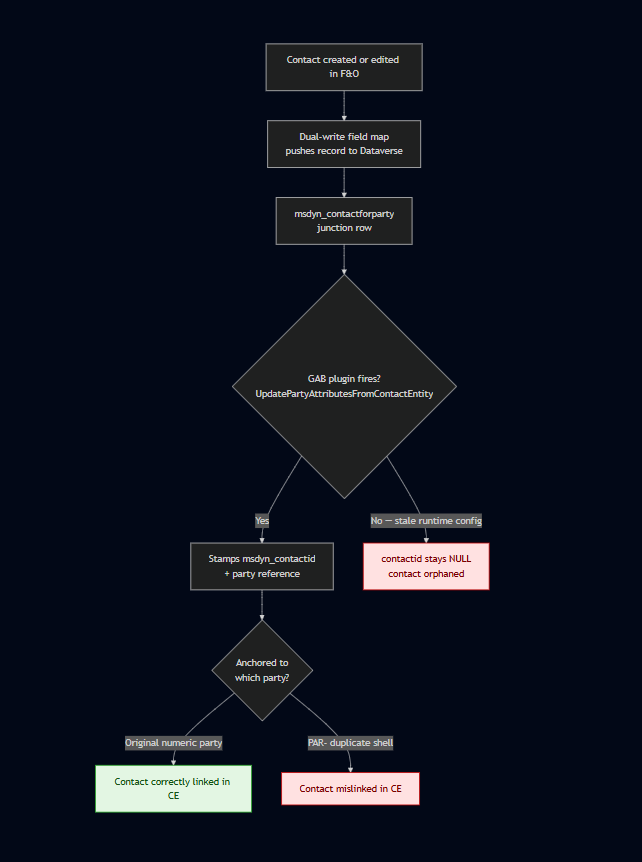
The two red nodes are exactly where my friend’s environment was landing: thousands of junction rows with a null contactid because the plugin wasn’t firing, and contacts that were stamped but pointed at the wrong, duplicate party.
The symptom
The headline number was ugly: roughly 6,042 msdyn_contactforparty rows had a null msdyn_contactid. The junction rows existed, but they weren’t pointing at anything. So as far as the address book was concerned, thousands of contacts had no home.
It got worse when I looked at which parties the CE contacts were anchored to. Instead of pointing at the original numeric party records that had existed since the environment’s 2022 go-live, many contacts were anchored to a second set of duplicate, PAR- prefixed party records. These had been created in early 2026 by the DataIntServiceUser system account.
My first instinct — and I want to be honest about this because it’s a trap — was to assume contacts had been deleted and re-created. That was wrong, and my friend corrected me on it. Nothing had been deleted. The ~6,000 broken rows had always been there. They were simply linked incorrectly, a leftover from an incomplete initial sync earlier in the project’s history. Getting the framing right here saved me from “fixing” a problem that didn’t exist.
Following the evidence
I’m allergic to guessing on production systems, so the first phase was pure diagnostics — no changes, just artefacts:
- CE Web API timestamp queries to see when records were created and by whom.
- Plugin Trace Logs to watch which GAB plugins fired (and which stayed silent) on a write.
- An export of the DualWriteProjectConfigurationEntity to read the actual map configuration.
- A look at the dual-write runtime config table for stale or orphaned rows.
A few things jumped out almost immediately.
The PAR- parties were empty shells. They had no customers, vendors, or contacts attached on the F&O side. Every operational F&O record still referenced the original numeric parties. That told me the duplicates were non-authoritative debris, not something to preserve.
The trace logs showed an asymmetry I almost missed: on a contact write, UpdatePartyAttributesFromPartyEntity fired, but its sibling UpdatePartyAttributesFromContactEntity did not. These are two distinct plugins, and only one of them was running. That is a classic fingerprint of a stale runtime configuration, not a broken field map. If it had been a mapping problem, the field would simply have been missing — instead the right plugin just wasn’t being invoked.
I also found two orphaned _del-suffixed runtime config rows, stale debris from old “CDS Contacts V2” maps, and confirmed that two of those maps had at one point been running simultaneously, colliding on entity keys.
The root causes
By the end of the diagnostics phase the picture was clear. There wasn’t one bug — there was a small pile of them, layered over time:
- Incomplete earlier initial syncs left thousands of contactforparty rows with a null contactid. This was the origin of the 6,000-row problem.
- Duplicate parties. The PAR- shells created during a later integration run competed with the original numeric parties, and CE contacts ended up anchored to the wrong ones.
- An initial sync run in the wrong direction — Dataverse treated as master instead of the intended F&O → CE flow — which produced orphaned junction rows.
- A gender value-map mismatch. Custom option set values were being rejected outright by CE, silently failing writes.
- Duplicate “CDS Contacts V2” maps running at once, causing entity-key collisions.
- A stale dual-write runtime config that stopped UpdatePartyAttributesFromContactEntity from firing — the reason updates from contacts were silently doing nothing.
The “create/update not working” complaint wasn’t a single failure. It was the combined effect of items 4, 5, and 6, sitting on top of the historical mess from items 1, 2, and 3.
The fix
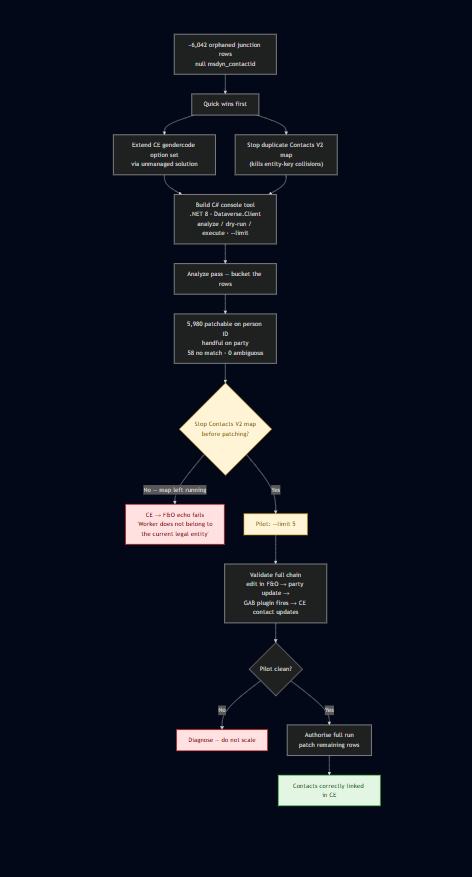
The value-map and duplicate-map issues were the quick wins. The gender mismatch was resolved by extending the CE contact gendercode option set through an unmanaged solution so it would accept the values F&O was sending. The duplicate Contacts V2 map was stopped so the entity-key collisions disappeared.
The 6,000 broken junction rows needed something more careful. I built a small C# console tool (.NET 8, Microsoft.PowerPlatform.Dataverse.Client) with three modes — analyze, dry-run, and execute — plus a –limit flag so I could pilot on a handful of records before touching anything at scale. Safety modes and idempotency first; scope later.
The analyze pass bucketed the rows so I knew exactly what I was dealing with: about 5,980 patchable matches on person ID, a handful matched on party, 58 with no match, and zero ambiguous rows. No surprises hiding in the data.
Then came the single most important operational lesson of the whole exercise: the Contacts V2 map must be stopped before patching. If you leave it running while you patch CE records, the changes echo back to F&O and fail with a “Worker does not belong to the current legal entity” error, because of how the map routes by legal entity. I only learned this because I piloted on 5 records first and watched it happen on a tiny, recoverable scale instead of across thousands.
With the map stopped, the pilot validated the full chain end to end: edit in F&O → party update → GAB plugin fires → CE contact updates correctly. Once that was clean, I authorised the full run.
If I had to compress the remediation into a single principle: pilot, validate, then scale. The –limit flag earned its keep.
A second puzzle: when creating a contact in F&O just fails
While I was in the environment, a different but related problem surfaced. Creating a contact in F&O would sometimes fail outright with:
Unable to write data to entity msdyn_contactforparties. Unable to lookup msdyn_parties with values {…}. Writes to msdyn_contactforparties failed.
A hard rollback on a basic create looks alarming, so I treated it as a fresh investigation and worked methodically down the dual-write stack — the maps (CDS Parties, Customers V3, Contacts V2), the integration keys, party-number sync, the CE autonumber configuration, and the GAB plugin state — ruling each out in turn. Everything checked out. Nothing was misconfigured, and I changed nothing.
The answer turned out to be the how, not the what. The contact was being created through the Quick Create form rather than the full Add Contact form. Under the Party / GAB model, that shortcut path doesn’t establish the underlying party the way the full form does. So when the Contacts V2 msdyn_contactforparties) map tries to link the new contact to its party in Dataverse, the party lookup can’t resolve — and the whole transaction rolls back. That’s exactly why the party on its own synced fine, but the combined contact-create failed. Microsoft documents the equivalent failure from the View Contact page under Known problems and limitations for the Party and GAB model; the Quick Create path hits the same wall for the same reason.
The right way to create contacts under GAB
The fix here isn’t code — it’s workflow, and it depends on which side you start from.
Starting in F&O: use the full Add Contact form, not Quick Create. The full form establishes the party and the contact-for-party association in one step, and the record syncs cleanly to CE.
Starting in CE: create the contact, then create the Contact for Party association that links it to the customer or vendor — via the Associated Organizations tab on the contact, or the Associated Contacts tab on the customer/vendor. Don’t rely on the out-of-box Company Name lookup on the contact form.
The principle underneath both directions is the one that took me longest to internalise: in the GAB model, it’s the Contact for Party association — not a contact record on its own — that makes someone a customer or vendor contact and drives the sync across. A standalone contact, on either side, won’t sync as a customer contact until that association exists.
Two behaviours that look like bugs but aren’t
Once you’re working this way, two things tend to get reported as defects when they’re actually by design.
The “PAR-” party number. The party number a contact gets depends on where it was born: contacts created in F&O get a plain numeric party number (for example 000223512), while contacts created in CE get one with a PAR- prefix. The prefix is just provenance — it means the party originated in CE — and the contact and its association still sync correctly both ways. It’s worth reconciling this with the duplicate-party story earlier: the prefix itself was never the problem. The problem was duplicate PAR- shells that contacts had been wrongly anchored to instead of the original numeric parties. The prefix is normal; the duplication and mislinking were not.
The blank Company Name on the CE contact. You may notice the Company Name parentcustomerid) field on a CE contact is empty and assume something failed. It didn’t. Under the Party / GAB model the contact-to-customer relationship is no longer stored in that single lookup — it’s a many-to-many party association held in the Contact for Party record, visible on the contact’s Associated Organizations tab and the customer’s Associated Contacts tab. Microsoft confirms this in the Party and global address book documentation.
My recommendation to my friend was simple: tell the users about both workflows so contacts get created correctly no matter which app they start in. A lot of the “create isn’t working” reports were really “create was done the wrong way.”
What GAB dual-write taught me
A handful of lessons I’ll carry into every future dual-write engagement:
- GAB relationship fields are plugin-stamped, not map-stamped. msdyn_contactid and msdyn_associatedaccountid populate only when the GAB plugin completes successfully after the write. If they’re empty, look at the plugin, not the field map.
- A silent plugin is a runtime-config signal. When …FromPartyEntity fires but …FromContactEntity doesn’t, suspect a stale runtime config, not a mapping bug.
- Stop the Contacts V2 map before patching contacts. The CE → F&O echo will bite you otherwise.
- *PAR–prefixed duplicate parties are safe to treat as non-authoritative** once you’ve confirmed they have no operational records attached.
- Get the framing right before you act. “Contacts were deleted” and “contacts were always there but mislinked” lead to completely different — and one of them, dangerous — remediations.
- Create contacts the right way, not the convenient way. In F&O use the Add Contact form, never Quick Create; in CE create the Contact for Party association. That association — not the contact record alone — is what drives the sync.
- There is a correct sequence for a clean GAB setup: parties → addresses → Customers V3 accounts → Customers V3 contacts → Vendors V2 → reference data → Contacts V2. Doing it out of order is how you end up with orphaned junction rows in the first place.
Open issues
I’m not going to pretend this is finished. A few things are still on the table:
The silent contact update failure is the big one. UpdatePartyAttributesFromContactEntity still isn’t firing reliably, which points back at a stale msdyn_dualwriteruntimeconfig. The next move is a Stop → Refresh → Start cycle on the Customers V3 (contacts) map, and if that doesn’t clear it, a clean dual-write reset and rebuild in the correct order.
There’s also a Vendors V2 gap: that map was never started, so vendor-contact associations were never being maintained. That needs its own assessment.
On the party-ID mismatch itself, there’s a clean split. It’s already fixed for newly created contacts — they link to the correct party going forward. What remains is correcting the mismatched party ID on the existing historical contact records, which I’ll run through the console tool. Microsoft documents this exact “Party ID is different” condition, and the supported fix — latest map versions plus manually corrected integration keys — in the party and global address book troubleshooting guide. I estimate roughly four hours to complete that historical-data pass.
And finally, the full end-to-end sync health needs validating across all of the legal entities, not just the ones I sampled during the fix.
Closing thoughts
The thing I keep coming back to is that none of these were exotic bugs. They were the accumulated sediment of an integration that had been started, stopped, re-pointed, and re-run over years — each step leaving a little debris behind. Dual-write rewards patience and evidence, and punishes assumptions. Stop the right map, pilot on five records, read the plugin traces, and let the data tell you what actually happened instead of what you expect.
My friend’s environment is in much better shape now. And I came away with a debugging checklist I’ll be reaching for the next time someone tells me “it used to work.”

