DefaultAzureCredential is the right default, and I said as much in the getting-started guide that this post follows. It walks an ordered chain — environment variables, managed identity, Azure CLI, VS Code, interactive browser — and the same line of code works on a laptop, in CI, and on production compute. That is exactly why it earns its place on day one.
The trouble starts by the time you hit production, when the questions get more specific. Your production workload needs to authenticate as something stronger than “whichever managed identity the host happens to provide.” Your CI/CD pipeline has to deploy agents, model deployments, and role assignments without a client secret sitting on the build agent. Your app calls Foundry on behalf of a signed-in user, and the user’s own identity has to reach Foundry — both for RBAC and for audit. And a security review asks for a complete inventory of who can call what, and “DefaultAzureCredential” is not an answer to that question.
What follows is the auth pattern catalogue I wish I had when I went from prototype to production on Foundry. Five patterns, a per-environment role assignment model, the multi-environment story, and the four things that will bite you.
The big picture — one diagram
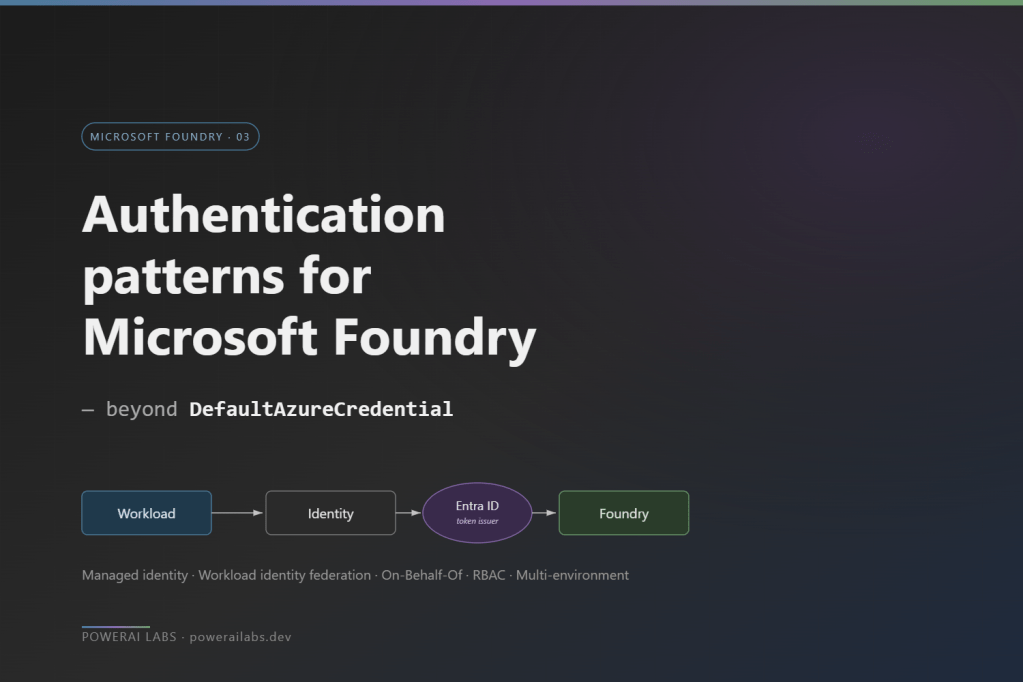
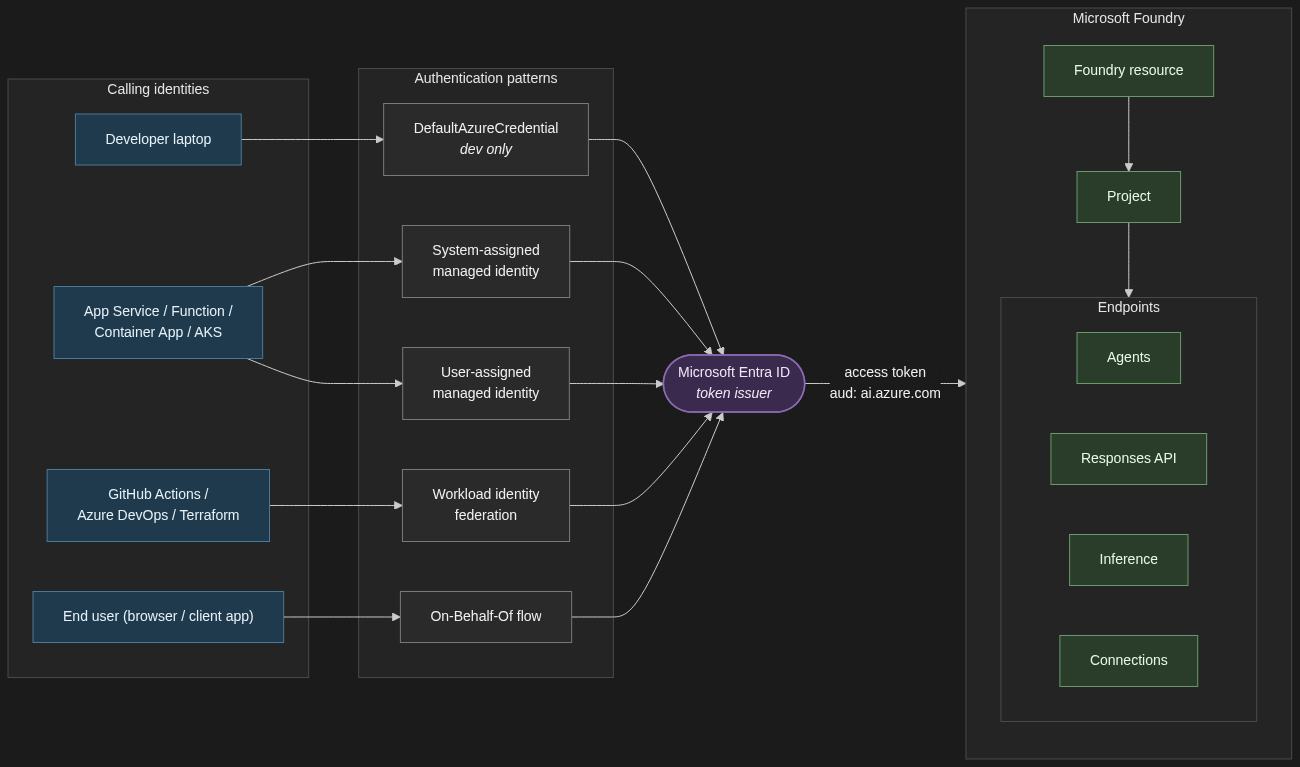
Before the catalogue, the one diagram that summarises the relationships. Every identity — a developer’s laptop, a signed-in end user, a workload on Azure compute, a CI/CD pipeline — reaches Foundry by way of an Entra-issued access token. The pattern you pick determines how that token is minted, not whether Entra is in the loop.
1. The auth pattern catalogue
1.1 System-assigned managed identity for single-resource workloads
When to use it. A single App Service, Function, or Container App that calls one Foundry resource, has no shared identity needs with anything else, and never has to outlive its host.
When not. Anything where two compute resources need the same identity, or where the identity must persist across redeploys.
Trade-off. System-assigned managed identities are created and deleted with their host. Zero lifecycle work, zero secrets, and zero portability. If you delete the App Service, the identity is gone — along with every role assignment that ever referenced it.
resource app 'Microsoft.Web/sites@2023-12-01' = { name: 'app-foundry-prod' location: location identity: { type: 'SystemAssigned' } properties: { serverFarmId: plan.id }}// Assign Foundry User on the project (not the resource)resource roleAssignment 'Microsoft.Authorization/roleAssignments@2022-04-01' = { name: guid(project.id, app.id, foundryUserRoleId) scope: project properties: { principalId: app.identity.principalId principalType: 'ServicePrincipal' // Foundry User role ID — stable across the rename roleDefinitionId: subscriptionResourceId( 'Microsoft.Authorization/roleDefinitions', '53ca6127-db72-4b80-b1b0-d745d6d5456d' ) }}

1.2 User-assigned managed identity for shared and durable workloads
When to use it. Multiple compute resources sharing one identity (App Service plus a Function, two AKS workloads, a Container App plus a Logic App). Or anywhere the identity must survive a redeploy of the compute.
When not. A single transient workload — system-assigned is simpler, and you do not have an identity hanging around with no host.
Trade-off. Durable and shareable, but you own the lifecycle. Think of it as identity-as-a-resource: it gets its own Bicep module, its own naming convention, and its own teardown plan.
resource uami 'Microsoft.ManagedIdentity/userAssignedIdentities@2023-01-31' = { name: 'id-foundry-app-prod' location: location}resource app 'Microsoft.Web/sites@2023-12-01' = { name: 'app-foundry-prod' location: location identity: { type: 'UserAssigned' userAssignedIdentities: { '${uami.id}': {} } } properties: { serverFarmId: plan.id }}resource projectRole 'Microsoft.Authorization/roleAssignments@2022-04-01' = { name: guid(project.id, uami.id, foundryUserRoleId) scope: project properties: { principalId: uami.properties.principalId principalType: 'ServicePrincipal' roleDefinitionId: subscriptionResourceId( 'Microsoft.Authorization/roleDefinitions', '53ca6127-db72-4b80-b1b0-d745d6d5456d' ) }}
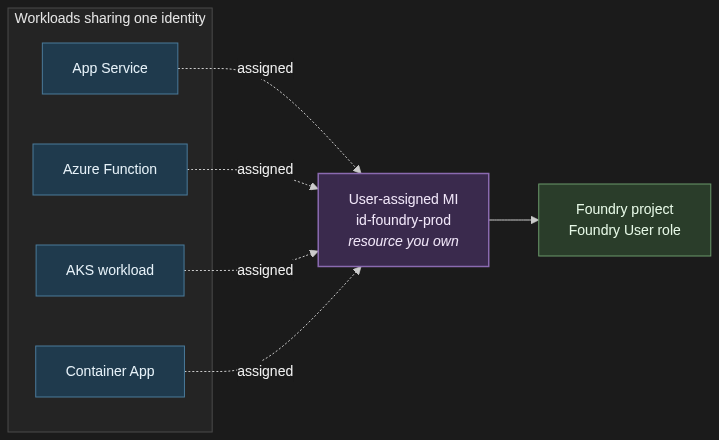
For anything in production, my default is user-assigned. The first time you redeploy a Container App and discover every role assignment has gone with it, you will thank yourself.
1.3 Workload identity federation for GitHub Actions and other federated CI/CD
When to use it. Any pipeline that deploys Foundry agents, model deployments, role assignments, or any other RBAC-protected operation. GitHub Actions, Azure DevOps with OIDC, Terraform Cloud, AKS workload identity — all federated subjects.
When not. There is not a good “when not.” If your GitHub Actions workflow still has AZURE_CLIENT_SECRET in its repository secrets, you should be migrating off it.
Trade-off. A bit of configuration up front — a federated credential on the app registration with the right subject claim and audience. Zero credential rotation forever after. The external identity provider (GitHub, Kubernetes, etc.) is trusted to assert the workload’s identity, and Entra exchanges that assertion for a token. No client secret ever crosses the wire.
# Create the federated credential on an app registrationaz ad app federated-credential create \ --id $APP_ID \ --parameters '{ "name": "github-main-prod", "issuer": "https://token.actions.githubusercontent.com", "subject": "repo:my-org/my-repo:ref:refs/heads/main", "audiences": ["api://AzureADTokenExchange"] }'
# .github/workflows/deploy.ymlpermissions: id-token: write # required to mint the OIDC token contents: readjobs: deploy: runs-on: ubuntu-latest steps: - uses: actions/checkout@v4 - uses: azure/login@v2 with: client-id: ${{ secrets.AZURE_CLIENT_ID }} tenant-id: ${{ secrets.AZURE_TENANT_ID }} subscription-id: ${{ secrets.AZURE_SUBSCRIPTION_ID }} enable-AzPSSession: false - run: az deployment group create ...
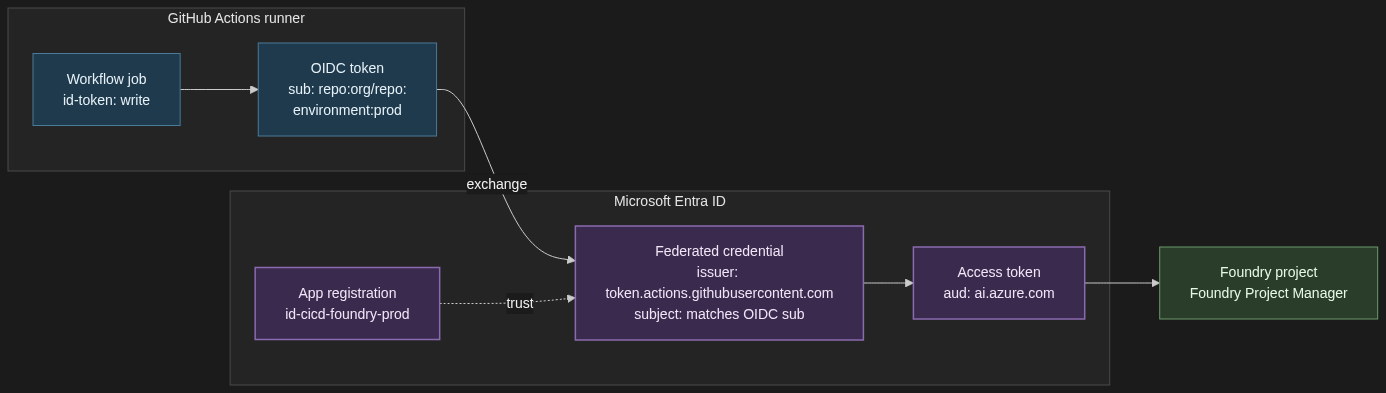
The pattern generalises. AKS workload identity uses the same federation primitive with the cluster’s OIDC issuer as the subject. Terraform Cloud has its own. The configuration changes; the model does not.
1.4 On-Behalf-Of flow for apps that call Foundry as the signed-in user
When to use it. A web app or API where the end user’s identity must reach Foundry — because the user’s own RBAC determines what they can see, because audit logs need the user not the app, or because a compliance regime requires per-user attribution all the way to the model call.
When not. Pure machine-to-machine workloads. If there is no signed-in human in the loop, you want a managed identity, not OBO.
Trade-off. More moving parts. The user signs into the front end, the front end calls your API with their access token, the API exchanges that token for a downstream token scoped to Foundry, and only then does the call go through. It is the only correct answer for user-scoped operations.
# Middle-tier API: exchange the incoming user token for a Foundry-scoped tokenimport msalapp = msal.ConfidentialClientApplication( client_id=API_CLIENT_ID, client_credential=API_CLIENT_SECRET, # or a certificate / federated credential authority=f"https://login.microsoftonline.com/{TENANT_ID}",)# incoming_user_token comes from the Authorization header on the requestresult = app.acquire_token_on_behalf_of( user_assertion=incoming_user_token, scopes=["https://ai.azure.com/.default"],)foundry_access_token = result["access_token"]
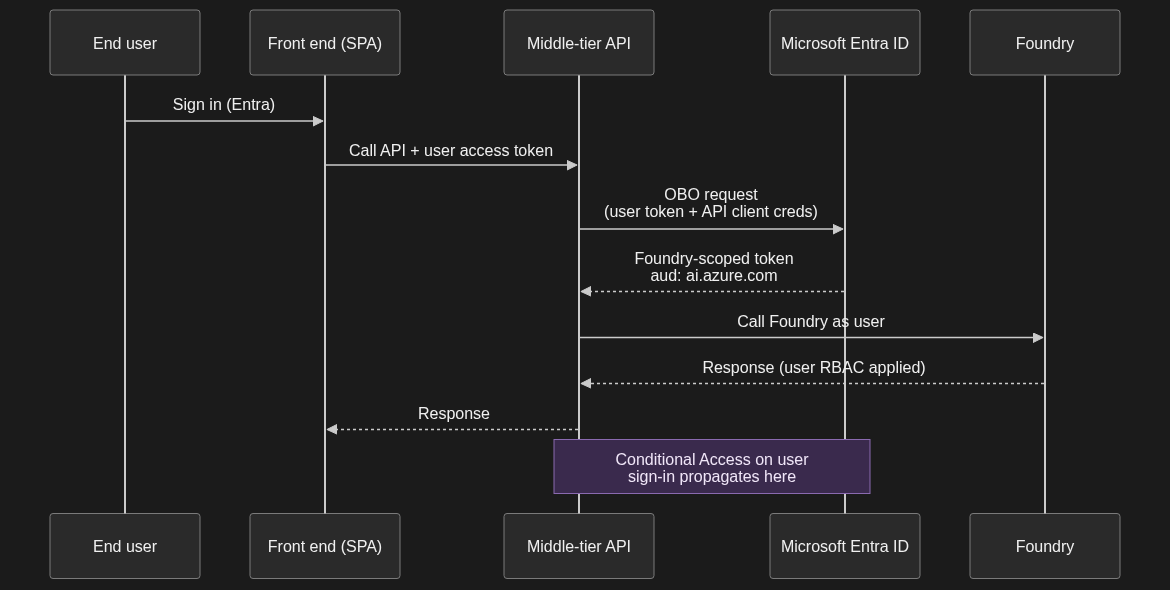
One implication worth calling out: any Conditional Access policy on the user’s original sign-in propagates through the OBO exchange. If your CA policy says “no Foundry access from non-compliant devices,” the downstream Foundry call inherits that. That is almost always what you want.
1.5 Application registrations with client secrets — when (rarely) still appropriate
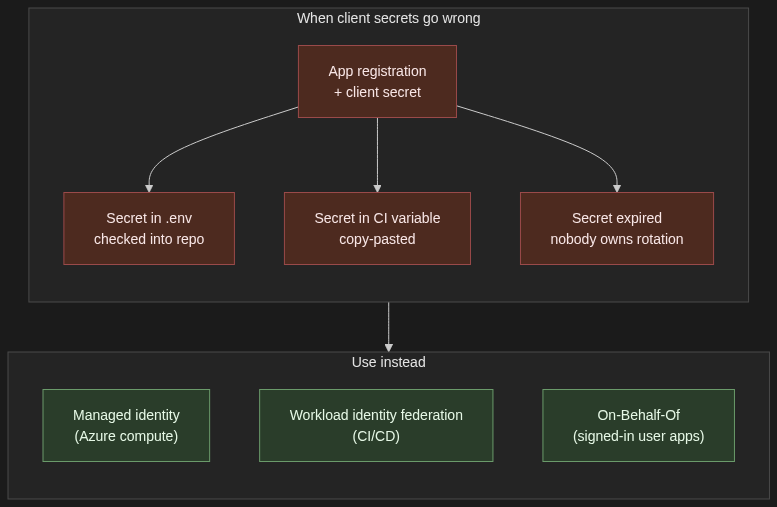
When to use it. Local developer machines that are not on a corporate-managed laptop with Entra-joined credentials. Genuinely headless scripts that cannot use a managed identity or federated workload identity. Third-party integrations that do not yet support OIDC federation. That is it.
When not. Anything in production on Azure compute — use a managed identity. Anything in CI/CD on a platform that supports federation — use workload identity federation. Anything an auditor will ever look at.
Trade-off. Simplest to set up, hardest to govern. Secrets rotate, they leak, they accumulate. If you have more than a handful, you have a secret-sprawl problem and you do not yet know it.
If you must use one: short expiry (90 days), stored in Key Vault, never in a .env checked into a repo, and the role assigned to the app’s service principal is the minimum it needs — Foundry User scoped to the project, never Contributor scoped to the subscription.
The hard line: if you are putting a client secret on a production workload, you have taken a wrong turn. Go back and use one of the four patterns above.
2. The role assignment model — least privilege without the spreadsheet
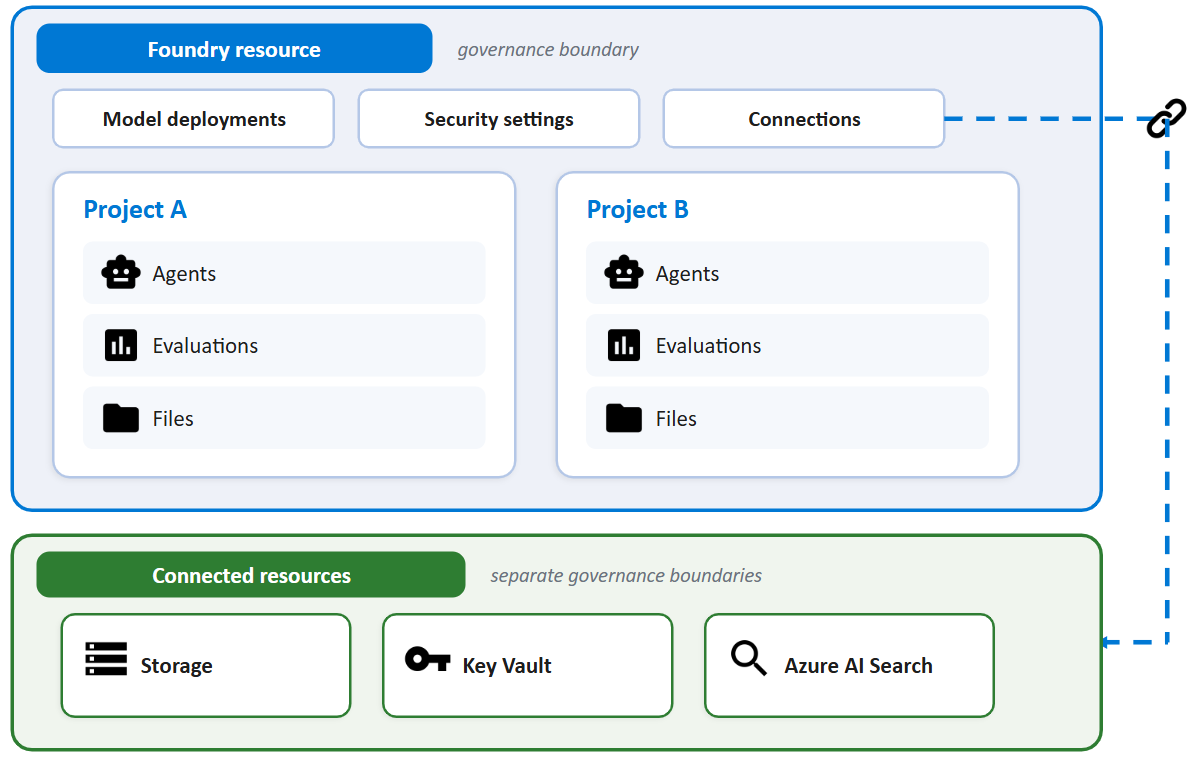
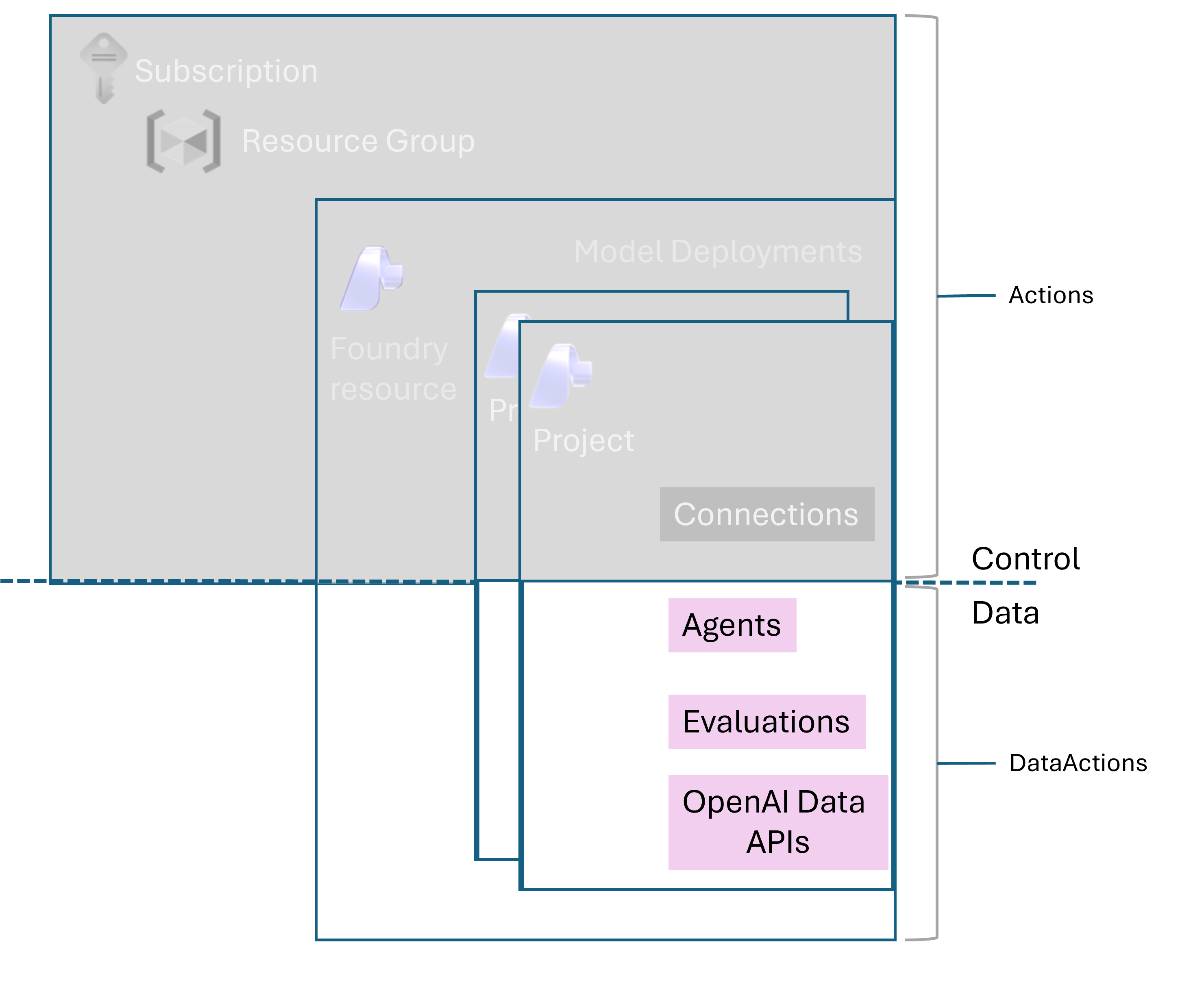
Two principles. Roles are assigned to principals — managed identities, user accounts, Entra groups — at a scope. The scope can be project, Foundry resource, resource group, or subscription. Get the scope right and least privilege follows naturally. Get it wrong and you will be re-assigning Contributor every six months because somebody got blocked at a demo.
In prose, here is the model I deploy:
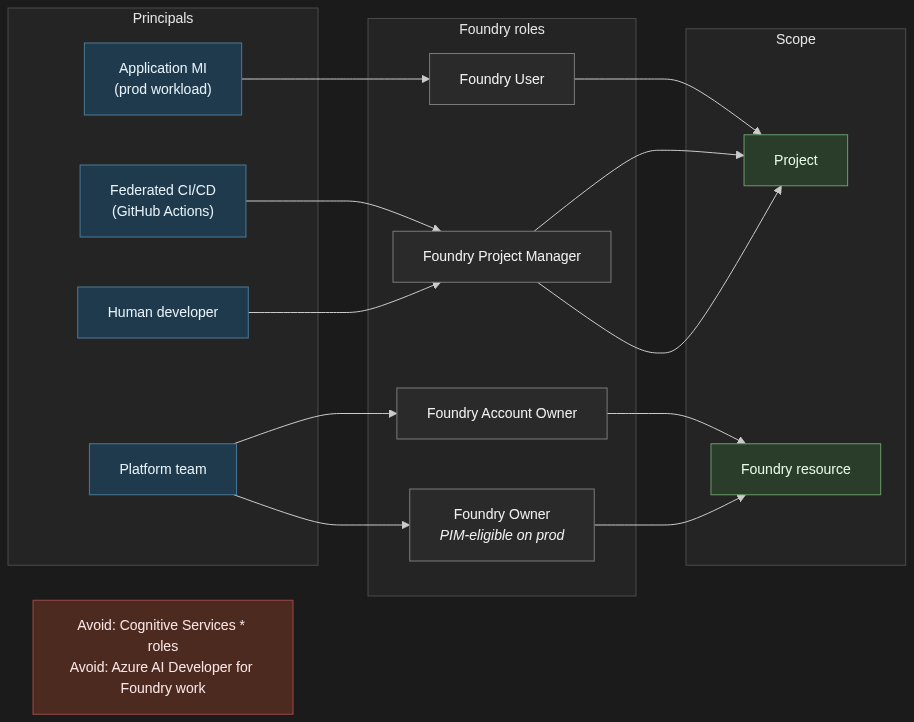
Application principals — the managed identity that the production app authenticates as, the federated workload identity the AKS pod assumes — get the Foundry User role, scoped to the project, not the resource. Project-scoped assignments mean a misconfigured app cannot accidentally see another project’s agents, threads, or connections.
Build and deploy principals — the federated CI/CD identity that runs your GitHub Actions workflow — get Foundry Project Manager scoped to the project. If the same pipeline also creates projects, then it needs a resource-level role for that one operation; keep it as narrow as you can get away with.
Human developers get Foundry Project Manager on the dev project, Foundry User on staging, and read-only on prod. Production changes go through the pipeline; they do not go through individual developer accounts.
Resource-level roles — Foundry Account Owner and Foundry Owner — are platform-team territory, and even there they should be PIM-eligible rather than standing assignments. These are the roles that can create new projects, configure guardrails, and conditionally hand out other roles. Treat them accordingly.
A few practical notes the docs are explicit about. Do not assign built-in roles that start with Cognitive Services for Foundry work — Microsoft’s RBAC documentation calls this out directly. Those roles are for accessing AI Services resources directly and do not apply to Foundry scenarios, even though Foundry sits on the Microsoft.CognitiveServices resource provider. Also avoid the Azure AI Developer role for Foundry — despite the name, it is scoped to Azure Machine Learning workspaces and Foundry hubs, not to Foundry projects or resources.
One more practical note: reference role definition GUIDs in Bicep and Azure CLI, not display names. The Foundry roles were recently renamed from their Azure AI predecessors (Azure AI User → Foundry User, Azure AI Project Manager → Foundry Project Manager, Azure AI Account Owner → Foundry Account Owner). The GUIDs are stable; the display names are still mid-rollout across the portal and tooling.
3. The multi-environment story
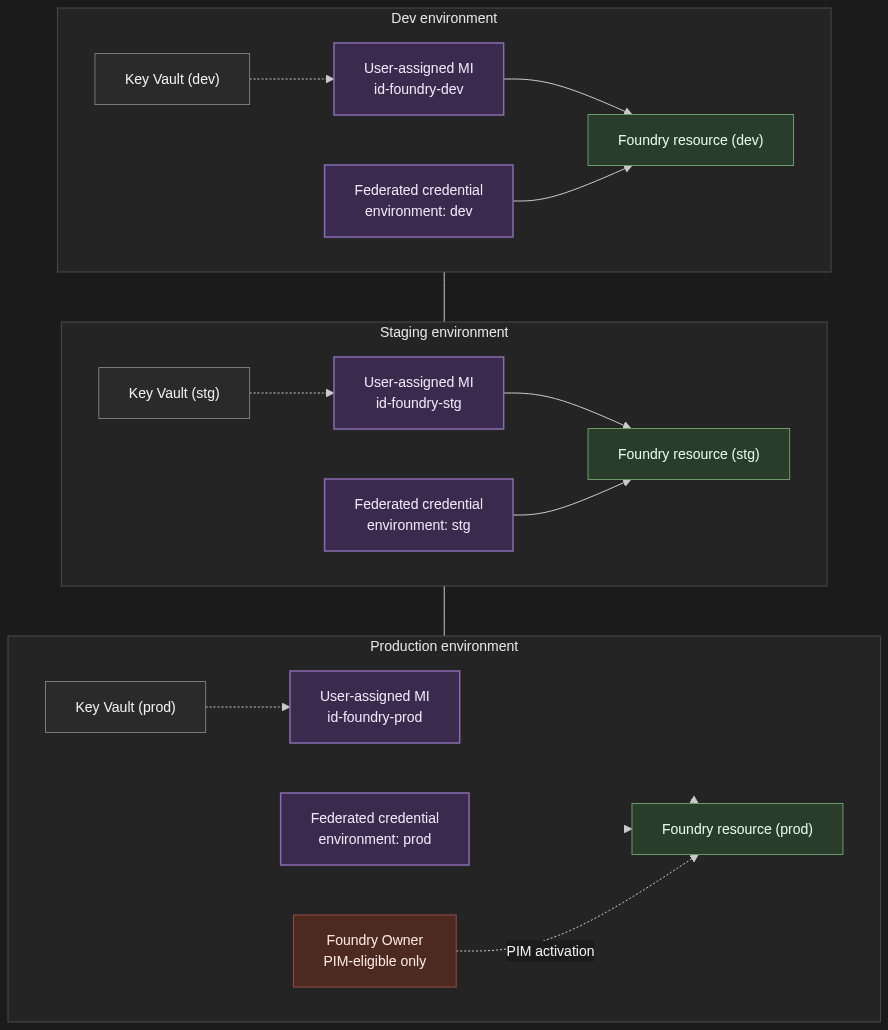
Dev, staging, and prod each get their own Foundry resource — not just their own project. Quotas are resource-scoped. Network configuration is resource-scoped. The blast radius of a misconfigured role assignment is resource-scoped. All of those argue for full resource separation between non-prod and prod, even if it means three sets of Bicep modules and three Application Insights workspaces. The cost of running an under-utilised dev resource is far less than the cost of an intern accidentally pointing a load test at a prod deployment.
Each environment gets its own user-assigned managed identity for the application principal, its own federated credential on the CI/CD app registration (one per environment, with a distinct subject claim — environment:dev, environment:prod — so prod deploys only run from protected branches and reviewed environments), and its own Entra group for human access. Group membership rather than direct user assignment, always — that is how you get clean joiner/mover/leaver flows without a quarterly spreadsheet review.
Secrets that genuinely have to exist — third-party API keys, database connection strings — live in a per-environment Key Vault, accessed by the per-environment managed identity. Foundry credentials themselves are never in Key Vault. They are token exchanges via the patterns in Section 1.
Elevated roles on the prod resource go through Privileged Identity Management. The platform team holds Foundry Owner on prod as PIM-eligible, not as a standing assignment. Activation requires justification, a time window, and an audit trail. If your auditor asks “who could have changed the prod guardrails on this date,” you want PIM logs to answer that, not Azure Activity Log archaeology.
4. The four things that will bite you
Token caching. The Azure SDK clients cache tokens for the lifetime of the credential object. Long-lived processes — anything stateful, anything that processes a queue, anything with a connection pool — need to handle credential refresh correctly. The right pattern is usually to reuse a single credential instance across all clients in the process, not to recreate DefaultAzureCredential() (or its successor) per call. Recreating it per call defeats the cache and, on a busy worker, will get you rate-limited at the IMDS endpoint before you have shipped a single completion.
Cross-tenant scenarios. Foundry resources live in a single tenant. If you have a partner tenant whose users need to call your Foundry workload, you are in B2B territory and the patterns above need adapting. Managed identities do not cross tenants without explicit federation, and OBO has its own constraints when the user is a guest. Do not discover this two weeks before a launch — design for the tenant model on day one.
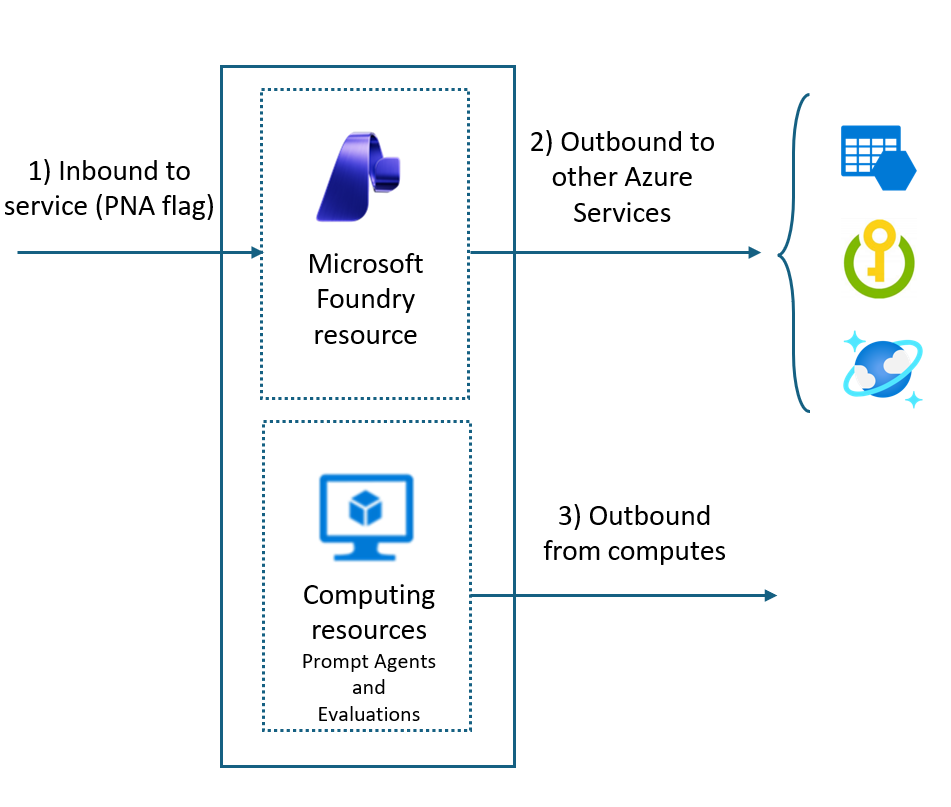
Private endpoints and DNS. Authentication works, the call still fails. If you have put Foundry behind a private endpoint, the DNS for the resource FQDN must resolve to the private IP from the calling network. Public DNS will look correct, your nslookup from a different network will look correct, and the call from inside the VNet will time out with no useful error. Always check resolution from the calling subnet, not from your laptop.
Role propagation latency. New role assignments take up to ten minutes to propagate. Pipelines that create a user-assigned managed identity and immediately use it against Foundry will hit 403s on the first run. Options: insert a wait step after role assignment, retry with exponential backoff in the calling code, or assign roles ahead of provisioning the compute they are attached to. I prefer the third — the assignment is declarative and the compute picks it up when it comes online.

5. When NOT to add another auth pattern
Counterweight, briefly. If your workload is one App Service calling one Foundry resource for one tenant’s users, deployed by one GitHub Actions workflow, you do not need four patterns. You need a user-assigned managed identity on the App Service and a federated workload identity for the pipeline. Stop there. Adding OBO, custom token exchange, or a second managed identity because “we might need it later” is the kind of architecture work that looks responsible in a design doc and creates three years of operational debt.
And if you find yourself building a custom token-exchange layer — your own service that sits in front of Foundry and stamps tokens on requests — you are almost certainly reinventing something Entra already does. Read the workload identity federation and OBO docs again before you write more code. The thing you are about to build is probably a federated credential with the wrong subject claim.
6. Closing
DefaultAzureCredential is how you start. The patterns in this post are how you scale. Pick the right managed identity flavour for the workload’s lifecycle. Federate your CI/CD so no client secret ever lives on a build agent. Use OBO where the user’s identity has to reach Foundry, and do not use it where it does not. Get the role scope right at the project level. Separate environments by resource, not just by project.
References
- What is Microsoft Foundry?
- Microsoft Foundry architecture
- Role-based access control for Microsoft Foundry
- How to configure network isolation for Microsoft Foundry
- Workload Identity Federation overview
- Create a trust relationship between an app and an external identity provider
- Microsoft identity platform and OAuth 2.0 On-Behalf-Of flow