
Most “getting started with Foundry” content is a screenshot tour of the portal. You watch someone click “Create resource,” pick a region from a dropdown, and end the post with a chat playground saying “Hello, world.” None of that helps you on Monday morning when you have to commit to a region, an auth pattern, and a project topology that you’ll be living with for the next year.
This is the post I wish I’d had open in another tab when I started TrafficIQ, our multi-agent supply-chain transport intelligence build on Foundry Agent Service. Five decisions you make before you click Create, the auth pattern you should adopt from day one, a first-sprint checklist, and the three things that will bite you.
1. The naming maze — what Foundry actually is in 2026
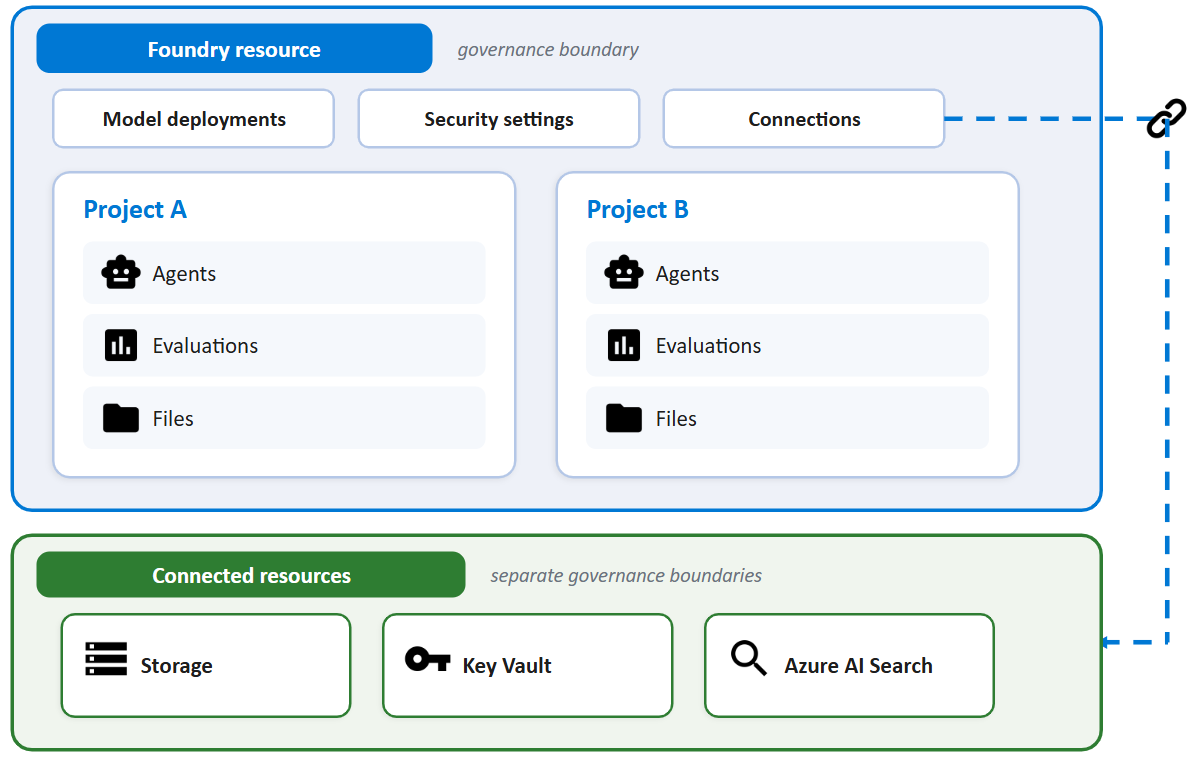
Eighteen months ago you had four products: Azure OpenAI, Azure AI Studio, Azure AI Services, and a sprawling Cognitive Services back catalogue. Today you have one Azure resource type — kind: AIServices with allowProjectManagement: true — and Microsoft calls it Microsoft Foundry (formerly Azure AI Foundry). Single resource, single ARM object, and three FQDNs hanging off it: the Azure OpenAI-compatible inference endpoint, the cognitive-services endpoint, and the Foundry project endpoint your agents and Responses API code talks to.
There are also two portals. Foundry (classic) is the hub-based experience that grew out of Azure AI Studio. Foundry (new) is the project-first experience built around the consolidated resource. Both still work. Classic is in maintenance mode. If you are starting a new project in 2026, start in the new portal and create a Foundry project — not a hub project. Hub projects still exist for backwards compatibility, but everything Microsoft is investing in — agent service, evaluations, the new model catalogue, observability — is wired up around Foundry projects first.
One more piece of context before you create anything: the Assistants API retirement deadline of 26 August 2026 is real. If you are building anything new today, do not start on Assistants — go directly to Foundry Agent Service and the Responses API. I’ll cover the migration path in a dedicated post; for now, treat Assistants as legacy.
2. The five decisions you make before you click Create
2.1. Foundry resource vs upgrading an existing Azure OpenAI resource
Decision: create a brand-new Foundry resource, or upgrade an existing Azure OpenAI resource in place. Trade-off: the in-place upgrade keeps your existing endpoint, deployments, network config, and RBAC bindings — but it requires a system-assigned managed identity on the source resource and is one-way once you commit (rollback exists but is a support operation, not a button).
For TrafficIQ: new resource. The repo was greenfield, I wanted a clean project boundary, and I didn’t want to inherit eighteen months of ad-hoc role assignments from the old Azure OpenAI resource.
2.2. Region
Decision: which Azure region hosts the resource. Trade-off: model availability is not uniform. Sweden Central, East US 2, and France Central each have meaningfully different model catalogues, and frontier models often land in one region weeks before the others. Pick the wrong region and you’ll either rewrite code against a different deployment or pay cross-region latency. For TrafficIQ: Sweden Central. TrafficIQ shipped on gpt-4.1 and gpt-4.1-mini, and Sweden Central was the region that aligned with both the model availability I needed and my EU data-residency obligations. Starting fresh today, I’d still default to Sweden Central but I’d evaluate gpt-5-mini for the router/orchestrator.
2.3. New portal vs classic portal
Decision: which portal you do your work in. Trade-off: classic gives you hub projects (good if you have an existing hub and shared compute), new gives you Foundry projects (better isolation, simpler RBAC, where all the new features land first).
For TrafficIQ: new portal, Foundry project. No hub.
2.4. Single project vs multiple projects per resource
Decision: how many projects to carve out of one Foundry resource. Trade-off: projects are the isolation and RBAC boundary in Foundry — a project owns its agents, threads, evaluations, connections, and the people who can see them. One project is simpler; multiple projects are how you separate prod from dev, or two workloads that should never see each other’s data.
For TrafficIQ: I started with a single project and split as soon as evaluations grew enough to need their own connections and quotas. The pattern I’d recommend day one: two projects per environment — one for the agent runtime, one for evaluations and offline experiments — and prod in a separate Foundry resource entirely from non-prod, so a misconfigured RBAC binding can never reach production data.
2.5. Direct Foundry-billed models vs Azure Marketplace third-party models
Decision: how you procure non-OpenAI models — Anthropic, Cohere, Mistral, Meta, and the rest. Trade-off: direct (first-party in the Foundry catalogue, billed on your Azure invoice, full enterprise SLA, no separate contract) versus Azure Marketplace (third-party publisher, often the only way to get the very latest version of a partner model, but it’s a separate offer you have to accept and the billing line lands differently).
For TrafficIQ: direct for everything I could, marketplace only where a specific model version wasn’t available first-party. One Azure invoice is worth real money in procurement time.
3. Authentication and authorisation — the day-one setup
If you take one thing from this post, take this: don’t use API keys. Foundry resources support Entra ID (Azure AD) authentication everywhere, and DefaultAzureCredential from azure-identity is the right pattern from day one. Keys feel quick on day one and become a rotation, secrets-sprawl, and audit nightmare by month three.
The pattern I use in TrafficIQ, lifted down to its essentials:
from azure.identity import DefaultAzureCredentialfrom azure.ai.projects import AIProjectClient# DefaultAzureCredential walks an ordered chain:# env vars -> managed identity -> Azure CLI -> VS Code -> interactive# Same line of code works locally, in CI, and in production.credential = DefaultAzureCredential()project = AIProjectClient( endpoint="https://<your-foundry-resource>.services.ai.azure.com/api/projects/<project-name>", credential=credential,)# Now you can use Agents, Responses, evaluations, connections —# all authenticated as the principal the host environment provides.agents = project.agents
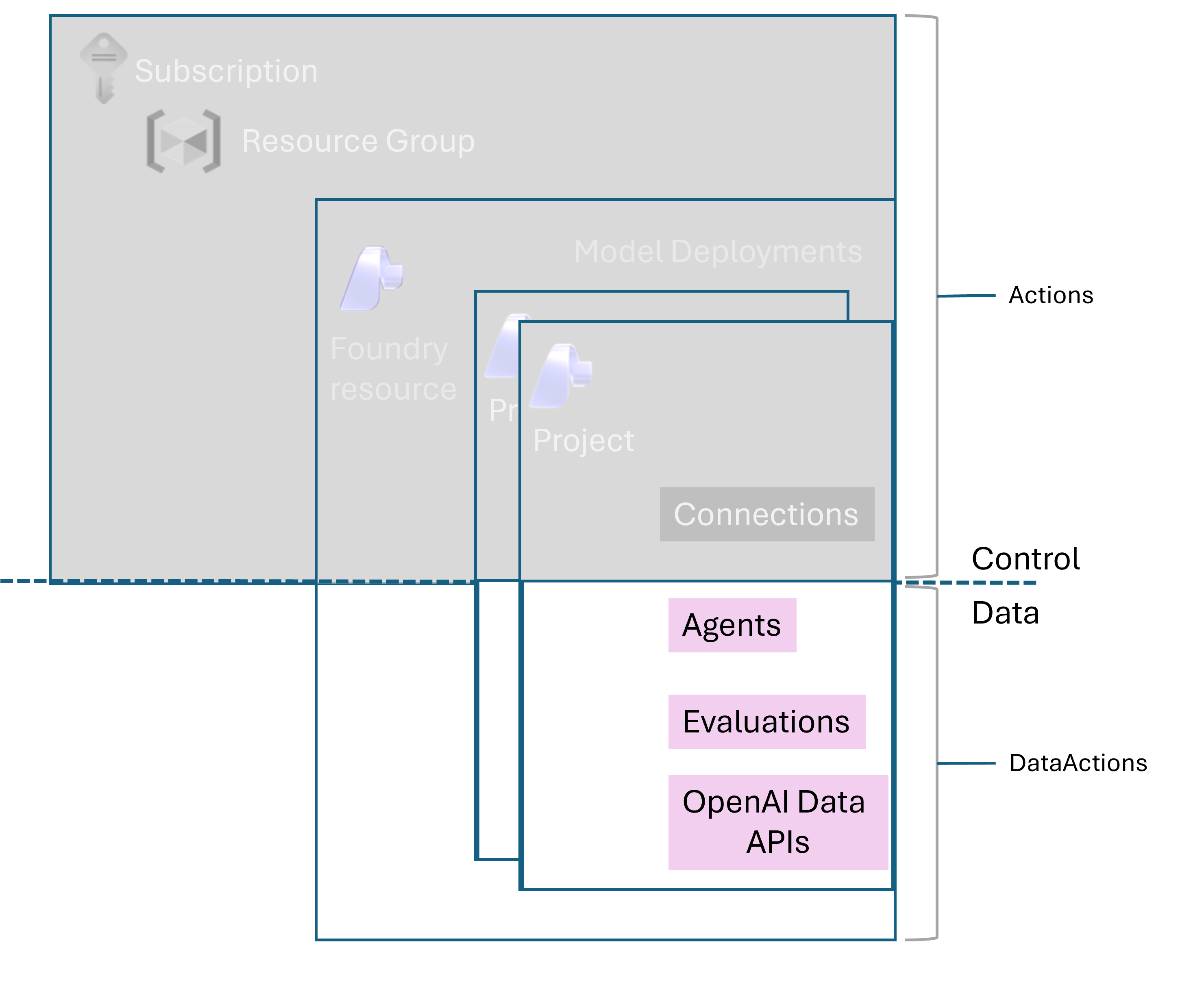
There are three roles you’ll actually find yourself assigning in the first week. Microsoft renamed these in the last release wave; both old and new names still appear across the portal and docs during the rollout, but the new names are what you should write into runbooks.
- Foundry User (formerly Azure AI User) — read/use existing agents, run inference, call the Responses API. This is the role for your application’s managed identity in production, and for engineers who consume but don’t author. Role ID:
53ca6127-db72-4b80-b1b0-d745d6d5456d. - Foundry Project Manager (formerly Azure AI Project Manager) — create and modify agents, manage connections, deploy models into the project. The role for developers actually building. Role ID:
eadc314b-1a2d-4efa-be10-5d325db5065e. - Foundry Account Owner (formerly Azure AI Account Owner) — resource-level operations like creating new Foundry resources and configuring guardrails. The elevated tier. Don’t grant casually.
Two practical notes. In Azure CLI and Bicep, use the role definition GUIDs, not the names — names are still mid-rename and the GUIDs are stable. And don’t grant any role that starts with “Cognitive Services” for Foundry work. The Microsoft Learn RBAC doc explicitly calls these out as not applicable to Foundry, even though Foundry sits on the Microsoft.CognitiveServices provider under the hood.
In production, the application principal is a managed identity — a user-assigned managed identity attached to your App Service, Container App, AKS workload identity, or Function. App registrations with client secrets are for local development and headless CI/CD only. If you find yourself putting an app registration secret on a production workload, you’ve taken a wrong turn — go back and attach a managed identity instead.
Secrets that genuinely have to exist — third-party API keys, database connection strings, anything that isn’t a Foundry credential — live in Azure Key Vault and are injected at build time, not runtime where possible. TrafficIQ uses a Vite Key Vault plugin pattern for the frontend so that the bundle never contains a literal secret and the build agent’s managed identity is the only thing that ever touches the vault.
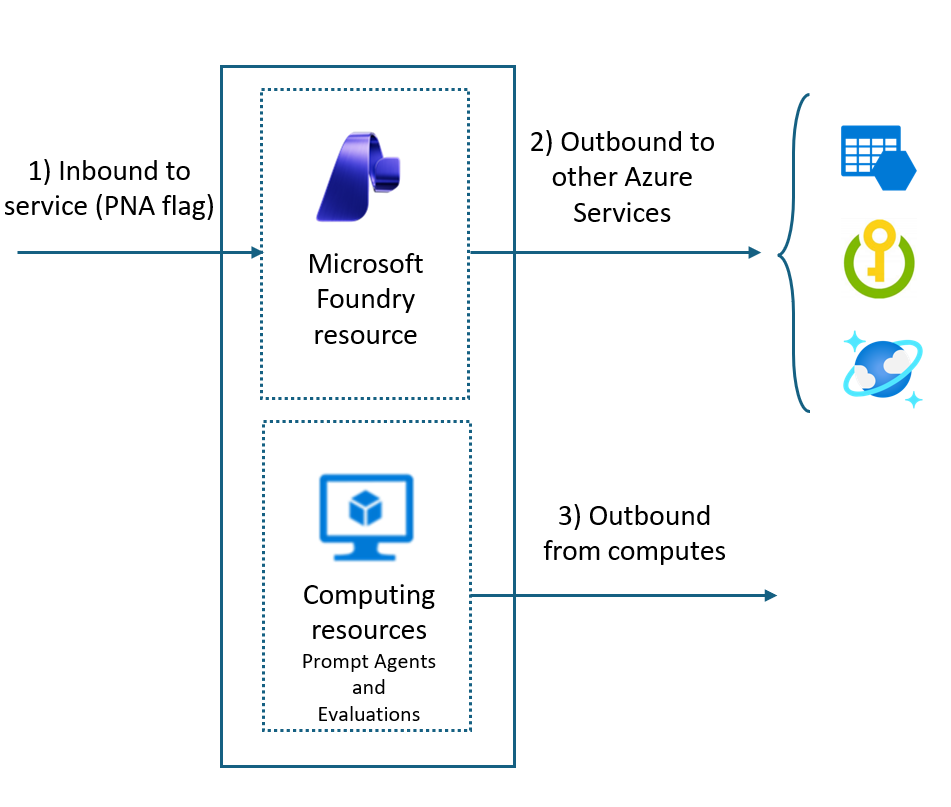
One last thing the docs bury and I wish someone had said louder: private endpoints are the most-forgotten production step, and you have to recreate them after an in-place upgrade from Azure OpenAI to Foundry. The upgrade preserves most of your network configuration, but private endpoints targeting the new Foundry sub-resources need to be re-provisioned, and DNS will be wrong until you do. Put it on the upgrade runbook.
4. The first sprint — a working checklist
In order. One line on what to do, one line on the trap.
- Create the Foundry resource. Use
kind: AIServices, allowProjectManagement: true, system-assigned managed identity on. Trap: if you let someone create it as a vanilla Azure OpenAI resource “for now,” you’ll be doing an upgrade migration in week three. - Create the first Foundry project. Give it a name that survives renames —
<workload-<envworks. Trap: project name is in the endpoint URL, so renaming later means client config changes everywhere. - Assign roles, not keys. Azure AI Project Manager for builders, Azure AI User for the app’s managed identity. Trap: don’t grant subscription-level Contributor “just to unblock the demo” — it never gets revoked.
- Set up Key Vault and managed identity. One vault per environment, user-assigned managed identity attached to your compute. Trap: system-assigned MIs disappear when you delete the compute resource; use user-assigned for anything you care about.
- Deploy a model. A reasonable default in 2026:
gpt-5-minifor router/orchestrator agents andgpt-4.1for specialists with heavier tool-calling. Trap: model availability is regional — check the catalogue in your target region before you write code against a specific deployment name. - Wire a connection for any external data source. Foundry “connections” are the project-scoped credential store for storage accounts, search indexes, and tools. Trap: connections live inside the project — copy them when you split prod from dev, don’t share.
- Call the Responses API from a smoke-test script.
AIProjectClient→ get inference client →responses.create. Trap: if you copy a sample using the legacy chat-completions endpoint, you’ll miss the new tool-calling and reasoning surface entirely. - Stand up your first agent in Foundry Agent Service. Tools, instructions, model — keep it boring. Trap: don’t start with a mega-agent; start with one narrow agent and add a second before you make the first one cleverer.
- Turn on Guardrails and review the defaults. They are on by default at “medium” across categories. Trap: defaults block legitimate enterprise content — see Section 5.
- Wire up observability before you ship. Application Insights connection on the project, distributed tracing through
opentelemetry, Foundry’s built-in run/thread tracing on. Trap: adding observability after the fact is two orders of magnitude harder than turning it on now.
5. The three things that will bite you in the first sprint
Quota. Tokens-per-minute (TPM) and requests-per-minute (RPM) limits are per-deployment and per-region, and the default quota you get on a fresh subscription is sized for demos, not production. The day you flip a real workload on, you will hit 429s. Mitigations: request quota increases early (the form is slow), spread deployments across multiple regions if your latency budget allows, and put Provisioned Throughput Units (PTU) under anything customer-facing where you cannot tolerate rate-limit jitter.
Guardrails (formerly content filters). Foundry’s Guardrails system is on by default with sensible consumer settings — and it will block legitimate enterprise content. Customer-complaint emails trip the harm filter. Security logs trip the violence filter. Code review of an exploit-handling library trips multiple. You can tune controls per-model and per-agent under Guardrails in the portal, define custom guardrails with their own controls, and apply them at four intervention points: user input, tool call, tool response, and output (the final completion returned to the user). Audit the defaults the day you deploy your first model, not the day a business user shows you a screenshot of a blocked legitimate prompt.
Observability. Foundry exposes distributed traces, per-run token accounting, evaluation hooks, and a thread/run viewer in the portal — but only if you wire it up. Wire it up on day one. The cost of adding tracing to a quiet new system is an afternoon. The cost of adding tracing to a live multi-agent system with real users is a sprint and a half, plus the customer trust you spend debugging the bug you can’t see.
6. When NOT to use Foundry
I’m bullish on Foundry, but it isn’t the answer to every question.
If you have exactly one OpenAI model in production and a stable PTU reservation on it, defer the upgrade. The in-place upgrade is non-trivial, and you get nothing from it if you aren’t using agents, evaluations, or the broader catalogue. Revisit when one of those becomes a “yes.”
If you need offline or on-device inference — air-gapped environments, edge devices, sub-10ms latency budgets — you want Foundry Local, not cloud Foundry. Same model story, very different deployment shape, and trying to make cloud Foundry pretend to be local will end badly.
If you have a price-sensitive, non-enterprise workload with no Entra or Azure compliance requirement — a side project, a hobby tool, a community OSS app — going direct to OpenAI’s or Anthropic’s API is still cheaper and operationally simpler. Foundry’s value is enterprise: SSO, RBAC, private networking, compliance attestations, one invoice. If you don’t need those, you’re paying for them anyway.
7. Closing — and what’s next
Foundry rewards a small amount of up-front thinking. Pick the region for the models you actually need. Use Entra and managed identities from line one of code. Multi-project from the start if you’re going to run more than one environment. Turn on observability before the first user hits the first endpoint. Re-do your private endpoints after any upgrade. Most of the pain I see on Foundry projects is pain that comes from skipping one of those.
Two follow-ups coming next on this blog: Foundry Agent Service migration from the Assistants API (with code from TrafficIQ) and an authentication-patterns deep-dive that goes well past DefaultAzureCredential into workload identity federation, on-behalf-of flows, and the per-environment role assignments I actually deploy. Subscribe if that’s useful — I’ll link them here as they go live.
Image credits
Diagrams in this post are reused from Microsoft Learn with attribution to Microsoft:
- Section 1 — Foundry resource architecture: Microsoft Foundry architecture
- Section 3 — Azure AI User role scope: RBAC for Microsoft Foundry
- Section 3 — Network isolation plan: Configure private link for Foundry
- Section 4 — Agent components: What is Microsoft Foundry Agent Service?
All other commentary, code, and opinions in this post are my own and reflect lessons from building TrafficIQ.

